100×worker · job analysis
Will AI Replace UX Writers?
UX writers write the small pieces of text that make software usable: button labels, error messages, empty states, onboarding flows. Generative AI now drafts a lot of that text in seconds, which raises an obvious question: does the job still need a human?
Microsoft Research analyzed 200,000 real Copilot conversations and published an "AI applicability score" for occupations in its 2025 paper Working with AI: Measuring the Applicability of Generative AI to Occupations. Across the EU, Eurostat found that 32.7% of people aged 16 to 74 used generative AI in the last three months of 2025. Writing-heavy roles show up near the top of applicability data like this, because generating language is close to what large language models are built to do.
That doesn't mean UX writing disappears. It means the task list changes: some tasks vanish, some run on autopilot, some get handed to AI with a human check, and some stay firmly with the writer.
A UX writer writes the short in-product text that guides users, such as button labels and error messages.
The task split: what AI takes over and what stays yours
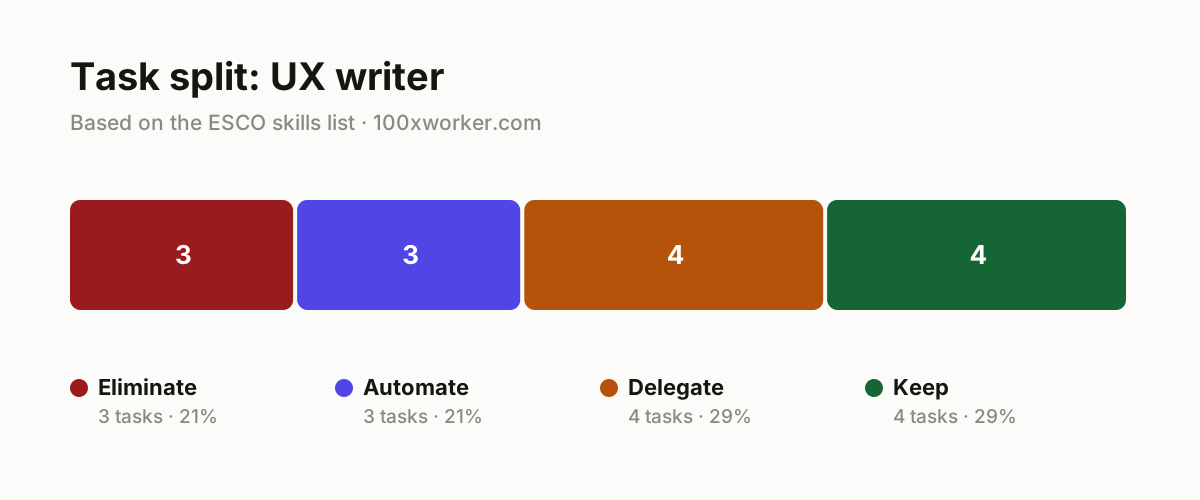
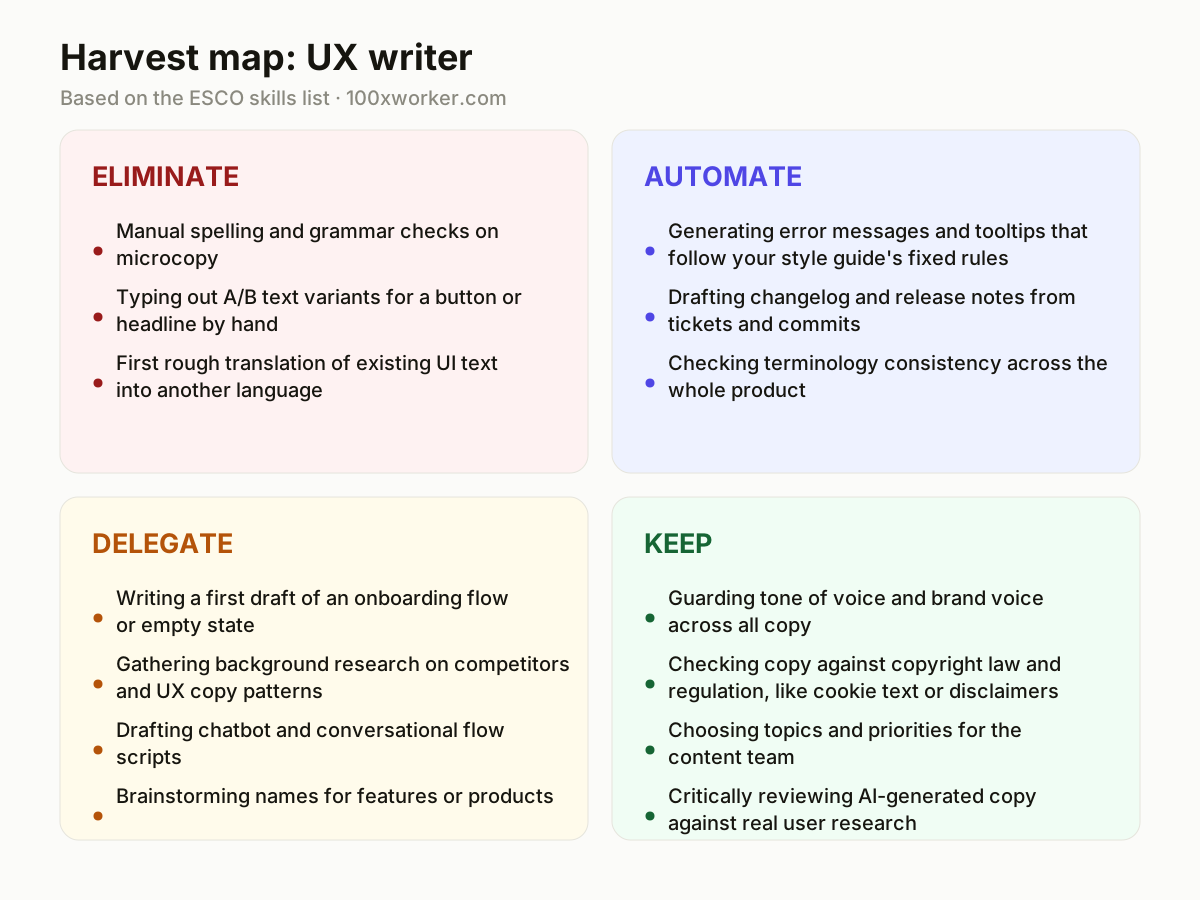
Not every UX writing task changes the same way. Some tasks disappear because AI does them instantly and well. Some get fully automated inside a workflow, running without you touching them. Others get delegated to AI as a first draft that you still edit and approve. And some stay entirely with you, because they involve brand judgment, legal responsibility, or reading a real user's frustration. Sorting your job into these four buckets, eliminate, automate, delegate, keep, shows you where your time actually goes next.
| Task | Bucket | Why |
|---|---|---|
| Manual spelling and grammar checks on microcopy | eliminate | AI checkers catch errors faster and more consistently than a second pair of human eyes. |
| Typing out A/B text variants for a button or headline by hand | eliminate | Generative models produce ten variants in the time it took you to write three. |
| First rough translation of existing UI text into another language | eliminate | Large language models deliver a usable first draft; you still adjust tone. |
| Generating error messages and tooltips that follow your style guide's fixed rules | automate | An agent applies the style guide consistently across every new screen, without drift. |
| Drafting changelog and release notes from tickets and commits | automate | The agent pulls details from Jira or GitHub and formats them into readable text. |
| Checking terminology consistency across the whole product | automate | An agent scans every screen against the glossary and flags mismatches automatically. |
| Writing a first draft of an onboarding flow or empty state | delegate | AI generates several options; you pick and refine the tone for your user. |
| Gathering background research on competitors and UX copy patterns | delegate | AI summarizes existing screenshots and text; you draw the conclusions. |
| Drafting chatbot and conversational flow scripts | delegate | AI writes the dialogue tree; you test it against edge cases and escalation paths. |
| Brainstorming names for features or products | delegate | AI produces a long list; you check it against brand voice and legal clearance. |
| Guarding tone of voice and brand voice across all copy | keep | A style guide never captures everything that makes a brand distinct. (Your edge: A feel for brand identity that can't be reduced to rules.) |
| Checking copy against copyright law and regulation, like cookie text or disclaimers | keep | Legal risk needs someone who carries responsibility for the outcome. (Your edge: Liability stays with a person, not a model.) |
| Choosing topics and priorities for the content team | keep | This requires insight into internal politics and product strategy. (Your edge: Organizational judgment calls AI cannot assess.) |
| Critically reviewing AI-generated copy against real user research | keep | AI has never felt the frustration of a user staring at a broken screen. (Your edge: Empathy for the user in a concrete, annoying moment.) |
Which UX writing tasks does AI take over?
AI now handles most of the repetitive, low-judgment parts of UX writing. It checks spelling and grammar on microcopy faster than a manual review, generates multiple A/B variants for a button or headline in seconds, and produces a usable first translation of existing UI text. Inside a workflow, an agent can also generate error messages and tooltips that follow your style guide's rules, draft changelog and release notes straight from Jira tickets or GitHub commits, and scan every screen in your product against your glossary to flag inconsistent terminology. None of this needs a writer sitting there typing it out by hand anymore.
Will AI replace UX writers?
No single occupation code exists for UX writer in Microsoft Research's 2025 analysis of 200,000 real Copilot conversations, but writing tasks generally score high on its AI applicability measure because generating text is close to what language models are built for. Anthropic's Economic Index shows a similar pattern in Claude conversations: some writing tasks look automation-like, where AI does the whole thing, and others look augmentation-like, where a person still drives the work. UX writing sits mostly in that second category. AI drafts the copy; a person still decides what the user needs to read, checks it against real behavior, and carries the legal and brand risk that AI can't own.
What can you do this month as a UX writer?
Start by auditing your own task list against four buckets: what can disappear, what can run on autopilot, what you can hand to AI as a first draft, and what stays with you. Pick one repetitive task this month, like drafting error messages or onboarding copy, and build a short prompt or template that an AI tool can run against your style guide. Test the output against three real user scenarios before you ship it. Track how much time that frees up, then spend that time on the review, research, and judgment calls that still need you.
How do you become the AI person on your UX team?
Become the person who sets up how your team uses AI, rather than just someone who uses it quietly. Write the prompt templates and style-guide rules that others can reuse. Test new tools against real product screens before recommending them, and document where AI output failed so your team doesn't repeat the same fix. Run a short session showing colleagues how you turned a repetitive writing task into an automated or delegated one. That visible ownership turns casual AI use into being the person who knows how AI fits your team's workflow.
Applicability scores come from analyzing real usage patterns across 200,000 conversations, not from guessing what a job title implies.
Microsoft Research, 2025
Become the AI person on your team
Build the prompt library
Create a shared doc of tested prompts for error messages, onboarding copy, and release notes. Include the style guide rules directly in the prompt so output matches brand voice on the first pass.
Set up a terminology-checking agent
Connect an AI agent to your product's glossary and have it scan new screens for inconsistent terms before release. Report the flagged items in your team's weekly review.
Run a before/after audit
Pick a task like translation drafts or changelog notes and measure the time it took before and after adding AI. Share the numbers with your manager to justify further tool adoption.
Want this for your actual task list?
The free scan on the homepage builds your personal task map in 30 seconds, based on your role and industry.
Run the free task scanTools for this work
| Tool | For which tasks | The sober take |
|---|---|---|
| Claude or ChatGPT | Drafting onboarding flows, chatbot scripts, translations, name brainstorming | General-purpose; you still need to feed it your style guide and check output against real users. |
| Grammarly | Spelling, grammar, and tone checks on microcopy | Good for eliminate-bucket tasks, weak on brand-specific terminology. |
| Writer.com | Enforcing style guide rules and terminology across large content sets | Built for terminology and brand-voice consistency at scale, not for creative drafting. |
| Figma AI (First Draft) | Generating first-pass UI copy directly inside design files | Useful for early exploration; still needs a writer to refine tone and edge cases. |
Prompts to try today
Error message rewrite
Onboarding flow first draft
Terminology audit
Related jobs
Frequently asked questions
Does AI understand brand voice well enough to replace a UX writer?
AI can mimic a documented style guide reasonably well once you feed it enough examples, but it has no sense of when to break its own rules for a specific moment. Brand voice often shows up in exceptions, like a lighter tone in an error screen or a firmer one in a legal disclaimer. A UX writer catches those exceptions because they understand the product and the user, not just the rulebook. AI can draft toward a voice; it can't own it.
What happens to junior UX writer roles?
Junior roles built mostly around drafting first-pass copy, checking spelling, and producing variants are the ones most exposed, since those are exactly the eliminate and automate tasks AI handles well. That doesn't mean junior roles vanish, but the entry point shifts toward editing AI output, running user tests on it, and learning the judgment calls faster than before. Teams that used junior writers mainly as typing capacity will need fewer of them; teams that used junior writers to learn the craft will still hire, just for different daily tasks.
Should UX writers learn to code or use AI tools instead?
Coding is optional; working with AI tools daily is not. You don't need to build models, but you do need to write good prompts, connect AI to your glossary or style guide, and judge when its output is wrong. That's closer to learning a new software habit than learning a new profession. Writers who treat AI as a first-draft generator and keep their editing and research skills sharp are better positioned than writers who ignore it or than writers who stop editing altogether.
How is UX writing different from copywriting when it comes to AI?
Copywriting often optimizes for persuasion in a single piece, like an ad or landing page, which AI can draft convincingly on its own. UX writing sits inside a working product, where copy has to match a real interface state, a user's exact moment of confusion, and rules that span hundreds of screens. That makes tasks like terminology consistency and error-message logic easier to automate, but it makes tasks like testing copy against actual user behavior harder to hand off, since AI never sees the user's face when a screen fails.
Sources
- Microsoft Research, Working with AI: Measuring the Applicability of Generative AI to Occupations (2025)
- Anthropic Economic Index
- Eurostat, isoc_ai_iaiu
- ESCO, European Commission
Hendrik De Winne, author of Becoming AI-Savvy, founder of VibeLab. Helps teams redesign their work with AI.
This article was drafted with AI assistance from public data sources and editorially reviewed.