100×worker · job analysis
Will AI Replace Executive Assistants?

Executive assistants have heard the automation warnings for years, usually based on outdated robot-versus-job percentages. The more current picture comes from Microsoft Research, which analyzed 200,000 real Copilot conversations and scored how applicable generative AI is to specific occupations. For roles closest to executive assistant work (executive secretaries and executive administrative assistants), that applicability score is 26.1%. For comparison, translators score highest at 49% and nurses score low at 12%. That places executive assistant work in a middle zone: real change, not wholesale replacement.
Anthropic's Economic Index adds detail by classifying millions of Claude conversations against standardized task lists and splitting AI use into automation-like use (AI does the task) versus augmentation-like use (AI supports a person doing the task). For assistant-type work, both patterns show up: some tasks (drafting, transcribing, comparing options) get handed off almost entirely, while others (research, event planning, task breakdowns) stay a back-and-forth between you and the tool.
The practical question is not whether AI touches your job, since it clearly does, but which of your specific tasks move into which bucket. That is what this article breaks down.
An executive assistant is an administrative professional who manages schedules, communication, and organization for senior executives.
The task split: what AI takes over and what stays yours
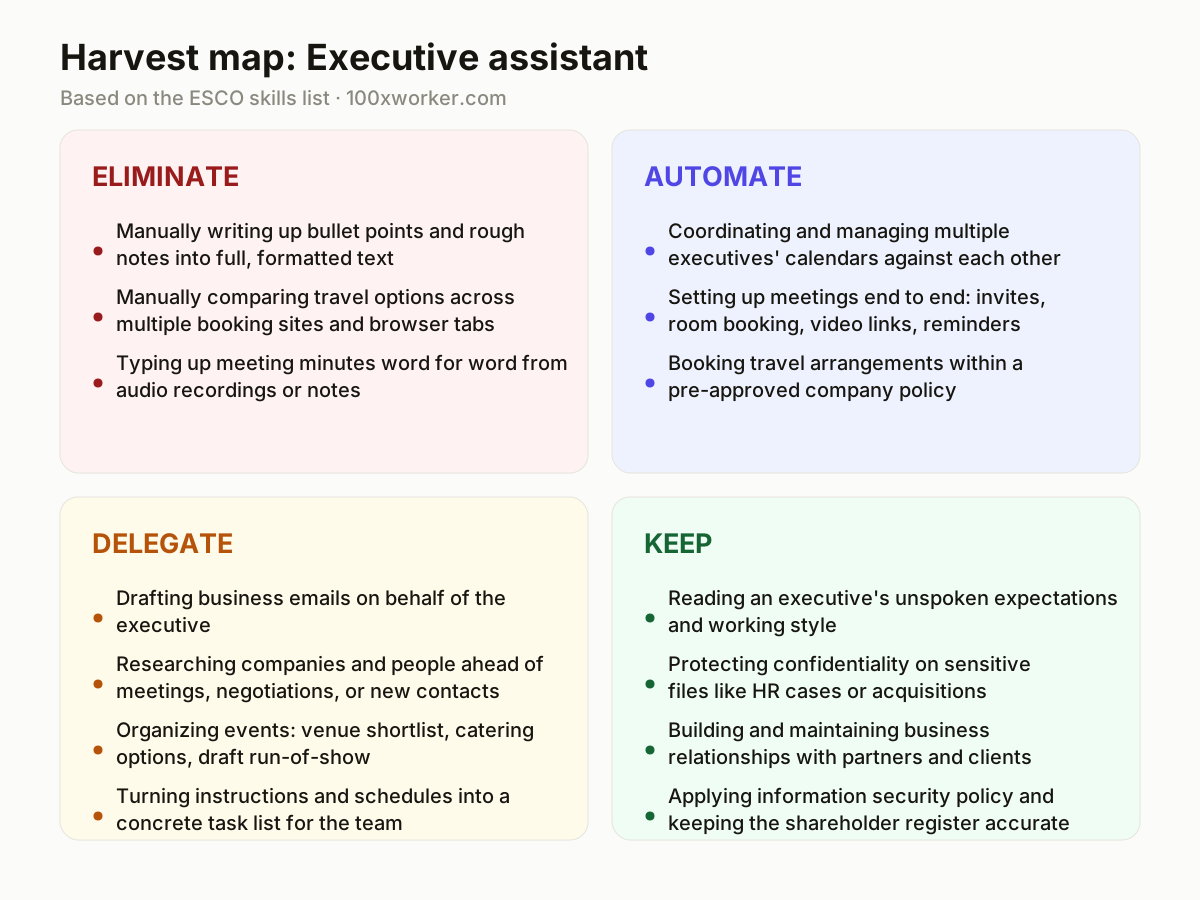
Not every task in an executive assistant's role responds to AI the same way. Some tasks disappear because the manual step itself becomes pointless. Others get handled end to end by an agent or workflow. A third group works best as a draft-and-review loop between you and a tool. And a fourth group stays firmly yours, because it depends on judgment, discretion, or trust that no model holds. Sorting your own task list into these four buckets, eliminate, automate, delegate, keep, is the most useful exercise you can do this quarter.
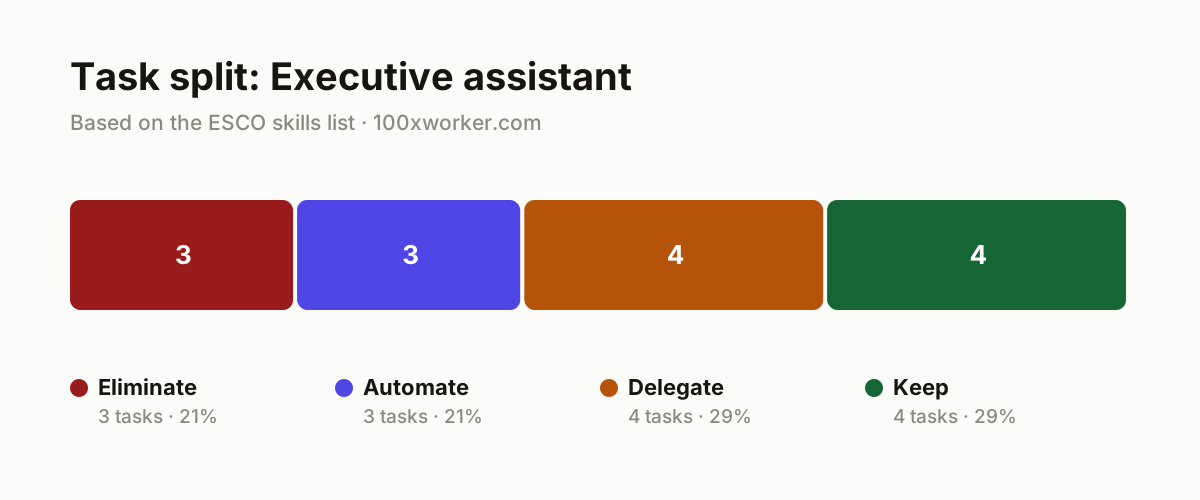
| Task | Bucket | Why |
|---|---|---|
| Manually writing up bullet points and rough notes into full, formatted text | eliminate | Text generation tools do this instantly from a few keywords, so the middle step disappears entirely. |
| Manually comparing travel options across multiple booking sites and browser tabs | eliminate | Search and comparison work now happens automatically inside a single interface or travel agent. |
| Typing up meeting minutes word for word from audio recordings or notes | eliminate | Transcription tools produce a readable draft immediately, making manual typing unnecessary. |
| Coordinating and managing multiple executives' calendars against each other | automate | A scheduling agent knows preferences and time zones and books slots without email back-and-forth. |
| Setting up meetings end to end: invites, room booking, video links, reminders | automate | Routine logistics follow fixed rules, so an agent executes them without you touching it. |
| Booking travel arrangements within a pre-approved company policy | automate | Within budget and policy rules, an agent books flights, hotels, and transport on its own. |
| Drafting business emails on behalf of the executive | delegate | AI writes a strong first draft, you adjust tone and nuance before it goes out. |
| Researching companies and people ahead of meetings, negotiations, or new contacts | delegate | AI gathers and summarizes background information, you verify sources and judge relevance. |
| Organizing events: venue shortlist, catering options, draft run-of-show | delegate | AI proposes options and a draft schedule, you decide and negotiate with vendors. |
| Turning instructions and schedules into a concrete task list for the team | delegate | AI structures raw instructions, you check priorities and communicate the nuances yourself. |
| Reading an executive's unspoken expectations and working style | keep | This takes years of built-up knowledge of someone's style, mood, and motivations. (Your edge: You can't read office politics and mood from a prompt.) |
| Protecting confidentiality on sensitive files like HR cases or acquisitions | keep | Discretion carries legal and personal responsibility that you cannot outsource. (Your edge: Discretion is a character trait, not a model output.) |
| Building and maintaining business relationships with partners and clients | keep | Trust gets built in conversation, not in a generated message. (Your edge: People do business with people they know.) |
| Applying information security policy and keeping the shareholder register accurate | keep | Final accountability and liability for wrong or leaked data stays with you. (Your edge: You sign off, you carry the responsibility, not an agent.) |
What tasks does AI take over from an executive assistant?
AI takes over the mechanical middle steps first: turning rough notes into polished text, transcribing meetings, and comparing travel or vendor options across tabs. It also automates routine logistics that follow fixed rules, such as calendar coordination across time zones and booking travel inside a pre-set company policy. What it does not take over is anything requiring judgment about people: reading an executive's mood, deciding what information a partner should or shouldn't see, or negotiating in person. Microsoft Research's 26.1% applicability score reflects this split. A meaningful share of the job changes, but the core relationship-management work stays with you.
Will AI replace executive assistants?
No single number settles this. Older 'robotization percentage' figures, like the widely cited Frey & Osborne (2013) study, were published before large language models existed and tend to overstate full-job automation risk. Microsoft Research's more recent, conversation-based measurement puts AI applicability for this role at 26.1%, meaning roughly a quarter of typical work activities show clear generative AI use, not that a quarter of jobs disappear. Anthropic's Economic Index shows a similar pattern: some tasks get automated outright, others stay augmented, meaning AI supports a person rather than replacing them. The role changes shape. It does not vanish.
How do you become the AI go-to person on your team as an executive assistant?
Start by mapping your own weekly tasks into the eliminate, automate, delegate, and keep buckets above. Pick one automate-bucket task, such as meeting logistics, and build a working setup for it using your existing calendar and email tools. Document the steps in a short one-page guide so colleagues can copy it. Volunteer to pilot new AI features your organization licenses (Copilot, transcription add-ons) before a formal rollout, and share what worked and what didn't in plain terms. Being the person who has already tested the tool, and can say honestly where it fails, makes you the reference point when others have questions.
What can you do this month to actually start using AI?
Pick three recurring tasks from your own calendar: one email type you write often, one research task you repeat before meetings, and one event or travel booking. Run each through an AI tool for two weeks and compare the output to what you'd normally produce by hand. Keep a short note of time saved and where you had to correct the AI. At the end of the month, decide which task moves permanently into your delegate or automate workflow, and which one you keep doing manually because the AI version wasn't good enough yet.
Generative AI is measurably applicable to a share of work activities, not to an entire job.
Microsoft Research, Working with AI: Measuring the Applicability of Generative AI to Occupations (2025)
Become the AI person on your team
Build a prompt library for recurring emails
Save three or four working prompts for the email types you write most often (scheduling follow-ups, vendor requests, executive updates). Reuse and refine them instead of starting from scratch each time.
Pilot a scheduling agent for one executive first
Test an automated calendar tool on a single executive's calendar before rolling it out across the team. Track how often you still had to intervene manually.
Turn one workflow into a shareable guide
Document exactly how you set up an AI-assisted meeting prep or travel booking workflow, step by step, and share it with the other assistants in your organization.
Want this for your actual task list?
The free scan on the homepage builds your personal task map in 30 seconds, based on your role and industry.
Run the free task scanTools for this work
| Tool | For which tasks | The sober take |
|---|---|---|
| Microsoft Copilot | Drafting emails, summarizing meeting notes, writing up bullet points into full text | Most directly studied tool in the Microsoft Research applicability data used in this article. |
| Meeting transcription tools (e.g. Otter.ai, Fireflies) | Transcribing and summarizing meetings instead of typing minutes by hand | Useful for the eliminate-bucket task of manual transcription, quality varies by accent and audio setup. |
| AI scheduling assistants (e.g. Reclaim.ai, Motion) | Coordinating multiple executives' calendars and setting up meeting logistics | Works best once you've defined clear rules and priorities for the assistant to follow. |
| AI research assistants (e.g. Perplexity, ChatGPT with browsing) | Company and contact research ahead of meetings or negotiations | Always verify names, figures, and recent events before passing research to an executive. |
Prompts to try today
Draft a business email in the executive's voice
Pre-meeting research brief
Turn instructions into a task list
Related jobs
Frequently asked questions
Will AI take my job as an executive assistant?
Not in the sense of full replacement. Microsoft Research's applicability score for this role sits at 26.1%, meaning a real but partial share of tasks show clear AI use. The tasks that involve judgment about people, discretion, and relationship-building are not measured as highly applicable, and those are the parts of the job that remain distinctly human.
What skills should executive assistants build now?
Focus on prompt writing for drafting and research tasks, basic familiarity with scheduling agents and transcription tools, and the judgment to check AI output for errors before it reaches an executive. The technical skill matters less than knowing exactly which of your tasks to hand off and which to keep doing yourself.
Which AI tools are worth learning first?
Start with whatever your organization already licenses, most commonly Microsoft Copilot if you work in a Microsoft 365 environment. Add a meeting transcription tool and a research assistant next. Scheduling agents are useful but worth piloting on one executive's calendar before wider rollout.
Why do older automation risk percentages for this job look so different?
Widely cited 'robotization percentage' figures often trace back to the Frey & Osborne (2013) Oxford study, published before large language models existed. It estimated broad automation risk by task type, not by measured real-world AI use. Newer data, like Microsoft Research's conversation-based applicability scores, reflects actual generative AI usage patterns and tends to show a more partial, task-by-task picture rather than whole-job replacement.
Sources
- Microsoft Research, Working with AI: Measuring the Applicability of Generative AI to Occupations (2025)
- Anthropic Economic Index
- Eurostat, Use of generative AI (isoc_ai_iaiu)
- ESCO, European Commission occupation taxonomy
Hendrik De Winne, author of Becoming AI-Savvy, founder of VibeLab. Helps teams redesign their work with AI.
This article was drafted with AI assistance from public data sources and editorially reviewed.