100×worker · job analysis
Will AI Replace Web Developers, and What Should You Do About It?

If you write code for the web, you have probably already used an AI coding assistant, whether that's GitHub Copilot inline in your editor, an agent in Cursor, or a chat window open on a second monitor. The question is not whether AI touches your job. It already does. The real question is which parts of your job it touches, and what that means for how you spend your day.
Microsoft Research analyzed 200,000 real conversations between professionals and Copilot, then scored how much of each occupation's reported work generative AI can plausibly handle. For web developers, that applicability score comes out to 35.3%. That is well above nursing (12%) but far below translation, the highest-scoring occupation at 49%. Roughly a third of what a web developer reports doing already shows up as something generative AI is applicable to.
That number does not mean a third of web developers will lose their jobs. Anthropic's Economic Index, which classifies millions of Claude conversations against the O*NET task taxonomy, distinguishes between automation-like use (AI does the task) and augmentation-like use (AI helps you do the task faster). For coding work, most real-world use falls into the second category. This article breaks down, task by task, what changes and what doesn't.
A web developer builds and maintains web applications, from front-end interfaces to back-end logic and APIs.
The task split: what AI takes over and what stays yours
To make this concrete, split your task list into four buckets: tasks AI eliminates because doing them by hand no longer makes sense, tasks AI automates end to end with a quick check from you, tasks you delegate to AI as a first draft that you then review, and tasks you keep because they need judgment, trust, or context AI doesn't have. Below is that breakdown for web development.
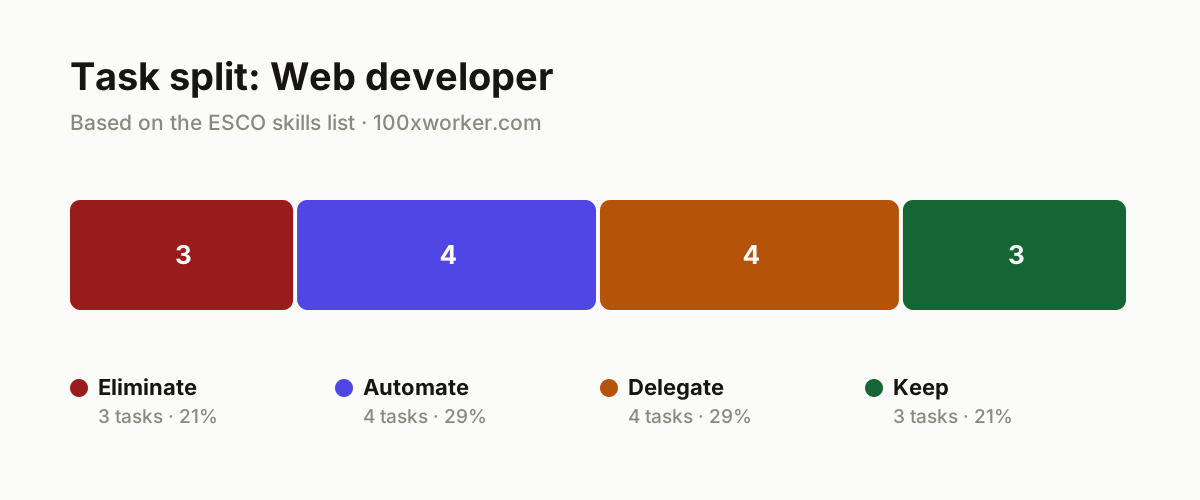
| Task | Bucket | Why |
|---|---|---|
| Typing out boilerplate HTML and CSS for standard components by hand | eliminate | AI tools generate this faster and with fewer typos than manual work. |
| Hunting for cross-browser CSS fixes through trial and error | eliminate | Generative AI knows the W3C standards and outputs compatible code right away. |
| Writing commit messages and changelogs word by word | eliminate | Agents read the code diff and write consistent logs without you typing them out. |
| Generating unit tests for existing functions | automate | An agent reads the function and writes test coverage; you check what it missed. |
| Updating technical documentation after a code change | automate | Agents extract function names and parameters and rewrite the docs automatically. |
| Applying dependency updates and security patches | automate | Automated agents scan the package file and prepare pull requests for you to merge. |
| Setting up standard CRUD endpoints from a database schema | automate | Agents generate ready-to-use boilerplate; you refine the business logic on top. |
| Proposing fixes for reported bugs | delegate | AI reads the stack trace and suggests a fix; you test it and approve the merge. |
| First-pass code review on pull requests | delegate | AI flags patterns and risks; you make the call on whether it merges. |
| Front-end implementation from a Figma design | delegate | AI generates a first version of the components; you refine interaction and accessibility. |
| Collecting and categorizing customer feedback | delegate | AI clusters feedback into themes; you decide what gets prioritized. |
| Making architecture decisions (monolith vs. microservices, database choice) | keep | This requires an overview of the whole project lifecycle, not just the code. (Your edge: long-term judgment and knowledge of the specific business context) |
| Complex debugging on unfamiliar, system-spanning failures | keep | These bugs don't follow a known pattern and require experience-based intuition. (Your edge: intuition built from years working with this exact system) |
| Discussing technical requirements with the client | keep | Managing expectations and building trust is not something AI can take over. (Your edge: trust and negotiation skill built in a real conversation) |
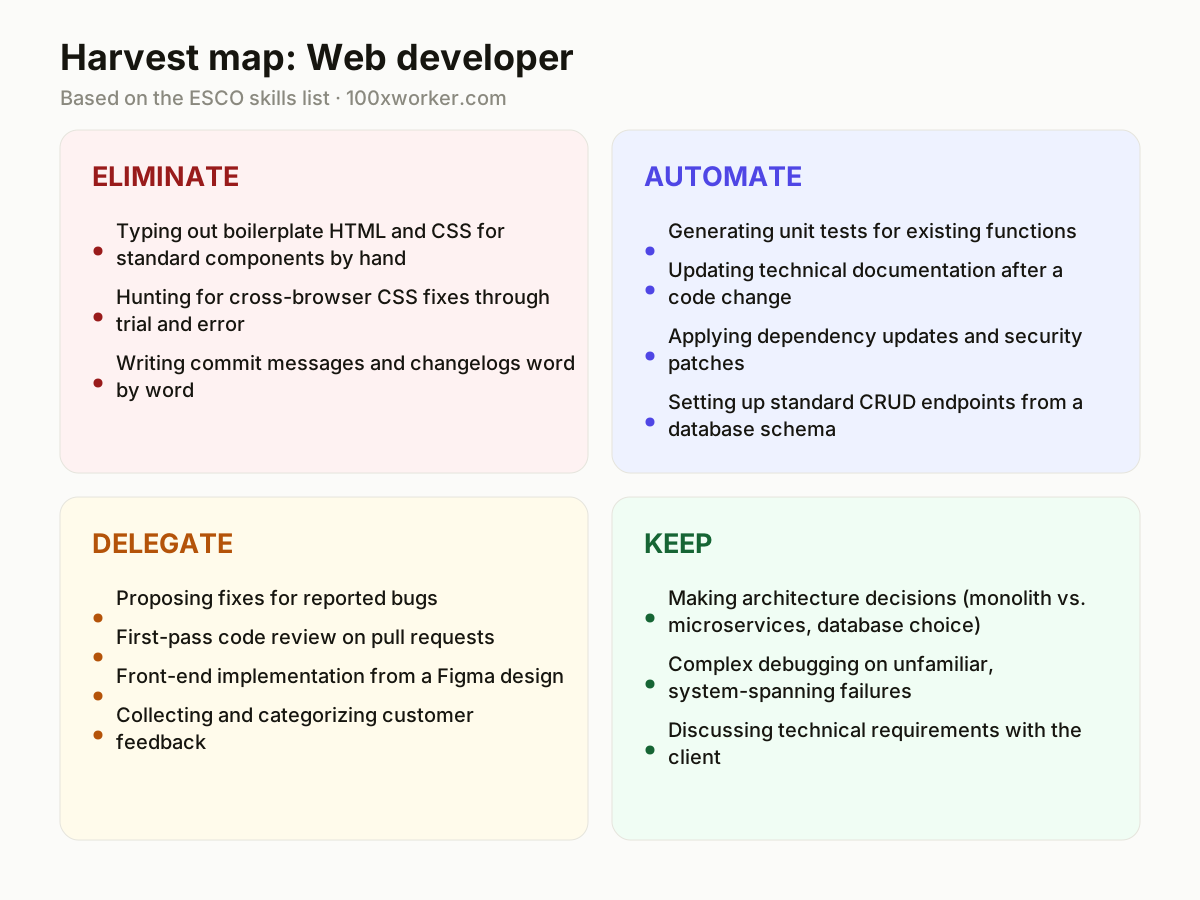
Which web developer tasks does AI take over?
AI is already handling a meaningful slice of day-to-day coding work. Microsoft Research's analysis of real Copilot conversations puts the applicability score for web developers at 35.3%, meaning roughly a third of the tasks web developers report doing show up as things generative AI can plausibly do. In practice that means boilerplate HTML and CSS, cross-browser fixes, commit messages, unit test generation, documentation updates, dependency patches, and standard CRUD endpoints. These are the tasks in the eliminate and automate buckets above. None of them require deep context about your specific product or client, which is exactly why AI handles them well.
Will AI replace web developers?
No, but your task list looks different than it did two years ago. Anthropic's Economic Index shows that most real-world AI coding use falls into augmentation (AI helps you work faster) rather than full automation (AI replaces the task outright). Architecture decisions, complex debugging across unfamiliar systems, and client conversations about requirements stay firmly in human hands, because they require judgment, trust, and context AI doesn't have. The web developers most at risk are the ones whose entire job consisted of eliminate-bucket tasks: repetitive boilerplate with no design or architecture responsibility attached to it.
What can you do this month to start using AI?
Pick one recurring task from the automate bucket, ideally test generation or documentation updates, and set up an AI coding assistant (GitHub Copilot, Claude, or Cursor) to handle it for a full sprint. Track how much time you save and where the output needs correction. Then move to one delegate-bucket task, such as first-pass code review on pull requests, and build a habit of having AI flag issues before you look at a diff yourself. Don't try to change your whole workflow at once. Small, measured changes to one or two tasks tell you more than a company-wide AI rollout.
How do you become the AI-savvy person on your dev team?
Start by documenting which tasks you have moved into the automate and delegate buckets, and share the prompts and setups that worked with your team. Volunteer to critically review AI-generated pull requests instead of rubber-stamping them, since spotting where AI code is subtly wrong is a rarer skill than writing the code yourself. Keep a running list of failure cases where AI got it wrong, and use those to calibrate what you delegate versus what you keep. Being the person who knows the limits of the tools, not just the tricks, is what makes you useful to a team.
Generative AI is applicable to over a third of the work activities web developers report doing, based on analysis of 200,000 real Copilot conversations.
Microsoft Research, Working with AI (2025)
Become the AI person on your team
Own the review process for AI-generated code
Set up a lightweight checklist for reviewing AI-suggested pull requests, focused on security, edge cases, and accessibility. Share it with your team so review quality doesn't depend on who happens to review the PR.
Build a prompt library for recurring tasks
Save the prompts that reliably produce good unit tests, documentation updates, or CRUD scaffolding, and keep them in a shared repo folder. This turns one person's trial and error into a team-wide shortcut.
Track where AI gets it wrong
Keep a short log of cases where AI-generated code introduced a bug or missed an edge case. Over time this becomes the internal guide for what your team should never fully automate.
Want this for your actual task list?
The free scan on the homepage builds your personal task map in 30 seconds, based on your role and industry.
Run the free task scanTools for this work
| Tool | For which tasks | The sober take |
|---|---|---|
| GitHub Copilot | Boilerplate code, unit test generation, first-draft front-end components from Figma | Works inline in your editor; still needs review for edge cases and security. |
| Claude (Anthropic) | Documentation updates, code review, debugging assistance, dependency update summaries | Anthropic's own data shows most coding use is augmentation, not full automation. |
| Cursor | Multi-file refactors, CRUD endpoint scaffolding, dependency and security patch pull requests | An AI-native editor built around agent-style edits across a codebase. |
| Dependabot / Renovate | Automated dependency updates and security patches | Not generative AI itself, but pairs well with an AI agent drafting the PR description. |
Prompts to try today
Generate unit tests for a function
Update documentation after a code change
First-pass review of a pull request
Related jobs
Frequently asked questions
Is web development one of the occupations most exposed to AI?
It's mid-range, not the most exposed. Microsoft Research's applicability scores run from 12% (nurses) to 49% (translators, the highest-scoring occupation). Web developers sit at 35.3%, meaning generative AI plausibly applies to about a third of reported tasks. That puts web development well above manual and care-based occupations but below language-heavy, text-in-text-out roles like translation, where nearly half the work maps cleanly onto what large language models do well.
Should junior web developers worry about their careers?
The risk concentrates on juniors whose whole job is eliminate-bucket work: typing boilerplate, fixing known CSS quirks, writing routine commits. Anthropic's Economic Index shows most real coding use is augmentation, meaning AI helps rather than replaces. Juniors who move quickly into reviewing AI output, understanding why a fix works, and taking on architecture and debugging responsibility stay valuable. The ones who stay purely production-line coders on repetitive tasks face the most pressure.
Are older 'automation risk' rankings for web developers still accurate?
Treat them with caution. The widely cited automation-risk percentages that circulate online trace back to Frey and Osborne's 2013 Oxford study, published before large language models existed. It modeled robotic and rule-based automation, not generative AI that can read requirements, write and review code, or draft documentation. Microsoft Research's 2025 applicability scores, based on real Copilot conversations, are a more current reference point for what generative AI can actually do in this job today.
How many people are actually using generative AI at work right now?
Adoption is already broad, though this figure covers the general population, not developers specifically. Eurostat reports that 32.7% of the EU population aged 16 to 74 used generative AI in the last three months of 2025. Among working professionals in tech-adjacent roles, actual usage tends to run higher, since coding assistants are often built directly into the tools developers use daily rather than requiring a separate decision to try AI.
Sources
- Microsoft Research, Working with AI: Measuring the Applicability of Generative AI to Occupations (2025)
- Anthropic Economic Index
- Eurostat, isoc_ai_iaiu
- ESCO, European Commission
- Frey & Osborne, The Future of Employment (Oxford, 2013)
Hendrik De Winne, author of Becoming AI-Savvy, founder of VibeLab. Helps teams redesign their work with AI.
This article was drafted with AI assistance from public data sources and editorially reviewed.