100×worker · job analysis
Will AI Replace Mobile Developers, and What Should You Do About It?
If you build apps for iOS or Android, you have probably already used an AI coding assistant to scaffold a screen or write a test. That is not a coincidence. Microsoft Research analyzed 200,000 real conversations between developers and Copilot and found that generative AI is applicable to 27.8% of software developers' work activities (Microsoft Research, Working with AI, 2025). That number sits well below translators (49%) and well above nurses (12%), which tells you something about where mobile development actually stands: high enough to matter, low enough that the job survives.
Anthropic's Economic Index, which classifies millions of Claude conversations against the O*NET task list, draws a similar line: some AI use replaces a task outright (automation), while more of it happens alongside a person who still makes the final call (augmentation). Across the EU, 32.7% of people aged 16 to 74 used generative AI in the last three months of 2025 (Eurostat), so these tools are mainstream, not experimental. The real question for a mobile developer is not whether AI writes code. It already does. The question is which of your daily tasks disappear, which get automated end to end, which you hand to an assistant and check, and which stay entirely yours.
A mobile developer builds apps for phones and tablets from designs and technical specifications.
The task split: what AI takes over and what stays yours
Not every task in a mobile developer's job responds to AI the same way. Some tasks disappear because AI does them instantly and nobody misses the manual version. Some get automated end to end, with a human only checking the output. Others get delegated: AI drafts, you review and take responsibility. And some tasks stay entirely with you because they involve judgment, liability, or trust that no model carries. Sorting your own task list into these four buckets is more useful than asking whether 'the job' will survive.
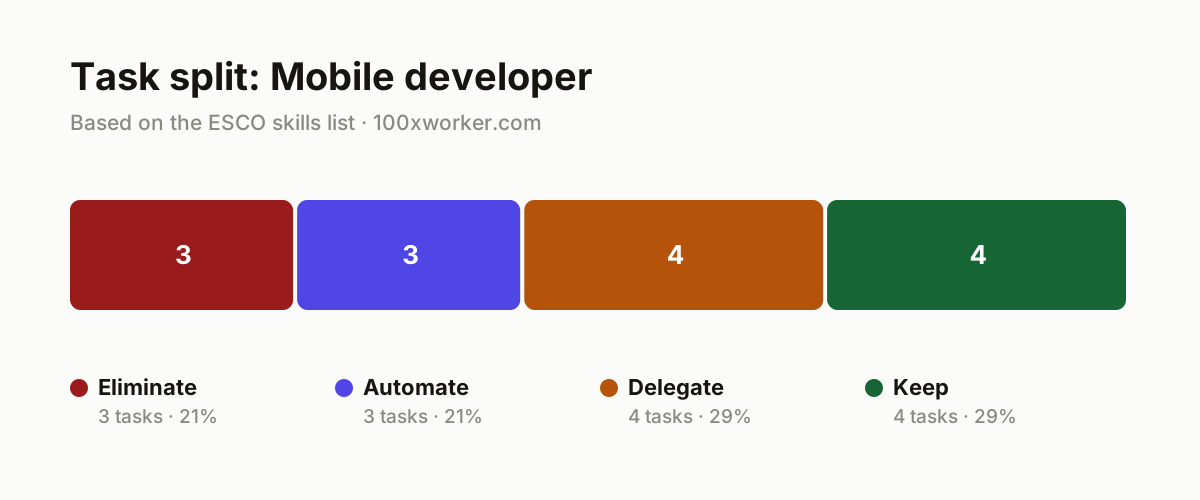
| Task | Bucket | Why |
|---|---|---|
| Writing boilerplate for standard screens (login, list views, settings) | eliminate | AI generates this directly from a prompt or design file, so typing it out by hand adds nothing. |
| Manually drawing flowcharts for simple user flows | eliminate | AI turns a spec into a diagram immediately, so hand-drawing serves no purpose anymore. |
| Compiling changelogs and release notes by hand from git commits | eliminate | AI summarizes commit history faster and more consistently than a person scrolling through logs. |
| Writing and running unit and UI tests for existing features | automate | Agents generate test cases and execute them, you just verify coverage. |
| Triaging and categorizing crash logs and stack traces into tickets | automate | AI spots patterns in logs faster than a human scrolling through them manually. |
| Translating app strings into multiple languages (i18n) | automate | Text translation is the highest-scoring AI use case measured, 49% for translators (Microsoft Research, 2025). |
| Building a first version of a new feature from specifications | delegate | AI produces working code, you rewrite the edge cases and handle integration. |
| Preparing code reviews (linting, style, obvious bugs) | delegate | AI flags the trivial issues, you judge logic, architecture, and security. |
| Drafting API documentation and technical write-ups from code | delegate | AI writes the first draft, you check it for accuracy and missing context. |
| Clustering and prioritizing app store reviews for the roadmap | delegate | AI groups thousands of comments, you decide what is actually worth building. |
| Architecture decisions (native vs. cross-platform, database choice, API design) | keep | Overseeing long-term technical debt requires experience and context a model does not hold. (Your edge: You carry the consequences of this call, not a model.) |
| Security and privacy reviews (encryption, App Store/Play Store compliance) | keep | Compliance risk and legal liability sit with a person, never with the model. (Your edge: You sign off, the AI does not.) |
| Scope and priority conversations with a product owner or client | keep | Negotiating and managing expectations is relational work, not generative work. (Your edge: You cannot build trust with a prompt.) |
| Debugging complex, non-reproducible production bugs | keep | System intuition and experience with a platform's quirks stay scarce and hard-won. (Your edge: You know the app better than any model does.) |
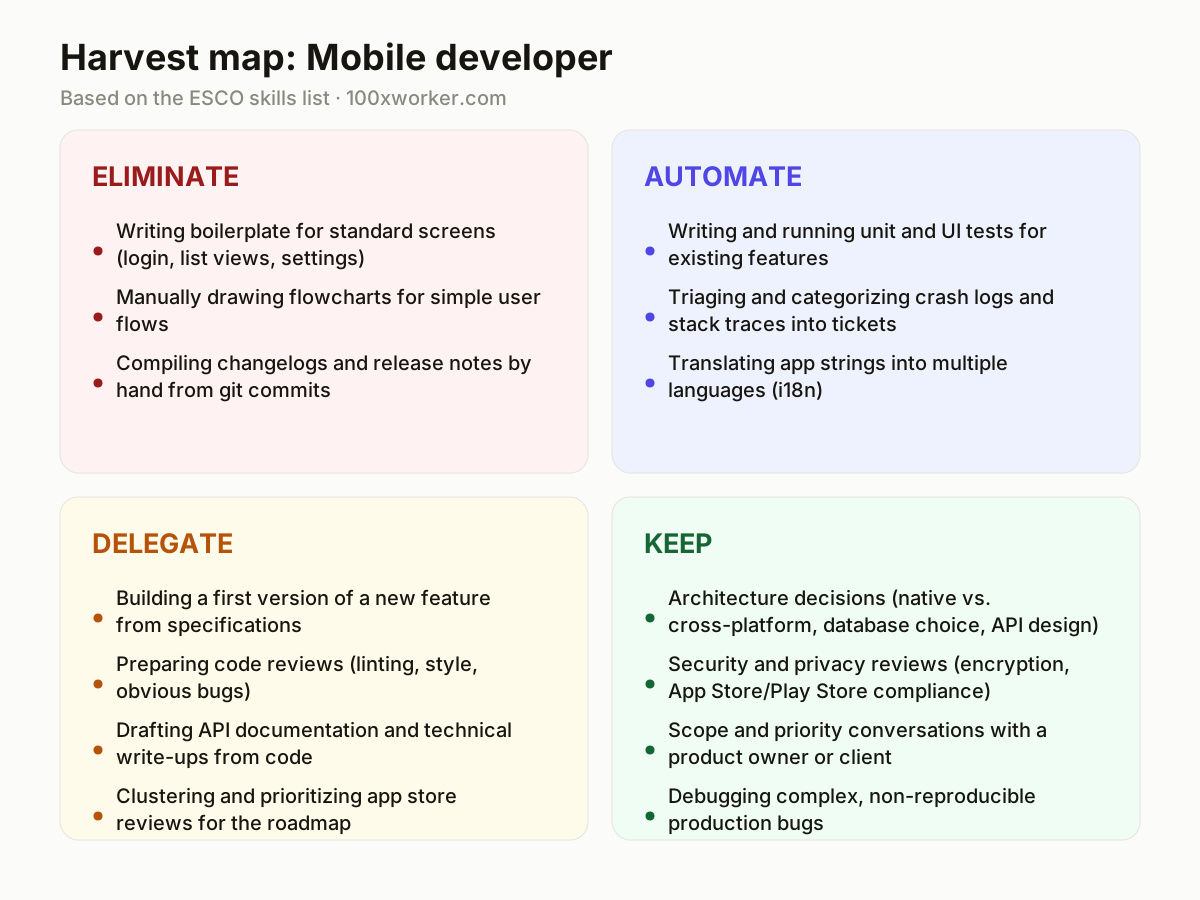
What tasks does AI take over from a mobile developer?
AI already removes the most repetitive parts of mobile development. It generates boilerplate for standard screens, drafts release notes from commit history, and turns simple specifications into flowcharts, tasks that used to take time but added little value. Further along, agents write and run unit and UI tests, triage crash logs into tickets, and translate app strings across languages, a task where generative AI performs better than almost anything else Microsoft Research measured (49% for translators, 2025). None of this eliminates the developer. It removes the parts of the job that were already closest to mechanical, freeing time for architecture, debugging, and decisions that carry real consequences.
Will AI replace mobile developers?
No, not in any near-term sense. Microsoft Research puts the AI applicability score for software developers at 27.8%, meaning roughly a quarter of daily work activities overlap with what generative AI can plausibly do. That leaves the majority of the job, architecture decisions, security and compliance sign-off, debugging non-reproducible bugs, and negotiating scope with stakeholders, in human hands. The job is being reshaped rather than deleted: fewer hours on boilerplate and test scaffolding, more hours on decisions that require context, judgment, and accountability. Developers who treat AI as a tool for the routine 27.8% and keep ownership of the rest are the ones whose role becomes more valuable, not less.
How do you become the AI-savvy person on your mobile development team?
Start by mapping your own sprint against the four buckets: eliminate, automate, delegate, keep. Pick one recurring task, say writing unit tests or drafting API docs, and set up an assistant to handle it end to end, then measure how much review time it actually saves. Share the setup with your team instead of keeping it as a personal shortcut. Volunteer to pilot AI-assisted code review or crash-log triage before management mandates it. Document what breaks, since brittle output on edge cases is where your judgment matters most. Being the AI-savvy person is less about knowing every new tool and more about knowing exactly which tasks it should not touch.
What can you do this month as a mobile developer?
Pick a feature you built recently and re-do the boilerplate screens with an AI coding assistant, then time the difference. Set up automated test generation for one module and check coverage before and after. Run your last month of app store reviews through an AI clustering prompt and compare its groupings against your own sense of what users complain about most. Keep a short log of where the AI output needed correction, since that log becomes your evidence for what to delegate further and what to keep firmly in your own hands.
Generative AI is applicable to 27.8% of software developers' work activities.
Microsoft Research, Working with AI (2025)
Become the AI person on your team
Automate one recurring task fully
Pick a task like i18n string translation or crash log triage and hand it to an agent end to end for two weeks. Track how often you need to intervene, then report the real time saved to your team lead instead of guessing.
Build a personal prompt library
Save the prompts that reliably produce usable boilerplate, test cases, or documentation drafts for your specific codebase and frameworks. Share it with teammates so the whole team's baseline speed goes up, not just yours.
Own the review, not just the output
When you delegate a feature draft or documentation to AI, write down what you changed and why before merging. That habit turns you into the person who can explain AI-assisted decisions to a security reviewer or product owner.
Want this for your actual task list?
The free scan on the homepage builds your personal task map in 30 seconds, based on your role and industry.
Run the free task scanTools for this work
| Tool | For which tasks | The sober take |
|---|---|---|
| GitHub Copilot | boilerplate screens, unit and UI test generation, code review prep | Works inline in most IDEs, strong for scaffolding and repetitive patterns, not for architecture calls. |
| Cursor | building a first draft of a new feature from specifications, drafting API documentation | An AI-first editor that can work across a whole codebase, useful for multi-file feature drafts. |
| DeepL and similar AI translation tools | translating app strings for i18n | Handles bulk string translation well, still needs a native speaker's review for tone. |
| AI-assisted crash reporting tools | triaging and categorizing crash logs and stack traces | Groups similar crashes automatically, cutting the manual scroll through raw logs. |
| Native IDE AI assistants (Xcode, Android Studio) | boilerplate generation, debugging suggestions, quick flowchart drafts from a spec | Stays closest to your build environment but often lags standalone assistants in raw capability. |
Prompts to try today
Turn a spec into working boilerplate
Cluster app store reviews for roadmap prioritization
Draft release notes from commit history
Related jobs
Frequently asked questions
Is mobile development one of the jobs most exposed to AI?
Not especially. Microsoft Research's applicability score puts software developers at 27.8%, well below translators at the top (49%) and well above nurses near the bottom (12%). Mobile development sits in the middle of the pack: routine code generation and testing are exposed, but architecture, security compliance, and debugging obscure production issues are not.
Should I worry about AI writing all the code myself?
AI already writes a meaningful share of boilerplate and test code, and that share will grow. But someone still has to decide what to build, review it for security and correctness, and take responsibility when it fails in production. That accountability, more than typing speed, is what keeps the role in demand.
Does the older 'robotization percentage' for software developers still apply?
No. The widely cited robotization percentages that circulate online come from a 2013 Oxford study (Frey and Osborne) done before large language models existed. It was built to predict automation from robotics and rule-based software, not generative AI, so it should not be used to estimate today's exposure. Microsoft Research's 2025 applicability score, based on real Copilot conversations, is a more current reference point.
Where do most professionals actually use generative AI day to day?
Across the EU, 32.7% of people aged 16 to 74 used generative AI in the past three months as of 2025 (Eurostat). Anthropic's Economic Index finds usage splits broadly between automation-like use, where AI completes a task outright, and augmentation-like use, where a person stays in the loop and makes the final call.
Sources
- Microsoft Research, Working with AI: Measuring the Applicability of Generative AI to Occupations (2025)
- Anthropic Economic Index
- Eurostat, isoc_ai_iaiu (2025)
- ESCO, European Commission occupation taxonomy
Hendrik De Winne, author of Becoming AI-Savvy, founder of VibeLab. Helps teams redesign their work with AI.
This article was drafted with AI assistance from public data sources and editorially reviewed.