100×worker · job analysis
Will AI Replace Video Editors, and What Should You Do About It?
Video editing looks like an obvious target for AI disruption. Software already transcribes footage, syncs clips, and suggests cuts. But the data tells a more specific story. Microsoft Research analyzed 200,000 real Copilot conversations and built an AI applicability score for individual occupations. Film and video editors scored 11.6%, meaning only a modest share of the work maps cleanly onto what generative AI does well today. Translators topped the list at 49%; nurses sat near the bottom at 12%. Editing lands closer to the nursing end than the translation end.
That does not mean nothing changes. Anthropic's Economic Index, which classifies millions of Claude conversations against O*NET task categories, distinguishes between AI use that automates a task outright and AI use that augments a person doing it. For editors, most current AI use falls into the augmentation camp: tools that speed up logging, transcription, or a first assembly, while a person still decides what the scene is actually saying. This article breaks the job into four buckets, tasks AI eliminates, automates, or supports, and tasks that stay with you, so you can see exactly where to spend your attention.
A video editor cuts raw footage into a coherent, watchable sequence for film, TV, or online use.
The task split: what AI takes over and what stays yours
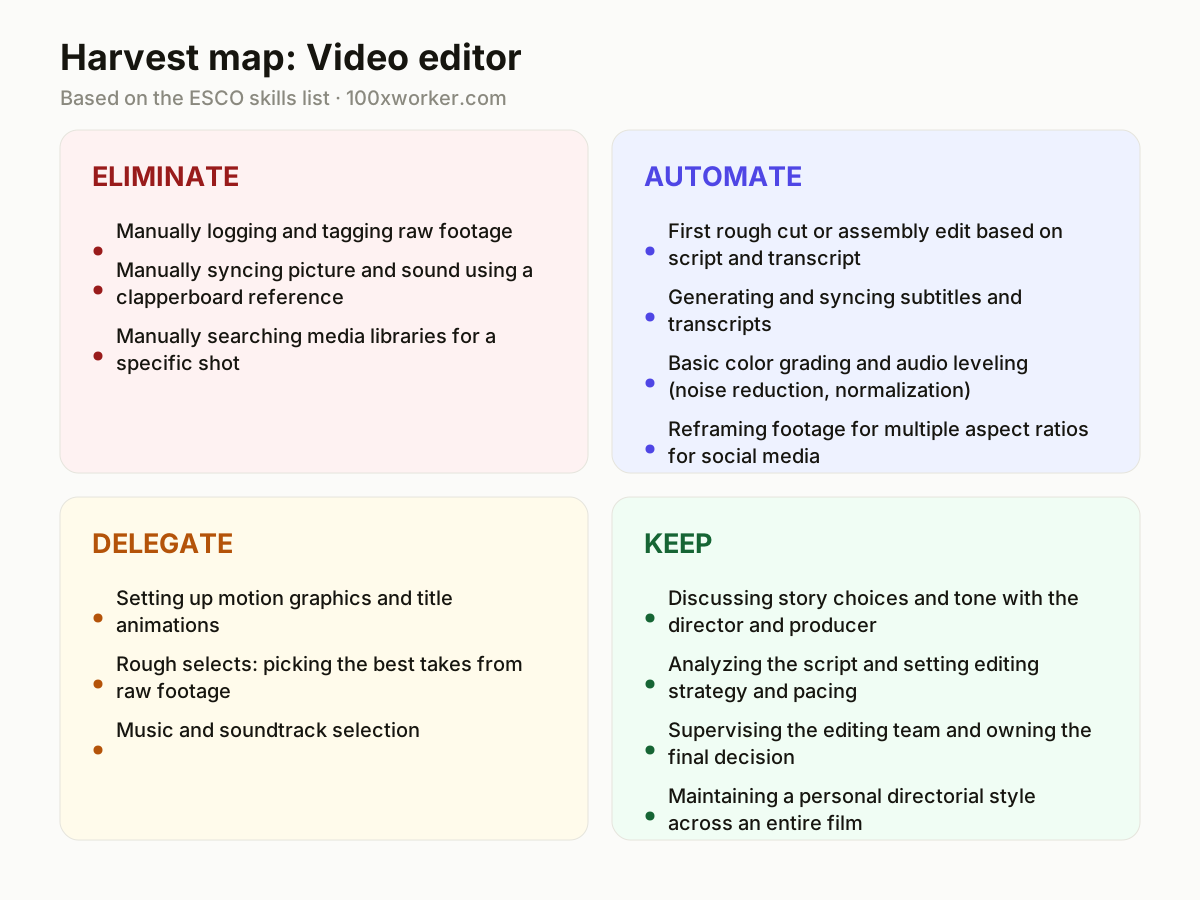
Instead of asking whether AI will take over video editing, it helps to break the job into individual tasks. Some tasks disappear because software now does them without asking. Some get automated as a first draft you refine. Some get delegated to AI as a suggestion engine that you approve or reject. And some stay firmly with you because they depend on judgment, taste, or relationships that software cannot replicate. This four-part split, eliminate, automate, delegate, keep, gives a clearer picture than a single yes-or-no answer.
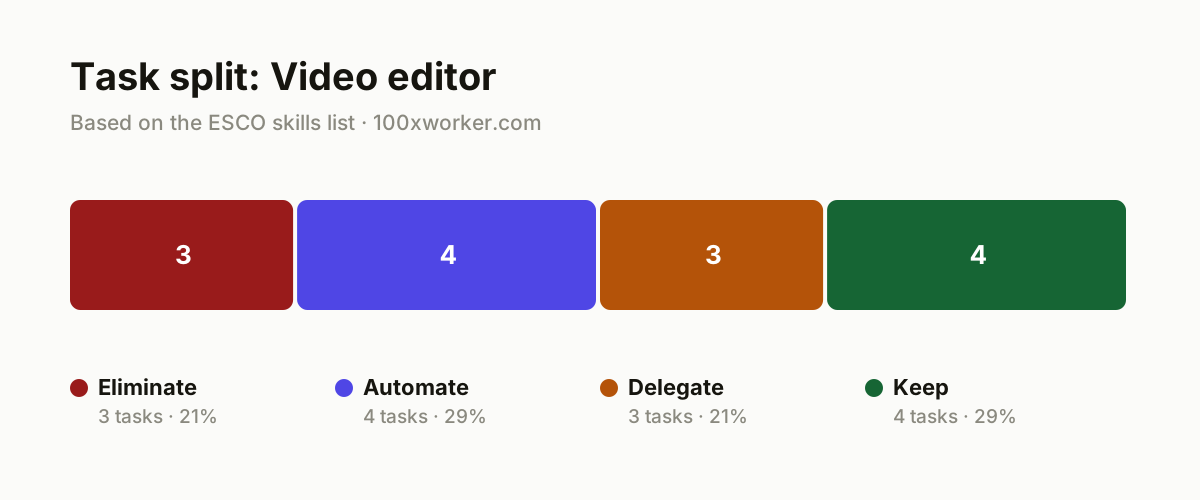
| Task | Bucket | Why |
|---|---|---|
| Manually logging and tagging raw footage | eliminate | AI tools transcribe and tag shots automatically by content, face, location, and dialogue. |
| Manually syncing picture and sound using a clapperboard reference | eliminate | Auto-sync features match audio to video by waveform the moment footage is imported. |
| Manually searching media libraries for a specific shot | eliminate | AI search finds shots by description, not just by filename or tag. |
| First rough cut or assembly edit based on script and transcript | automate | AI converts a script and transcript into a first editing sequence that you then refine. |
| Generating and syncing subtitles and transcripts | automate | Speech-to-text tools produce timecoded subtitles ready for export. |
| Basic color grading and audio leveling (noise reduction, normalization) | automate | AI applies consistent corrections across every shot, faster than adjusting clip by clip. |
| Reframing footage for multiple aspect ratios for social media | automate | AI reframing tracks the subject automatically to produce vertical or square versions. |
| Setting up motion graphics and title animations | delegate | AI generates templates and variants; you choose the style and refine timing and typography. |
| Rough selects: picking the best takes from raw footage | delegate | AI proposes a shortlist based on script match and image quality; you decide which take stays. |
| Music and soundtrack selection | delegate | AI suggests tracks based on mood, tempo, and rhythm; you make the final call. |
| Discussing story choices and tone with the director and producer | keep | Editing is a conversation about intent, not just a technical sequence. (Your edge: Only a person reads implicit directorial intent and team dynamics.) |
| Analyzing the script and setting editing strategy and pacing | keep | A sense of rhythm decides whether a scene works, and that is not a computational problem. (Your edge: Dramatic instinct and a feel for timing stay human work.) |
| Supervising the editing team and owning the final decision | keep | Someone has to make the final call and keep the team moving toward deadline. (Your edge: Accountability and mentorship require human judgment.) |
| Maintaining a personal directorial style across an entire film | keep | A consistent artistic signature comes from experience and taste. (Your edge: An artistic signature is not a sum of AI suggestions.) |
Which tasks will AI take over from video editors?
AI is best at the parts of editing that are repetitive and rule-based: logging footage, syncing audio and picture, transcribing dialogue, generating subtitles, applying basic color and audio corrections, and reframing footage for different aspect ratios. These tasks have a clear input and a checkable output, which is exactly what generative AI handles reliably. What AI does not do well is decide whether a scene actually works dramatically, which is why those tasks stay with the editor rather than moving to software.
Will AI replace video editors?
No. Microsoft Research's applicability score put film and video editing at 11.6%, far below occupations like translation (49%) and closer to roles like nursing (12%), where most of the work resists automation. AI removes hours of manual prep work, logging, syncing, rough transcription, but it cannot judge pacing, read a director's unspoken intent, or take responsibility for a final cut. The job shifts toward supervising AI output and making creative calls, rather than disappearing.
How many people already use AI at work?
Adoption is rising quickly but still uneven. Eurostat found that 32.7% of the EU population aged 16-74 had used generative AI in the three months before being surveyed in 2025. That figure covers all uses, not just work, and varies widely by country and age group. For a creative and technical field like video editing, day-to-day use of AI tools for transcription, rough cuts, and subtitle generation is already common in professional workflows, even where broader population-level adoption is lower.
What can you do this month as a video editor?
Pick one repetitive task, logging footage, syncing audio, or drafting subtitles, and run it through an AI tool for your next project. Compare the AI output against your own manual process to see where it saves real time and where it still needs correction. Then spend the time you save on the tasks that stay human: reviewing pacing with the director, refining tone, and protecting the overall structure of the edit. Small, task-level experiments beat trying to overhaul your whole workflow at once.
Film and video editing scores well below occupations like translation on AI applicability, closer to roles where most of the work still depends on human judgment.
Microsoft Research, Working with AI: Measuring the Applicability of Generative AI to Occupations (2025)
Become the AI person on your team
Let AI produce the first assembly, not the final structure
Feed your script and transcript into an AI-assisted editing tool to get a rough sequence in minutes instead of hours. Treat that output as a starting draft, not a decision, and rebuild the pacing yourself once you see where the AI cut falls flat.
Automate subtitles and transcripts as a default step
Run speech-to-text on every project the moment footage lands, before you start cutting. This gives you a searchable transcript for finding shots by dialogue, plus subtitles ready for review, instead of adding that step at the end.
Use AI shortlists for selects, then trust your own eye
Ask an AI tool to flag likely best takes based on script match and technical quality, then review the shortlist yourself rather than the full raw folder. This narrows the search without handing over the actual creative choice.
Want this for your actual task list?
The free scan on the homepage builds your personal task map in 30 seconds, based on your role and industry.
Run the free task scanTools for this work
| Tool | For which tasks | The sober take |
|---|---|---|
| Descript | Transcription, rough cuts, subtitle generation | Edits video by editing the transcript text, which speeds up rough assembly. |
| Adobe Premiere Pro (with AI-assisted features) | Auto-sync, reframing for social formats, basic color and audio cleanup | Built-in AI features handle repetitive technical steps inside a familiar timeline. |
| Otter.ai or similar speech-to-text services | Logging and tagging raw footage by dialogue | Turns spoken content into searchable text, useful for finding shots later. |
| Runway | Automated reframing, some motion graphics assistance | Useful for social-media resizing and quick visual experiments, not final-grade output. |
Prompts to try today
Generate a rough cut sequence from a script and transcript
Shortlist best takes for a scene
Draft subtitle text for review
Related jobs
Frequently asked questions
Do I need to learn AI tools to stay employable as a video editor?
Basic familiarity helps, since more studios and freelance clients expect faster turnaround on logging, transcription, and rough cuts. You do not need to become a developer or prompt engineer. Learning to use one or two AI-assisted tools inside your existing editing software, such as auto-transcription or auto-reframing, is enough to keep pace with workflow expectations in most production environments.
Which part of video editing is safest from AI automation?
Story-level decisions are safest: choosing pacing, deciding how a scene should feel, interpreting a director's intent, and taking responsibility for the final cut. Microsoft Research's applicability score of 11.6% for this occupation reflects the fact that most of the work involves this kind of judgment rather than repeatable technical steps AI can fully handle.
Can AI write a full edit on its own without a human editor?
AI can produce a rough assembly from a script and transcript, but it cannot reliably judge whether a scene works dramatically, match a director's unstated intent, or make final creative calls under a production deadline. Anthropic's Economic Index classifies most current AI use in creative and technical fields as augmentation of a person's work rather than full automation of the task.
Is the ESCO skill list for video editors still accurate given AI tools?
The core skills ESCO lists for this occupation, analyzing a script, synchronizing sound and picture, digitally editing raw footage, supervising an editing team, still describe the job accurately. What changes is how some of those skills get executed: synchronization and basic transfer of footage now happen through software rather than manual steps, while script analysis and team supervision remain unchanged.
Sources
- Microsoft Research, Working with AI: Measuring the Applicability of Generative AI to Occupations (2025)
- Anthropic Economic Index
- Eurostat, isoc_ai_iaiu (generative AI use, EU population 16-74)
- ESCO, European Commission occupation and skills taxonomy
Hendrik De Winne, author of Becoming AI-Savvy, founder of VibeLab. Helps teams redesign their work with AI.
This article was drafted with AI assistance from public data sources and editorially reviewed.