100×worker · job analysis
Will AI Replace Technical Writers?
Technical writers turn product knowledge into manuals, help content, API documentation, and specifications that ordinary users and developers can actually follow. That work is built out of dozens of smaller tasks, and not all of them are equally exposed to generative AI.
Microsoft Research analyzed 200,000 real Copilot conversations and scored occupations on how much of their work overlaps with what generative AI can do. Technical writers land at 37.3%, well below translators (49%, the highest score in the study) but far above nursing (12%, one of the lowest). That places the job in a middle zone: heavily touched by AI, but not close to being eliminated.
The useful move is not to ask whether AI will replace technical writers. It is to break the job into its actual tasks and sort them into four buckets: what disappears, what runs on autopilot, what you hand to AI as a first draft, and what stays firmly your responsibility.
A technical writer turns product knowledge into clear manuals, help content, and specifications for users.
The task split: what AI takes over and what stays yours
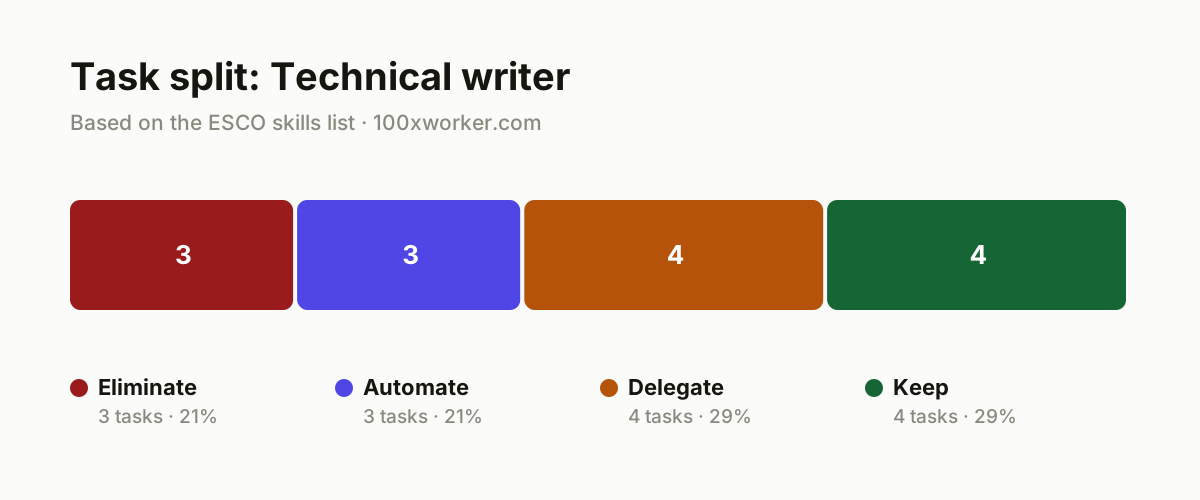
Instead of asking whether AI takes your job, look at what you actually do in a week and sort it. Some tasks disappear because a tool now does them without anyone asking. Some run automatically once someone sets them up. Some get delegated to AI as a first pass that you then check and fix. And some stay with you because they require judgment, legal responsibility, or direct contact with real users.
| Task | Bucket | Why |
|---|---|---|
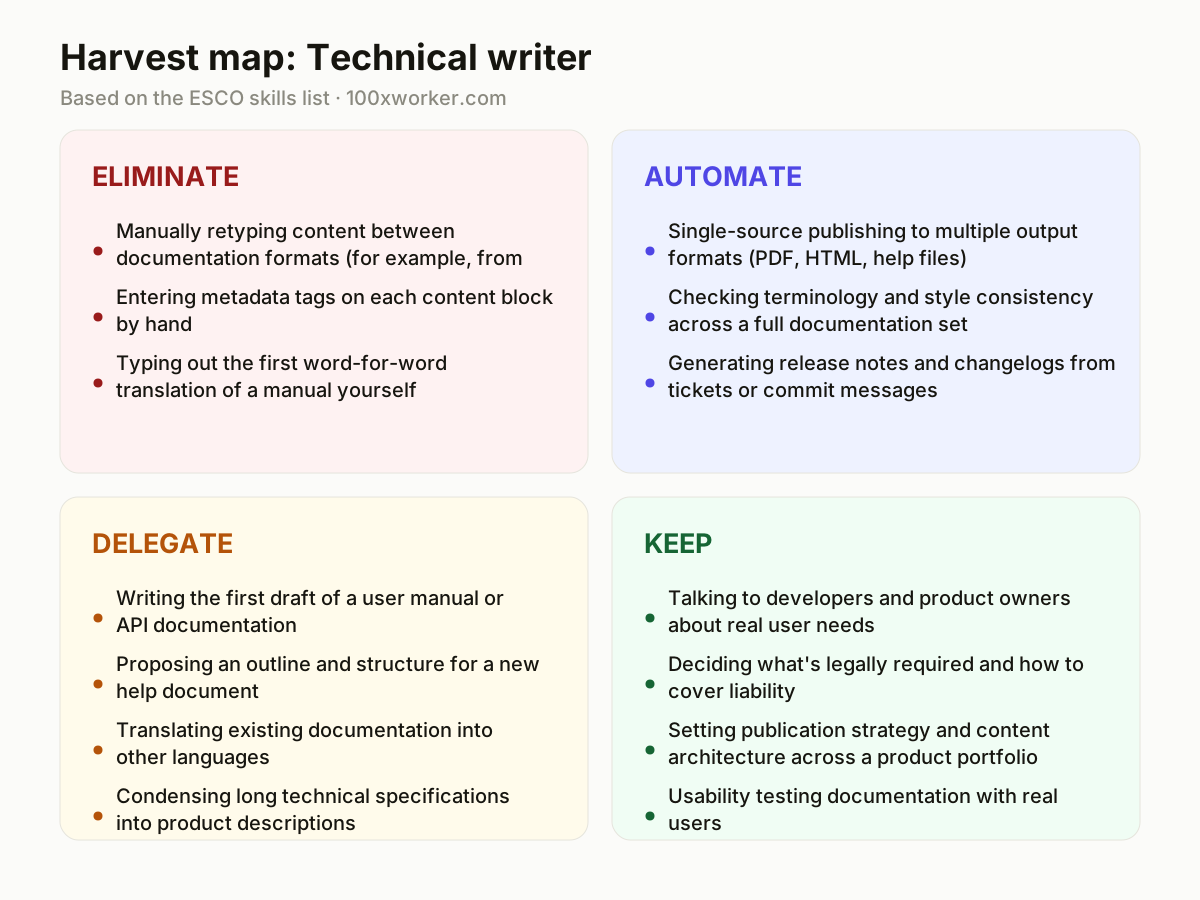
| Manually retyping content between documentation formats (for example, from Word into DITA or XML) | eliminate | Conversion tools and AI parsers do this faster and with fewer errors than copy-paste ever could. |
| Entering metadata tags on each content block by hand | eliminate | Managing content metadata is rule-based work a system now infers automatically. |
| Typing out the first word-for-word translation of a manual yourself | eliminate | An AI translation engine produces the first pass faster, so your time shifts to checking, not typing. |
| Single-source publishing to multiple output formats (PDF, HTML, help files) | automate | Integrating content into output media is exactly the repeatable step agents now handle end to end. |
| Checking terminology and style consistency across a full documentation set | automate | Quality control on content scales better with a tool that checks every document against the glossary. |
| Generating release notes and changelogs from tickets or commit messages | automate | Gathering technical information from systems is a task AI can pull on its own with the right access. |
| Writing the first draft of a user manual or API documentation | delegate | AI produces a usable first draft from specifications; you rewrite, verify, and take responsibility for it. |
| Proposing an outline and structure for a new help document | delegate | Structuring information moves faster with an AI-generated proposal as a starting point you adjust. |
| Translating existing documentation into other languages | delegate | AI delivers a strong first version; human review stays necessary for regulated or safety-critical text. |
| Condensing long technical specifications into product descriptions | delegate | Interpreting and compressing technical text is work where AI hands you a solid first draft. |
| Talking to developers and product owners about real user needs | keep | Identifying what users actually need requires trust and nuance you can't get from a chat window. (Your edge: A human conversation surfaces what no one ever writes in a ticket.) |
| Deciding what's legally required and how to cover liability | keep | Developing documentation to meet legal requirements stays a responsibility that sits with a person. (Your edge: You can't delegate legal liability to a model.) |
| Setting publication strategy and content architecture across a product portfolio | keep | Publication strategy requires an overview of organization, priorities, and future plans that AI doesn't have. (Your edge: Portfolio-wide overview stays human work.) |
| Usability testing documentation with real users | keep | Cognitive psychology and behavioral observation with actual people isn't a task a language model performs. (Your edge: Watching someone get stuck differs from grading a paragraph.) |
Which technical writing tasks does AI take over?
AI takes over the mechanical layer of the job first: reformatting content between document types, tagging metadata, producing first-draft translations, and checking terminology consistency across large document sets. It also generates first drafts of manuals, API docs, and release notes from tickets or commit logs. What AI doesn't take over is deciding what should be written, what's legally required, or how a document should read to a confused first-time user. Those decisions stay with the writer, with AI handling the repetitive mechanics around them.
Will AI replace technical writers?
No single number settles this, but the closest available one is Microsoft Research's 37.3% AI applicability score for technical writers, based on 200,000 real Copilot conversations. That means a meaningful chunk of the job overlaps with what AI can do, but well over half doesn't. The role shifts rather than vanishes: less time drafting from scratch or reformatting, more time verifying accuracy, talking to users and engineers, and taking responsibility for content that has legal or safety implications. Writers who use AI for drafts and spend the saved time on judgment work are the ones likely to stay employed.
How do you become the AI person on your documentation team?
Start by mapping every recurring task in your workflow against the four buckets. Then build and share reusable prompts for your team's most common documents: API references, release notes, onboarding guides. Test one AI tool against your actual style guide and glossary rather than a generic benchmark, and document what it gets wrong. Being the person who knows where AI helps and where it fails on your specific content set makes you more useful than someone who just uses the tool quietly.
What can you do this month as a technical writer?
Pick one document type you write often, an API reference or a release note, and run it through an AI tool to produce a first draft. Compare that draft against your last three manually written versions and note exactly where it's wrong, where it's good enough, and where it needs your voice. Then set up one automation, like single-source publishing to multiple formats, that removes a task you currently do by hand every week.
Technical writers show a 37.3% AI applicability score, based on an analysis of 200,000 real Copilot conversations, placing them well behind translators at 49% and far ahead of nursing at 12%.
Microsoft Research, Working with AI (2025)
Become the AI person on your team
Build a prompt library from your style guide
Turn your team's style guide and glossary into a set of reusable prompts that produce drafts already close to your house style. Share it so colleagues stop reinventing the same instructions every time.
Run a documentation audit with AI, then verify by hand
Use an AI tool to flag terminology drift, broken cross-references, and inconsistent formatting across your full doc set. Check every flagged item yourself before making changes, since the tool will produce false positives.
Own the AI translation workflow
Set up AI-driven first-pass translation for your manuals, then define a human review step for anything touching safety warnings or legal disclaimers. Present the time saved to your manager in concrete hours.
Want this for your actual task list?
The free scan on the homepage builds your personal task map in 30 seconds, based on your role and industry.
Run the free task scanTools for this work
| Tool | For which tasks | The sober take |
|---|---|---|
| ChatGPT or Claude | Drafting manuals, API docs, outlines, and condensing specifications (delegate bucket) | Good for a fast first draft, weak on your specific terminology unless you feed it your glossary. |
| DeepL or similar AI translation engines | First-pass translation of documentation and manuals (eliminate and delegate buckets) | Handles routine text well; safety and legal language still needs a human reviewer. |
| DITA-aware CCMS platforms with AI features | Single-source publishing and metadata tagging (eliminate and automate buckets) | Removes manual reformatting, but setup and governance still take real configuration work. |
| Grammarly Business or similar style checkers | Terminology and style consistency checks across a document set (automate bucket) | Catches surface issues fast; doesn't judge whether the content itself is accurate. |
| GitHub Copilot or docs-as-code AI assistants | Generating release notes and changelogs from commits or tickets (automate bucket) | Useful when your docs live in a code repository; less useful outside that workflow. |
Prompts to try today
First draft of an API reference section
Terminology consistency check
Release notes from commit messages
Related jobs
Frequently asked questions
Is technical writing a dying career because of AI?
No, but the day-to-day content of the job is changing. Microsoft Research's 37.3% AI applicability score for technical writers shows meaningful overlap with generative AI, yet the majority of the role, including talking to users, verifying accuracy, and handling legal requirements, is not something current AI tools do on their own. The job shifts toward review, verification, and strategy rather than disappearing.
Which AI tool should a technical writer learn first?
Start with a general-purpose model like ChatGPT or Claude for drafting and summarizing, since these skills transfer across almost every document type you write. Once that's comfortable, add a specialized tool for your specific workflow, such as an AI translation engine if you localize content or a CCMS with AI features if you manage single-source publishing.
Can AI write legally compliant documentation on its own?
No. AI can draft language that looks compliant, but developing documentation to meet legal requirements is listed among the core skills in the ESCO occupational profile for technical communicators, and it requires a person who understands the specific regulatory context and takes responsibility for the result. Use AI for the draft, keep the legal review and sign-off with a qualified human.
How is AI use among professionals actually measured?
Two main approaches exist. Microsoft Research scores occupations by analyzing real Copilot conversations against the tasks that make up each job. Anthropic's Economic Index takes a similar approach with Claude conversations, mapping them against the O*NET task taxonomy and separating automation-style use from augmentation-style use. Both give a task-level picture rather than a single verdict on whether a job disappears.
Sources
- Microsoft Research, Working with AI: Measuring the Applicability of Generative AI to Occupations (2025)
- Anthropic Economic Index
- Eurostat, Individuals using generative AI (isoc_ai_iaiu)
- ESCO, European Commission occupational taxonomy
Hendrik De Winne, author of Becoming AI-Savvy, founder of VibeLab. Helps teams redesign their work with AI.
This article was drafted with AI assistance from public data sources and editorially reviewed.