100×worker · job analysis
Will AI Replace Animators?
Animators keep hearing that AI is coming for their jobs. The data says something more specific. Microsoft Research analyzed 200,000 real Copilot conversations and built an AI applicability score for occupations. Special effects artists and animators, the closest US occupational match, score 13.1%. That is far below translators at 49% and slightly above nurses at 12%. AI touches a real slice of animation work, but most of the job stays outside its reach for now.
Anthropic's Economic Index, which classifies millions of Claude conversations against O*NET task lists, finds a similar split across occupations: AI use breaks into automation-like use (AI does the task) and augmentation-like use (AI helps a person do the task faster). For animation, the automation-like share concentrates in mechanical, repetitive steps: interpolation, cleanup, format conversion. The augmentation-like share shows up in concept generation and first-draft work.
Across the EU, 32.7% of people aged 16 to 74 used generative AI in the last three months of 2025, according to Eurostat. Adoption is rising fast, which means clients and studios increasingly expect AI-assisted workflows by default. This article breaks the animator's ESCO-defined task list into what AI eliminates, automates, delegates, and what stays yours.
An animator uses software to build moving images and story sequences from drawings or 3D models.
The task split: what AI takes over and what stays yours
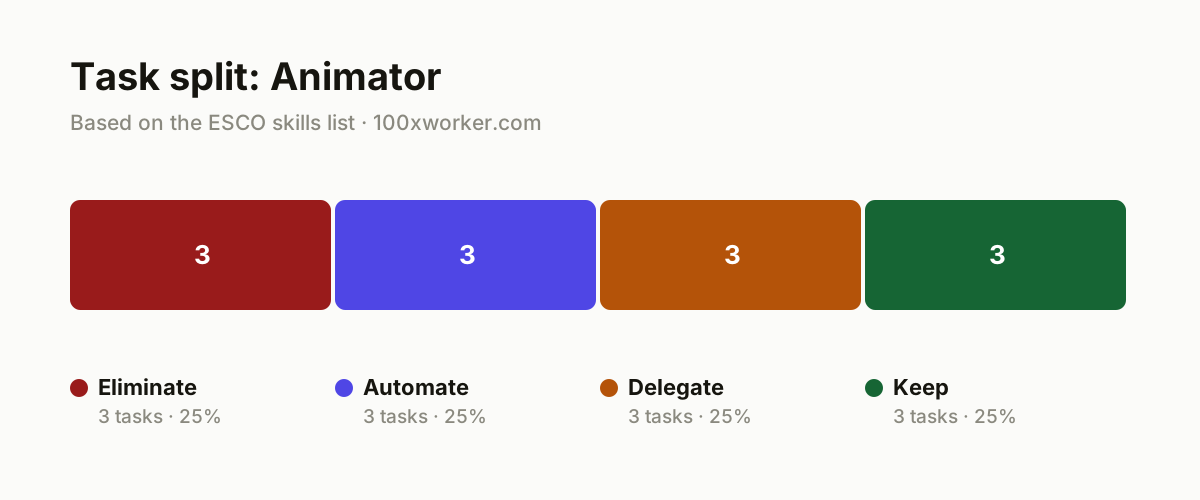
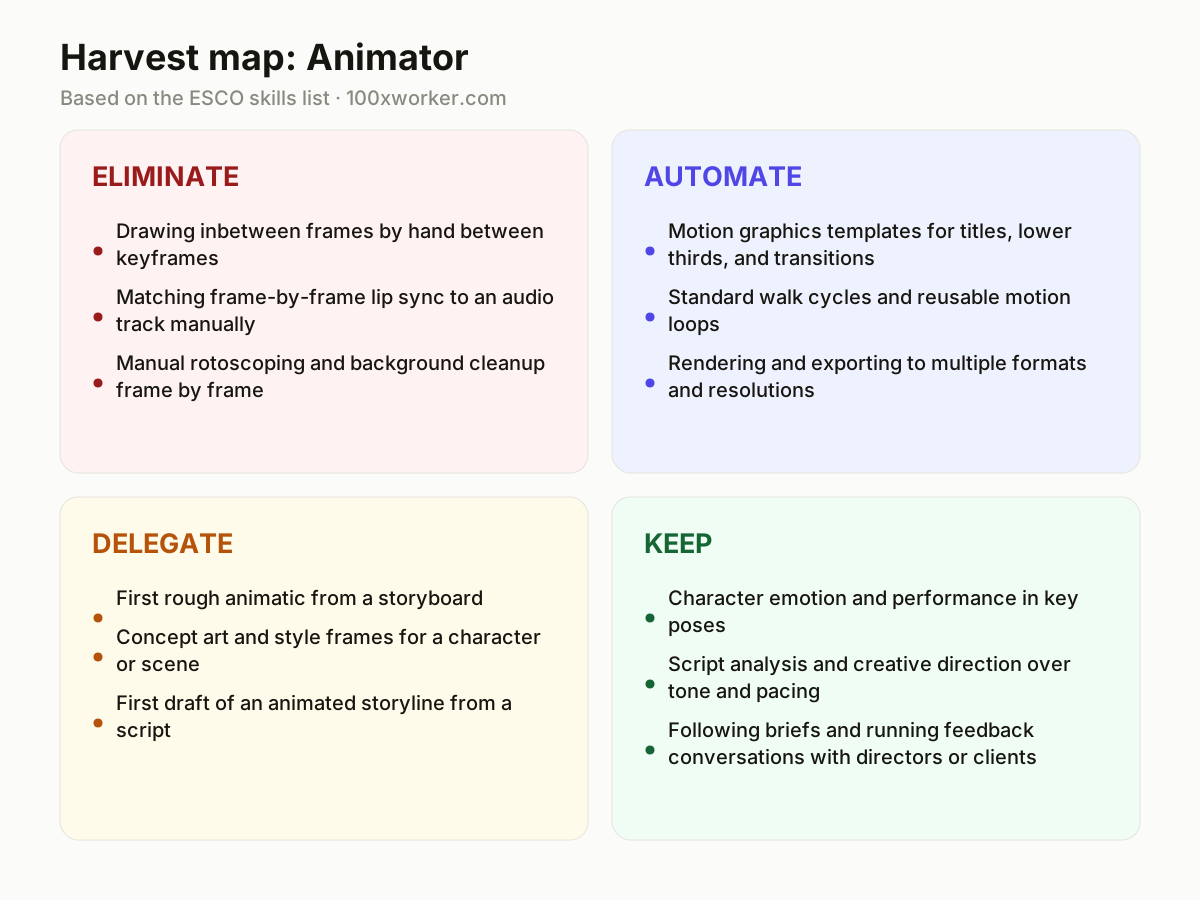
Not every animation task changes the same way. Some tasks disappear because software now does them better than manual work ever could (eliminate). Some get fully automated once you set the parameters once (automate). Some you can hand to AI for a first pass, then take back to refine (delegate). And some depend on judgment, taste, and human presence that no model replicates (keep). Sorting your own task list this way, rather than asking whether "animator" as a job survives, is the more useful question.
| Task | Bucket | Why |
|---|---|---|
| Drawing inbetween frames by hand between keyframes | eliminate | Interpolation tools now calculate in-between motion more accurately and faster than manual work. |
| Matching frame-by-frame lip sync to an audio track manually | eliminate | AI reads the audio waveform and generates mouth shapes that are already mostly correct. |
| Manual rotoscoping and background cleanup frame by frame | eliminate | Image segmentation handles this automatically, without noticeable quality loss. |
| Motion graphics templates for titles, lower thirds, and transitions | automate | Agents produce production-ready templates from a fixed style guide. |
| Standard walk cycles and reusable motion loops | automate | Libraries of generated cycles replace redrawing the same motion for every new project. |
| Rendering and exporting to multiple formats and resolutions | automate | Fully automatable once output settings are locked in. |
| First rough animatic from a storyboard | delegate | AI turns still frames into a rough timeline, you rework timing and cutting rhythm. |
| Concept art and style frames for a character or scene | delegate | AI generates variants quickly, you choose and refine the artistic direction. |
| First draft of an animated storyline from a script | delegate | AI structures scenes from the script, you guard tone and dramatic build. |
| Character emotion and performance in key poses | keep | Timing and subtlety that make a character believable require human feel. (Your edge: Emotional nuance stays out of reach for a model.) |
| Script analysis and creative direction over tone and pacing | keep | Interpreting a script requires context and taste a tool doesn't have. (Your edge: You decide what the story should make people feel.) |
| Following briefs and running feedback conversations with directors or clients | keep | Reading expectations and adjusting vision stays human work. (Your edge: No model builds a client's trust for you.) |
Which animator tasks does AI take over?
AI is most capable on mechanical, repetitive tasks: inbetweening between keyframes, matching lip sync to an audio track, rotoscoping, background cleanup, and rendering to multiple formats. These are tasks with clear rules and a single correct answer, which is exactly where generative AI and interpolation algorithms perform reliably. Motion graphics templates and standard walk cycles fall into the same category once a style guide exists. What AI struggles with is judgment: deciding how a character should feel in a given moment, or what a scene needs to land emotionally. Those tasks stay with the animator.
Will AI replace animators?
Not as a full job, based on current data. Microsoft Research's applicability score puts animators at 13.1%, well below high-exposure roles like translators (49%) and only slightly above low-exposure roles like nurses (12%). Older "robotization percentage" figures that circulate online usually trace back to Frey and Osborne's 2013 Oxford study, published before large language models existed, and shouldn't be read as current. AI reshapes which tasks fill an animator's day: less time on inbetweens and cleanup, more time on performance, direction, and briefing feedback loops.
How do you become the AI person on your animation team?
Start by mapping your own task list against the eliminate, automate, delegate, and keep buckets above. Pick one repetitive task, like rotoscoping or a walk cycle library, and build a repeatable AI-assisted workflow for it, then document the steps so a teammate can reuse it. Learn to write clear generation prompts for concept art and animatics, since prompt quality now sits alongside drawing skill as a production skill. Being the person who can turn a rough AI draft into a usable production asset, fast, is what makes you valuable on a team adopting these tools.
What can you do this month to start working with AI as an animator?
Pick one delegate-bucket task, such as generating a first animatic from your next storyboard or producing concept art variants for a current character brief. Run it through an AI tool, then time how long the manual rework takes compared to starting from scratch. Keep a short log of what worked and what needed heavy correction. After two or three projects, you'll have a real basis for deciding which tools earn a permanent spot in your workflow and which don't.
Across occupations, AI use splits into automation-like and augmentation-like patterns, a far more granular picture than any single job simply disappearing.
Anthropic Economic Index
Become the AI person on your team
Build a reusable motion-loop library
Generate a set of standard walk cycles, idle loops, and transitions once, tag them by style and rig type, and store them where your team can pull from them. This turns a repeated drawing task into a five-minute lookup.
Standardize an AI-assisted animatic workflow
Write down the exact steps for turning a storyboard into a rough animatic with AI, including which tool, what prompt structure, and what always needs manual fixing. Share it so the whole team skips the trial-and-error phase.
Own the concept art review step
Generate multiple style-frame variants per brief, then run a fast internal review before anything goes to the client or director. This positions you as the filter between raw AI output and production-ready art.
Want this for your actual task list?
The free scan on the homepage builds your personal task map in 30 seconds, based on your role and industry.
Run the free task scanTools for this work
| Tool | For which tasks | The sober take |
|---|---|---|
| Adobe Character Animator | Lip sync matching, real-time performance capture for delegate-bucket first drafts | Widely used for automating mouth shapes from an audio track before manual polish. |
| Runway | Concept art, style frames, rough video generation for early-stage delegate work | Useful for fast visual exploration, not for final production-ready shots. |
| Cascadeur | AI-assisted pose and motion work for standard cycles in the automate bucket | Physics-aware animation assistance, still needs a human pass on performance nuance. |
| ElevenLabs | Voice generation to pair with lip sync automation | Handles voice tracks that feed into automated mouth-shape generation. |
Prompts to try today
Turn a storyboard description into a rough animatic outline
Generate concept art variants from a character brief
Draft a first-pass animated storyline from a script excerpt
Related jobs
Frequently asked questions
What share of an animator's work can AI currently handle?
Microsoft Research's applicability score for special effects artists and animators is 13.1%, meaning a relatively small share of typical work activities show clear generative AI applicability based on real usage patterns. That is well below high-exposure roles like translators (49%) and close to lower-exposure roles like nurses (12%). It measures applicability across observed conversations, not a prediction of job loss.
Are old automation percentages for animators still accurate?
No. The widely cited "robotization percentage" figures on many websites trace back to Frey and Osborne's 2013 Oxford study, which predates large language models and modern generative AI entirely. Newer measures like Microsoft Research's applicability score and Anthropic's Economic Index, both based on actual 2025 AI usage data, give a more current and more granular picture.
Which animation skills stay valuable as AI improves?
Character performance, script interpretation, creative direction over tone and pacing, and client or director relationship management stay firmly human. These depend on judgment, taste, and trust building, none of which a model produces. ESCO's own skill list for animators includes analyzing scenarios and following briefings, both squarely in this category.
Do animators need to learn AI tools now?
It helps. Generative AI adoption is rising fast, with 32.7% of the EU population using it in late 2025 according to Eurostat, and studios increasingly expect faster turnaround on drafts and concept work. Learning to direct AI tools for inbetweening, lip sync, and concept generation lets you spend more time on the performance and direction work that actually differentiates your output.
Sources
- Microsoft Research, Working with AI: Measuring the Applicability of Generative AI to Occupations (2025)
- Anthropic Economic Index
- Eurostat, isoc_ai_iaiu (generative AI use, EU, 2025)
- ESCO, European Commission occupation and skills taxonomy
Hendrik De Winne, author of Becoming AI-Savvy, founder of VibeLab. Helps teams redesign their work with AI.
This article was drafted with AI assistance from public data sources and editorially reviewed.