100×worker · job analysis
Will AI Replace Art Directors?
Art direction sits in the middle of the AI applicability scale. Microsoft Research analyzed 200,000 real Copilot conversations and scored occupations by how much of their daily work generative AI can plausibly handle. Art directors landed at 24.3%, well below translators at the top (49%) and well above nurses at the bottom (12%). That places the job in a mixed zone: enough repetitive visual and administrative work to automate, but a core of judgment, taste, and leadership that stays firmly human.
This is not a niche shift. Eurostat reports that 32.7% of the EU population aged 16 to 74 used generative AI in the last three months of 2025, and Anthropic's Economic Index shows millions of real conversations already split between automation-style use (AI doing the task) and augmentation-style use (AI assisting a person doing the task). For art directors, most of that split falls on the augmentation side: AI drafts, the director decides.
The rest of this article breaks the job into four buckets: tasks that disappear, tasks AI now does end to end, tasks you hand to AI but still check, and tasks that stay yours because they depend on human judgment.
An art director sets and protects a concept's visual identity, from moodboard to final output.
The task split: what AI takes over and what stays yours
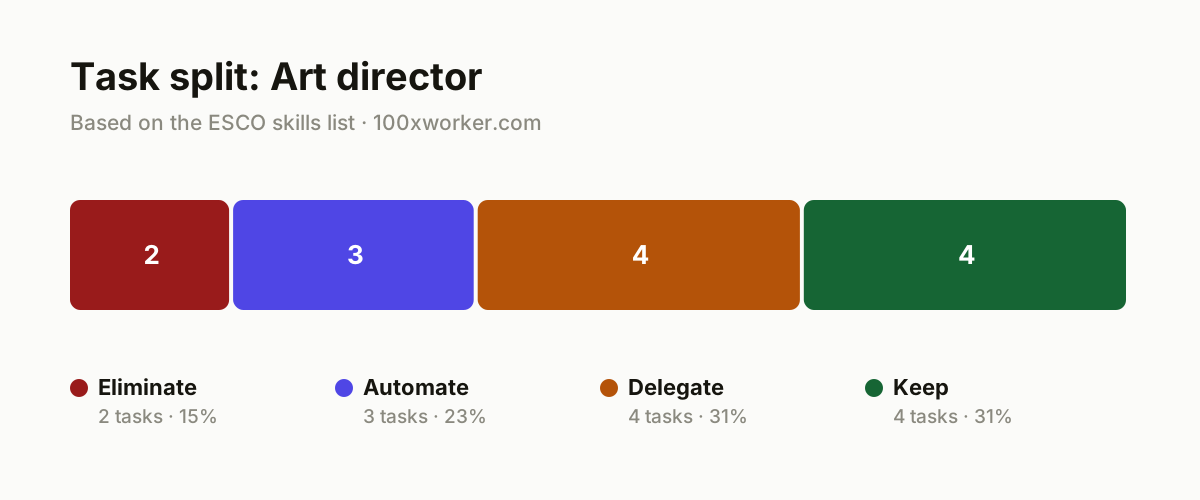
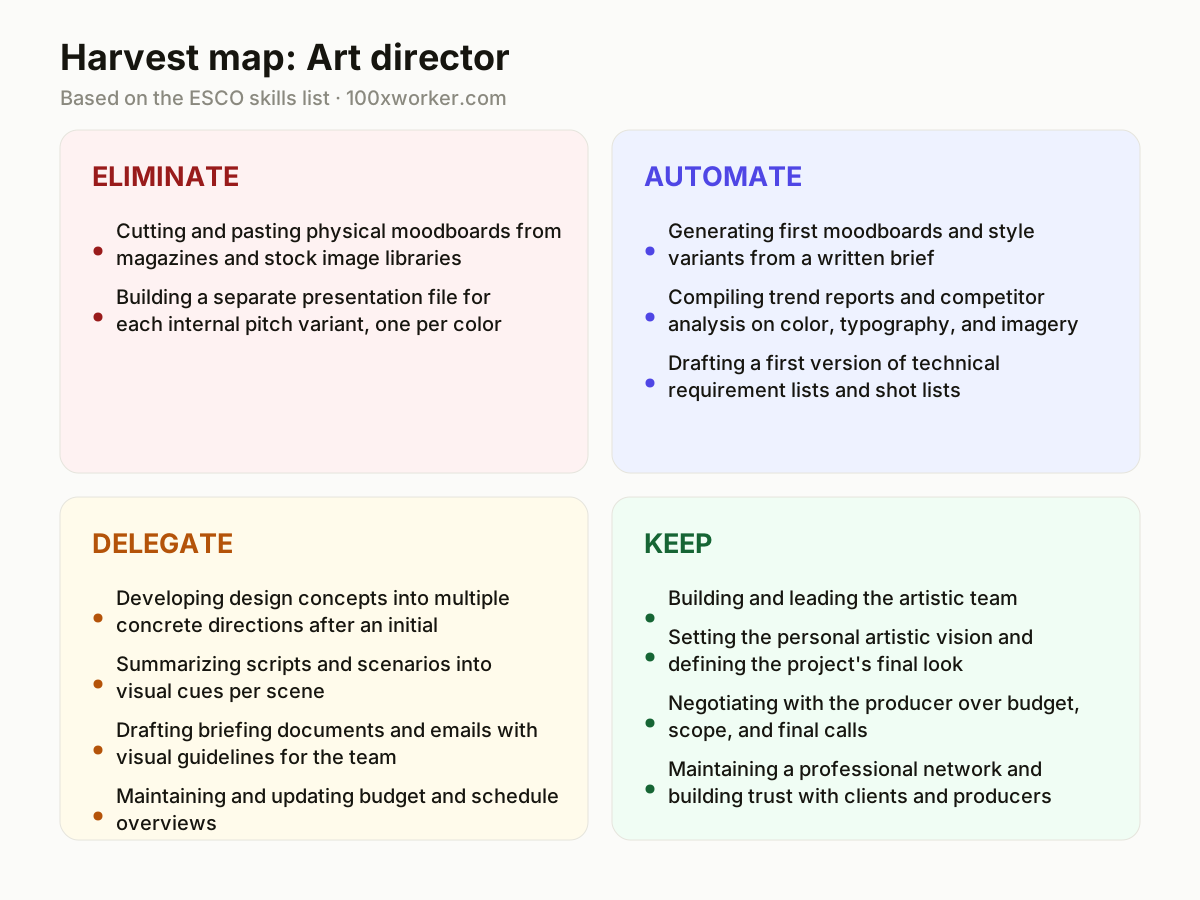
Not every art director task changes the same way. Some manual steps simply vanish once AI tools exist. Others can run almost fully on AI with a human sign-off at the end. A third group gets handed to AI for a first draft, then reworked by the director. And a core set of tasks, tied to taste, leadership, and trust, stays with the human regardless of how good the tools get. Sorting the job this way, rather than asking whether the role survives, gives a more accurate picture of what your week will actually look like.
| Task | Bucket | Why |
|---|---|---|
| Cutting and pasting physical moodboards from magazines and stock image libraries | eliminate | Image generators produce dozens of visual directions in seconds, making manual cutting and pasting obsolete. |
| Building a separate presentation file for each internal pitch variant, one per color or font choice | eliminate | AI shows every variant side by side in one canvas, so separate files per option add no value. |
| Generating first moodboards and style variants from a written brief | automate | An AI agent turns a text brief into several ready visual directions on its own. |
| Compiling trend reports and competitor analysis on color, typography, and imagery | automate | Agents scan and cluster visual trends faster and wider than anyone tracking them by hand. |
| Drafting a first version of technical requirement lists and shot lists | automate | AI turns a brief into a structured draft list of needed resources, ready for review. |
| Developing design concepts into multiple concrete directions after an initial selection | delegate | AI produces the first eighty percent, you pick the direction and adjust the details. |
| Summarizing scripts and scenarios into visual cues per scene | delegate | AI pulls location, mood, and color from the text, you interpret what it means visually. |
| Drafting briefing documents and emails with visual guidelines for the team | delegate | AI writes a first draft from your notes, you rewrite tone and nuance. |
| Maintaining and updating budget and schedule overviews | delegate | AI tracks deadlines and costs and flags deviations, you decide what to do about them. |
| Building and leading the artistic team | keep | Who fits this project and each other stays a human judgment call. (Your edge: Trust and chemistry between people, not an algorithm.) |
| Setting the personal artistic vision and defining the project's final look | keep | Final taste and artistic choices stay with you, built on experience and intuition. (Your edge: Taste and intuition cannot be automated.) |
| Negotiating with the producer over budget, scope, and final calls | keep | Decisions made under time pressure with conflicting interests need human judgment and authority. (Your edge: Negotiation requires social insight and standing.) |
| Maintaining a professional network and building trust with clients and producers | keep | Long-term relationships and industry reputation are built through personal contact and proven work. (Your edge: Reputation and relationships are strictly personal.) |
Will AI replace art directors?
No single AI tool covers the full job. Microsoft Research puts the applicability of generative AI to art director work at 24.3%, meaning roughly a quarter of daily activities can plausibly be handled by AI, concentrated in moodboards, trend scanning, and first drafts. The rest of the job, leading a team, setting a project's artistic vision, negotiating budget and scope with producers, and building trust with clients, depends on human judgment and relationships. Expect the job title to survive while the daily task list shifts heavily toward reviewing, directing, and deciding rather than producing every asset by hand.
Which art director tasks will AI take over first?
The tasks going first are the ones that are repetitive and don't require final judgment: generating first-pass moodboards from a brief, producing multiple style variants for internal review, drafting trend and competitor reports, and building initial shot lists or resource overviews. These are the automate-bucket tasks above. They already run largely unattended with an AI agent, and a director only checks the output before it moves forward. Tasks tied to persuasion, negotiation, or final creative choice are the last to change, since those depend on judgment calls that current AI tools are not built to make.
What can you do this month to become the AI person on your team?
Pick one recurring task from the automate or delegate bucket, such as first-draft moodboards or briefing documents, and run it through an AI tool for two weeks before your next project kickoff. Document what worked and what needed heavy editing. Share the workflow with your team instead of keeping it to yourself. Being the person who has already tested the tool, knows its limits, and can brief others on it is a stronger position than being the person who avoided it until forced to use it.
Which AI skills should an art director learn now?
Three skills matter most: writing clear briefs that an AI tool can turn into usable first drafts, evaluating AI-generated visuals quickly enough to keep a review process fast, and knowing which tasks to keep off an AI tool entirely, such as final creative decisions or client negotiations. None of this requires coding. It requires treating AI tools the way you'd treat a fast junior designer: give clear direction, check the work, and take responsibility for the final call.
Generative AI's applicability varies widely across occupations, from nearly half of a translator's work to a small share of a nurse's, with creative direction roles landing in the middle of that range.
Microsoft Research, Working with AI (2025)
Become the AI person on your team
Run one brief through an AI tool before the team meeting
Take your next project brief and generate three to five moodboard directions with an image tool before the kickoff meeting. Bring them as a starting point instead of a blank page.
Automate the trend scan you already do manually
Set up a recurring prompt that summarizes recent visual trends in your niche (color, typography, campaign styles) and review it weekly instead of collecting reference images by hand.
Turn budget tracking into a standing AI check
Feed your budget and schedule data into an AI tool that flags overruns or missed deadlines. Review the flags once a week rather than combing through spreadsheets yourself.
Teach one teammate your AI workflow
Pick the AI step that saves you the most time and walk a junior designer or coordinator through it. This spreads the skill across the team and frees you for the tasks only you can do.
Want this for your actual task list?
The free scan on the homepage builds your personal task map in 30 seconds, based on your role and industry.
Run the free task scanTools for this work
| Tool | For which tasks | The sober take |
|---|---|---|
| Midjourney or a similar image generator | Eliminate and automate: moodboards, style variants | Fast for exploring directions, still needs a human to pick and refine the final look. |
| Adobe Firefly | Automate: first-draft visual variants integrated with existing design files | Useful when your team already works inside Adobe tools and needs quick iterations. |
| ChatGPT or Claude | Automate and delegate: trend reports, script summaries, briefing drafts | Good for first drafts of text-based deliverables, weak on final tone without your edit. |
| A project tracker with AI flagging (e.g. Notion AI or similar) | Delegate: budget and schedule overviews | Tracks numbers and deadlines reliably, but you still decide how to respond to a flag. |
Prompts to try today
First-pass moodboard from a brief
Visual cues from a script
Trend and competitor scan
Related jobs
Frequently asked questions
What percentage of an art director's job can AI handle?
Microsoft Research scored art directors at 24.3% applicability, meaning generative AI can plausibly handle about a quarter of the work activities in this occupation category. That figure covers tasks like moodboard generation and trend research, not the full job. For comparison, translators scored 49% and nurses scored 12%, so art direction sits closer to the middle of the scale rather than at either extreme.
Do art directors need to learn to code to use AI tools?
No. The AI tools relevant to art direction, image generators, chatbots for drafting text, and project trackers with AI features, work through plain-language prompts and existing interfaces. What matters more is writing clear briefs, checking AI output critically, and knowing which decisions to keep for yourself rather than hand off.
Will junior art director or assistant roles disappear because of AI?
Some entry-level tasks that used to train juniors, like assembling first moodboards or basic shot lists, are shifting to AI. That changes what junior roles look like day to day, with more time spent reviewing and refining AI output and less on manual production. It is not documented in the available data whether this reduces the total number of junior positions, so treat that as an open question rather than a confirmed trend.
How does AI use among art directors compare to general adoption trends?
Eurostat reports that 32.7% of the EU population aged 16 to 74 used generative AI in the last three months of 2025. Creative professionals, including art directors, tend to use these tools more than the general population because the tasks (drafting, summarizing, generating visuals) map directly onto what current AI tools do well, based on Anthropic's Economic Index classification of real usage against occupational task lists.
Sources
- Microsoft Research, Working with AI: Measuring the Applicability of Generative AI to Occupations (2025)
- Anthropic Economic Index
- Eurostat, isoc_ai_iaiu (2025)
- ESCO, European Commission occupation taxonomy
Hendrik De Winne, author of Becoming AI-Savvy, founder of VibeLab. Helps teams redesign their work with AI.
This article was drafted with AI assistance from public data sources and editorially reviewed.