100×worker · job analysis
Will AI Replace Graphic Designers?
Graphic designers spend a large share of their time on production work that follows rules: resizing a poster into ten formats, assembling a moodboard from stock images, generating color variants of an existing layout. That is exactly the kind of work generative AI handles well. Microsoft Research analyzed 200,000 real Copilot conversations and scored occupations on how much of their work generative AI can plausibly touch. Graphic designers score 22.8%, well below translators (49%) and well above nurses (12%).
That number does not mean 22.8% of designers will lose their jobs. It means roughly a quarter of the tasks inside the role are candidates for AI to draft, generate, or execute. The rest, briefing interpretation, concept direction, final quality control, stays with the person. The European Commission's ESCO taxonomy (2166.10, Graphic and multimedia designers) still lists market research, briefing comprehension, and creative concept development as core skills, none of which a model can fully own.
Adoption is already broad. In 2025, 32.7% of the EU population aged 16 to 74 had used generative AI in the previous three months, according to Eurostat. Anthropic's Economic Index, which classifies millions of Claude conversations against O*NET tasks, finds that AI use splits into automation (AI does the task) and augmentation (AI assists while a person decides). For design work, that split is the whole story.
A graphic designer translates briefings into visual concepts, increasingly with AI drafting the first-round variants.
The task split: what AI takes over and what stays yours
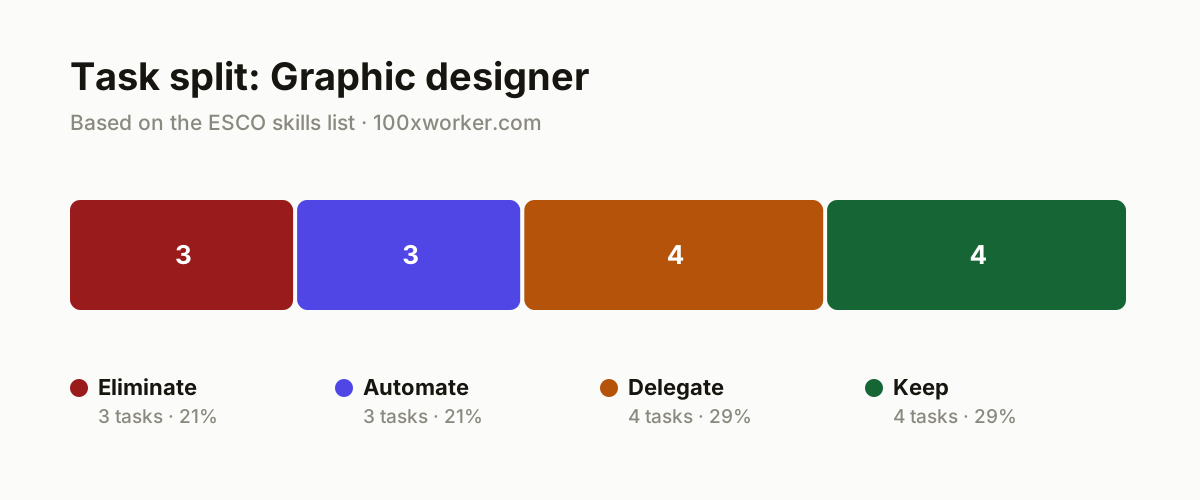
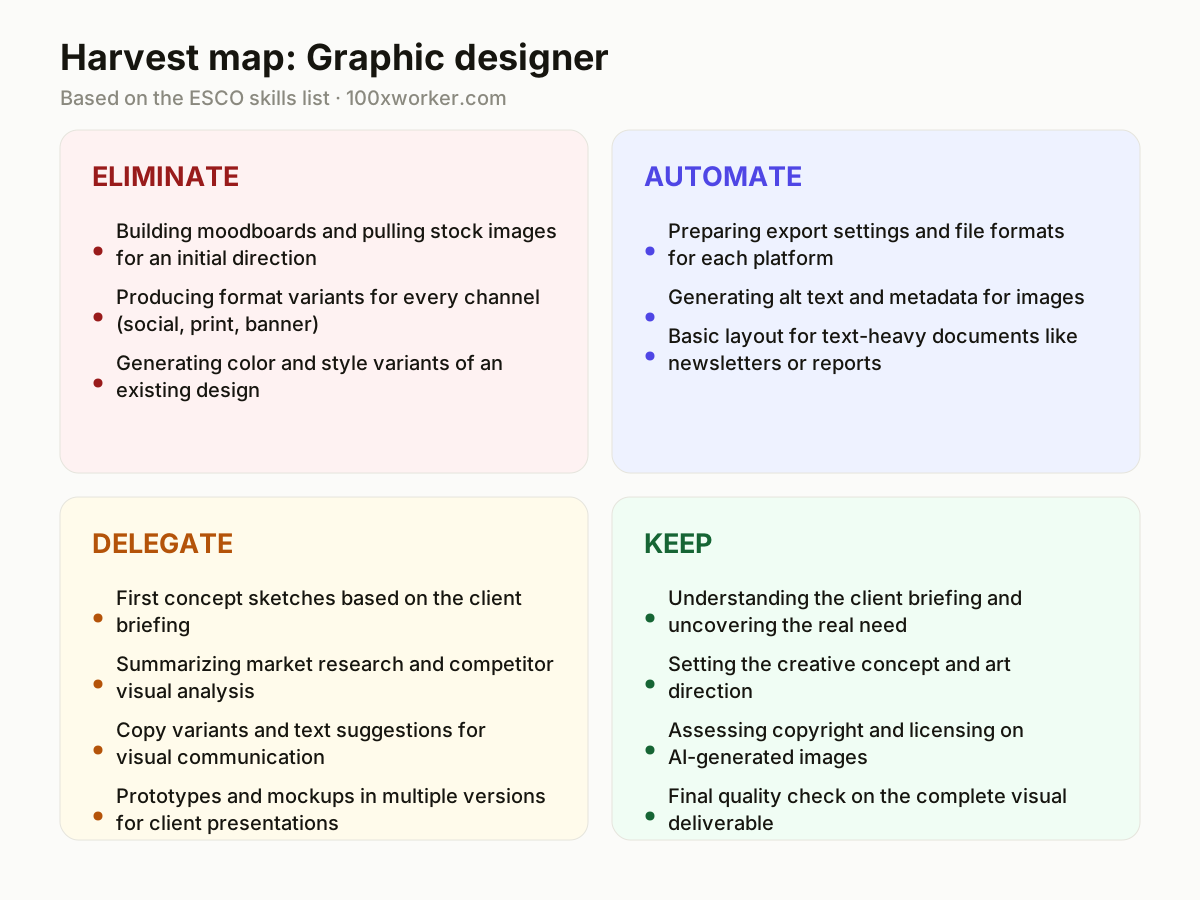
Not every task in a graphic designer's job changes the same way. Some tasks disappear because AI does them faster and better with no quality loss (eliminate). Some get handed to an AI agent that runs the process end to end under your rules (automate). Some stay yours to decide but AI drafts the raw material first (delegate). And some stay fully human because they require judgment, taste, or legal accountability no model can carry (keep).
| Task | Bucket | Why |
|---|---|---|
| Building moodboards and pulling stock images for an initial direction | eliminate | A language model generates dozens of visual references in seconds, faster than hours of browsing stock libraries. |
| Producing format variants for every channel (social, print, banner) | eliminate | Resizing to fixed specifications is exactly the kind of repetitive task generative AI handles well. |
| Generating color and style variants of an existing design | eliminate | Producing ten variants of a base design takes an AI tool seconds and needs no creative judgment. |
| Preparing export settings and file formats for each platform | automate | Agents know each channel's specifications and deliver production-ready files without manual intervention. |
| Generating alt text and metadata for images | automate | Accessibility and metadata are rule-based work an agent can execute consistently and without errors. |
| Basic layout for text-heavy documents like newsletters or reports | automate | Template-driven layout follows fixed style rules, well suited to an agent that knows the brand guide. |
| First concept sketches based on the client briefing | delegate | AI turns a short briefing into multiple visual directions; you choose and refine the strongest one. |
| Summarizing market research and competitor visual analysis | delegate | AI gathers and structures what competitors are doing visually; you draw the conclusion for the concept. |
| Copy variants and text suggestions for visual communication | delegate | AI delivers ten options per tagline or call to action; you pick what fits the brand voice. |
| Prototypes and mockups in multiple versions for client presentations | delegate | AI builds several versions quickly; you decide which one actually answers the briefing. |
| Understanding the client briefing and uncovering the real need | keep | A briefing rarely states outright what the client actually needs. (Your edge: sensing what the client leaves unsaid) |
| Setting the creative concept and art direction | keep | Taste, brand feel, and cultural context are not parameters you can fit in a prompt. (Your edge: judgment about what will and won't work) |
| Assessing copyright and licensing on AI-generated images | keep | Who is liable when a generated image resembles existing copyrighted work remains a legal open question. (Your edge: taking legal final responsibility) |
| Final quality check on the complete visual deliverable | keep | An agent misses the feel for coherence, tone, and emotional impact of the finished piece. (Your edge: keeping an eye on tone and overall coherence) |
Which tasks can AI take over from graphic designers?
AI is strongest on repetitive, rule-based work: resizing a design into every channel format, generating moodboards from a brief description, producing color and layout variants of something that already exists. It also handles regulated production work like alt text, metadata, and export settings for each platform. What it does not do well is decide which direction actually serves the brand or the client's real (often unstated) need. Those tasks stay with the designer, who reviews, edits, and picks the direction before anything ships.
Will AI replace graphic designers?
No, not the role. Microsoft Research scores generative AI's applicability to graphic design work at 22.8% of tasks, meaning roughly a quarter of the job is candidate work for AI, not the whole job. Anthropic's Economic Index shows a similar pattern across occupations: AI use splits into automation (AI does it) and augmentation (AI assists, a person decides). For designers, most current AI use looks like augmentation: faster drafts, more variants to choose from, less time on production. What disappears is time spent on repetitive execution, not the role of deciding what good design looks like.
What can a graphic designer do this month?
Pick one recurring task you already do by hand, such as resizing a campaign across ten formats or drafting three moodboard directions, and run it through an AI tool once. Compare the output against your usual result: where does it save time, where does it need heavy editing? Write down which tasks you would confidently hand off, which need your review before delivery, and which you would never delegate. That short list becomes your personal map for where to use AI in your actual workflow, not a general one.
How do you become the AI person on the design team?
Start by documenting where AI tools genuinely save time on your own projects, with before/after examples, not just claims. Share a short internal guide: which tool for which task (moodboards, resizing, copy variants), and where human review is mandatory before client delivery. Volunteer to test new AI features in your design software before the rest of the team does, and flag copyright or licensing risks early. Being the person who has already tested the tool and knows its limits carries more weight than being the person who talks about AI in general terms.
Generative AI's applicability varies sharply by occupation, from translators near 49% to nurses near 12%; graphic designers sit at 22.8%.
Microsoft Research, Working with AI (2025)
Become the AI person on your team
Build a before/after log
Keep a running record of tasks you ran through an AI tool versus doing them manually, with time saved and edits needed. This turns opinion into evidence when you talk to your team or manager about where AI actually helps.
Own the copyright checklist
Draft a short internal checklist for reviewing AI-generated images before they go to a client: source, resemblance to existing work, license terms. Being the person who flags this risk early builds trust faster than being fast with prompts.
Pilot one agent workflow end to end
Set up one automated pipeline, for example export formatting or alt text generation, and run it for a full project cycle. Report back on what broke, what needed a human check, and what ran clean.
Want this for your actual task list?
The free scan on the homepage builds your personal task map in 30 seconds, based on your role and industry.
Run the free task scanTools for this work
| Tool | For which tasks | The sober take |
|---|---|---|
| Adobe Firefly | Eliminate tasks: moodboards, color/style variant generation | Built into Adobe's Creative Cloud apps, so output lands directly in your existing files. |
| Midjourney | Eliminate and delegate tasks: initial concept sketches, mood direction | Strong for visual exploration, weak on precise brand-guideline compliance without heavy prompting. |
| Canva Magic Studio | Automate tasks: format resizing, basic layout for documents | Fast for template-driven work, less useful for custom brand systems. |
| Figma AI features | Automate and delegate tasks: prototypes, layout variants | Works inside an existing design file, so review and edits stay part of your normal workflow. |
| ChatGPT or Claude | Delegate tasks: copy variants, market research summaries | Good for drafting text options quickly; brand voice judgment still needs a human pass. |
Prompts to try today
Moodboard starter
Format resize checklist
Concept variant from a briefing
Related jobs
Frequently asked questions
Do junior graphic designer roles disappear first?
Entry-level work often overlaps with what AI now does well, such as producing first-draft variants and resizing assets, which is traditionally how juniors build skill. This does not remove the need for junior designers, but it changes what they should be judged on: speed of concept thinking and quality control over AI output, rather than raw production hours. Microsoft Research's 22.8% applicability score for the occupation applies across seniority levels, since it measures tasks, not job titles.
Who owns the copyright on an AI-generated image I use in client work?
This remains a genuinely unresolved legal question, and it varies by jurisdiction and by the AI tool's own terms of use. If a generated image closely resembles existing copyrighted work, liability questions are not fully settled in case law yet. Treat this as a task you keep control over: check licensing terms of the tool you used, document your prompts, and flag potential resemblance to existing work before delivering to a client.
What is the difference between automation and augmentation, and why does it matter for designers?
Anthropic's Economic Index classifies AI use in two categories: automation, where AI completes the task with minimal human input, and augmentation, where AI assists while a person still decides. Most current AI use in graphic design looks like augmentation: AI drafts variants, the designer picks, edits, and finalizes. Tracking which of your own tasks fall into each category helps you see where AI genuinely saves time versus where it just adds a review step.
Is generative AI actually widely used yet, or is this mostly hype?
Adoption is already broad and growing. Eurostat reports that 32.7% of the EU population aged 16 to 74 used generative AI in the three months before being surveyed in 2025. That is general population use, not design-specific, but it shows the tools are mainstream rather than niche. For graphic designers specifically, Microsoft Research's task-level applicability score (22.8%) is a more direct measure of how much of the actual job AI can touch.
Sources
- Microsoft Research, Working with AI: Measuring the Applicability of Generative AI to Occupations (2025)
- Anthropic Economic Index
- Eurostat, isoc_ai_iaiu (Individuals use of AI, 2025)
- ESCO, European Commission, Graphic and multimedia designers (2166.10)
Hendrik De Winne, author of Becoming AI-Savvy, founder of VibeLab. Helps teams redesign their work with AI.
This article was drafted with AI assistance from public data sources and editorially reviewed.