100×worker · job analysis
Will AI Replace Industrial Designers, and What Should You Do About It?
Industrial design sits at the intersection of sketching, engineering, and market strategy. Generative AI is now good enough to draft mood boards, render product variants, and summarize trend reports, which means the day-to-day task list for this job is shifting fast, even if the job title stays the same.
Microsoft Research analyzed 200,000 real Copilot conversations and scored how applicable generative AI is across occupations. For commercial and industrial designers, the applicability score comes out at 20.9%, meaning roughly one in five work activities in this field can plausibly be handled by generative AI today. That places industrial design well below translators (49%) and well above nurses (12%), in the middle of the exposure range: meaningfully affected but far from automated away.
Adoption is already mainstream. Eurostat reports that 32.7% of the EU population aged 16 to 74 used generative AI in the three months before being surveyed in 2025. For designers, the practical question isn't whether to use these tools, it's which parts of the job to hand over, which to supervise, and which to keep doing yourself.
An industrial designer turns ideas into feasible, appealing, market-ready product concepts, balancing creativity and engineering.
The task split: what AI takes over and what stays yours
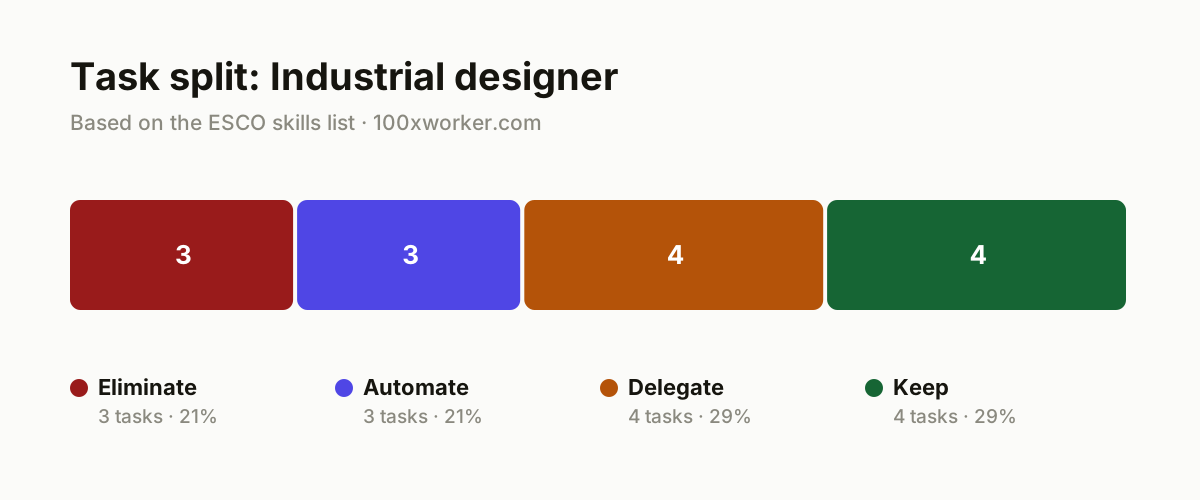
AI rarely deletes an entire job. It reshapes the mix of tasks inside it. The ESCO taxonomy already breaks the industrial designer role into specific tasks and skills, from sketching and material selection to drafting design specifications, and that task-level view is exactly where AI's impact shows up. This article sorts the job into four buckets: tasks AI removes outright, tasks a workflow or agent can automate end to end, tasks you hand to AI as a first draft and then check, and tasks that stay with you because they need physical presence, trust, or judgment no model has.
| Task | Bucket | Why |
|---|---|---|
| Building mood boards by manually scrolling through stock photo sites and Pinterest | eliminate | AI generates dozens of visual directions in seconds from a short brief. |
| Manually reading and summarizing trend reports and trade literature | eliminate | A language model reads and summarizes faster and more consistently than manual review. |
| Transcribing client calls and briefings word for word into notes | eliminate | Transcription tools turn every call into a structured summary with action items instantly. |
| Structuring early market research and competitor analysis of existing products | automate | An agent searches product databases and patent registers and returns a comparison table. |
| Drafting standard design specification documents from a brief and brand template | automate | Filling in materials, dimensions, and tolerances to a fixed format is agent work rather than judgment work. |
| Rendering color and material variants of an existing 3D concept | automate | Rendering AI produces dozens of variants while you move on to the next concept. |
| Generating first-round concept sketches and visual directions from a brief | delegate | AI image generation branches quickly into many ideas; you select and refine the strong ones. |
| Drafting a detailed design proposal with text and visuals for the client | delegate | AI writes a first draft; you rewrite the tone and check feasibility. |
| Analyzing material suitability for cost, mechanical properties, and sustainability | delegate | AI searches material databases faster; the final trade-off with the engineer stays with you. |
| Drafting a preliminary technical description for a patent filing | delegate | AI writes the first technical description; the designer and patent attorney verify the claims. |
| Discussing production feasibility with engineers | keep | This involves negotiating trade-offs between form and manufacturing process rather than filling in a template. (Your edge: Building technical trust doesn't happen through a prompt.) |
| Testing ergonomics with real users and prototypes | keep | Someone physically holding an object gives signals no AI can pick up. (Your edge: Reading physical cues and body language stays human work.) |
| Making the final aesthetic call and defining brand design language | keep | Taste and brand recognition rely on intuitive judgment rather than an optimization problem. (Your edge: Brand intuition builds from years of experience, not from data.) |
| Running the client briefing conversation and probing real expectations | keep | Implicit wishes and budget sensitivities surface live, rarely in a transcript. (Your edge: Winning trust happens in the conversation itself.) |
What tasks does AI take over from industrial designers?
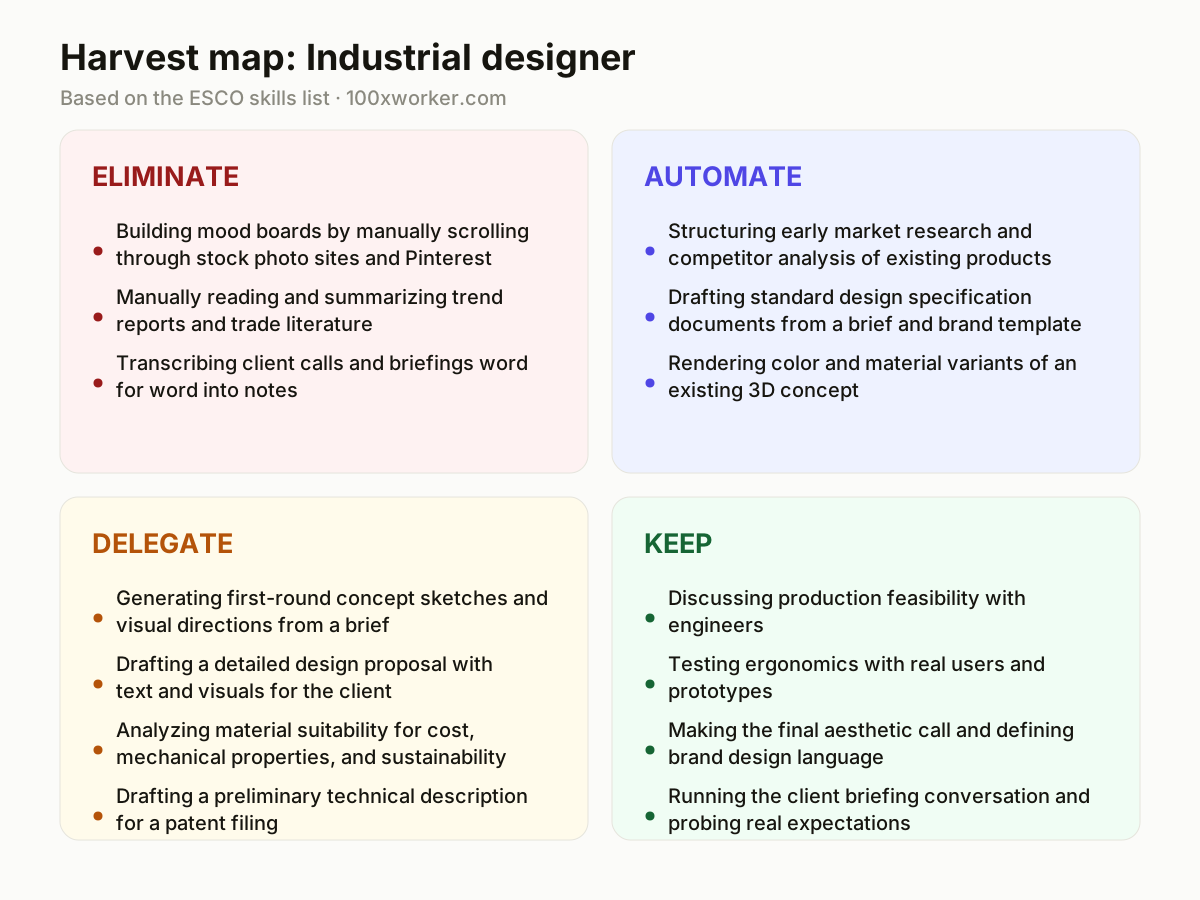
AI takes over the repetitive and format-driven parts of the job. Building mood boards from stock imagery, summarizing trend reports, and transcribing client briefings into notes can be eliminated outright with current tools. One step up, drafting standard specification documents, structuring competitor research, and rendering material or color variants of an existing 3D concept can run through an automated workflow with light review. Microsoft Research's analysis of real Copilot conversations puts overall applicability at 20.9% of tasks for this occupation, concentrated in research, documentation, and visualization rather than in judgment calls or physical testing.
Will AI replace industrial designers?
Not in the sense of eliminating the role. Anthropic's Economic Index, which classifies millions of Claude conversations against O*NET task lists, splits AI use into automation-like patterns, where AI does a task directly, and augmentation-like patterns, where AI assists while a person decides. For industrial design, most current use falls on the augmentation side: drafting a first proposal, generating variant sketches, checking material data. The tasks that resist replacement, negotiating feasibility with engineers, reading a user's reaction to a prototype, making a brand's aesthetic call, depend on physical presence and accumulated judgment. The job changes shape rather than disappears.
How do you become the AI-savvy person on your design team?
Start by owning the workflows nobody else wants to build. Set up a repeatable pipeline that turns a brief into 20 to 30 concept directions in an afternoon, and document the prompts so colleagues can reuse them. Build a spec-drafting template that pre-fills materials and tolerances from a brief, leaving reviewers to correct rather than start from scratch. Configure an agent that pulls competitor and material data on request into a comparison table. Then run a short session with your team mapping which tasks are safe to hand to AI and which need to stay fully human, like ergonomic testing and client trust-building.
What can you do this month as an industrial designer?
Pick one recurring task from the eliminate or automate bucket, such as mood board creation or spec drafting, and run it through an AI tool for two weeks. Track how much time it saves and where it produces output you have to fix anyway. Write down the prompt or workflow that worked so it becomes reusable. Then look at your delegate-bucket tasks, like first-draft proposals, and set a personal rule for how much of the draft you keep versus rewrite. Small, measured tests beat a full workflow overhaul, and they show you concretely where the 20.9% applicability actually lands in your own work.
Generative AI's applicability to commercial and industrial design work sits at 20.9%, well below translation and well above nursing.
Microsoft Research, Working with AI (2025)
Become the AI person on your team
Own the concept-generation pipeline
Set up a repeatable workflow that takes a brief straight into an image generator, producing 20 to 30 directions in an afternoon instead of two days of manual moodboarding. Document the prompt templates so teammates can reuse them.
Build the spec-drafting template
Create a standard prompt and document template that turns a client brief into a first-draft specification sheet with materials, tolerances, and dimensions pre-filled. Reviewers then only correct, they no longer start from a blank page.
Set up material and competitor research agents
Configure an AI agent to pull from product databases and patent registers on request, returning a comparison table instead of a raw list of links. Keep the final sourcing decision with the engineering team.
Teach the team where AI stops helping
Run a short internal session mapping which tasks are augmentation, where AI drafts and a human decides, versus tasks that need to stay fully human, like ergonomic testing and client trust-building. This keeps expectations realistic across the team.
Want this for your actual task list?
The free scan on the homepage builds your personal task map in 30 seconds, based on your role and industry.
Run the free task scanTools for this work
| Tool | For which tasks | The sober take |
|---|---|---|
| AI image generation tools (e.g. Midjourney, Adobe Firefly) | Concept sketches, mood boards, visual direction generation | Useful for volume and speed, but final shape decisions still need your eye. |
| Transcription and meeting tools (e.g. Otter.ai, Copilot in Teams) | Client briefing notes and meeting summaries | Turns a call into a structured action list automatically, saving manual write-up time. |
| General-purpose AI assistants (e.g. ChatGPT, Claude) | Drafting specification sheets, proposal text, patent description drafts | A solid first-draft writer for repetitive documents, weak on final technical sign-off. |
| AI-assisted material databases (e.g. CES Selector-style tools) | Material suitability and cost/property comparisons | Speeds up the search step, the trade-off decision stays with engineer and designer. |
| Render and variant generation tools (e.g. Vizcom, KREA) | Color and material variant rendering of existing 3D concepts | Handles volume rendering while you focus on the next concept. |
Prompts to try today
Concept direction brief
Spec sheet first draft
Material comparison table
Related jobs
Frequently asked questions
Is industrial design a job at high risk of AI automation?
Older automation-risk studies, such as Frey and Osborne's 2013 Oxford analysis, predate large language models and tend to overstate risk for creative technical roles. More recent, task-level work like Microsoft Research's 2025 applicability study places industrial design at 20.9%, in the middle of the range across occupations, meaning parts of the job are exposed but the role as a whole is not close to full automation.
Do industrial designers already use AI tools day to day?
Broad adoption data suggests yes, at least for general-purpose AI use. Eurostat found that 32.7% of the EU population aged 16 to 74 used generative AI in the three months before being surveyed in 2025, and usage skews higher among younger, more digitally active professionals, a group that overlaps heavily with design and creative roles.
What is the ESCO task breakdown used for?
ESCO is the European Commission's taxonomy covering 3,039 occupations and their associated skills in 28 languages. For industrial designers, it lists concrete skills like drawing design sketches, determining material suitability, and consulting with engineers. That task-level breakdown is what makes it possible to sort a job into eliminate, automate, delegate, and keep buckets instead of asking a vague yes-or-no question about job loss.
Which industrial design tasks are safest from AI right now?
The safest tasks are the ones that require physical presence or accumulated judgment: negotiating manufacturing trade-offs with engineers, testing ergonomics with real users holding a prototype, making the final aesthetic call that fits a brand's design language, and running the live briefing conversation where a client's real budget and priorities surface. None of these show up cleanly in a document an AI can process.
Sources
- Microsoft Research, Working with AI: Measuring the Applicability of Generative AI to Occupations (2025)
- Anthropic Economic Index
- Eurostat, Individuals using generative AI (isoc_ai_iaiu)
- ESCO, European Commission occupation and skills taxonomy
Hendrik De Winne, author of Becoming AI-Savvy, founder of VibeLab. Helps teams redesign their work with AI.
This article was drafted with AI assistance from public data sources and editorially reviewed.