100×worker · job analysis
Will AI Replace Production Planners?
Generative AI has moved from novelty to daily tool faster than most job descriptions have been rewritten. Eurostat reports that 32.7% of the EU population aged 16 to 74 used a generative AI tool in the three months before being surveyed in 2025 (isoc_ai_iaiu). For production planners, the practical question is narrower: which parts of your job does that adoption actually touch?
Microsoft Research analyzed 200,000 real Copilot conversations and scored occupations by how much generative AI shows up in their actual work. The closest US match to a production planner, industrial engineering technologists and technicians, scored 17.4% applicability, well below translators (49%) but above nurses (12%). That number tells you AI is relevant here, but it is not close to replacing the role.
This article breaks the job into four buckets: tasks to stop doing, tasks to automate outright, tasks to delegate to an AI tool with your review, and tasks that stay firmly yours. It uses the ESCO occupational classification (European Commission) to define the role and matches each task to what the evidence actually supports.
A production planner schedules and monitors production runs, capacity, and inventory to keep delivery promises.
The task split: what AI takes over and what stays yours
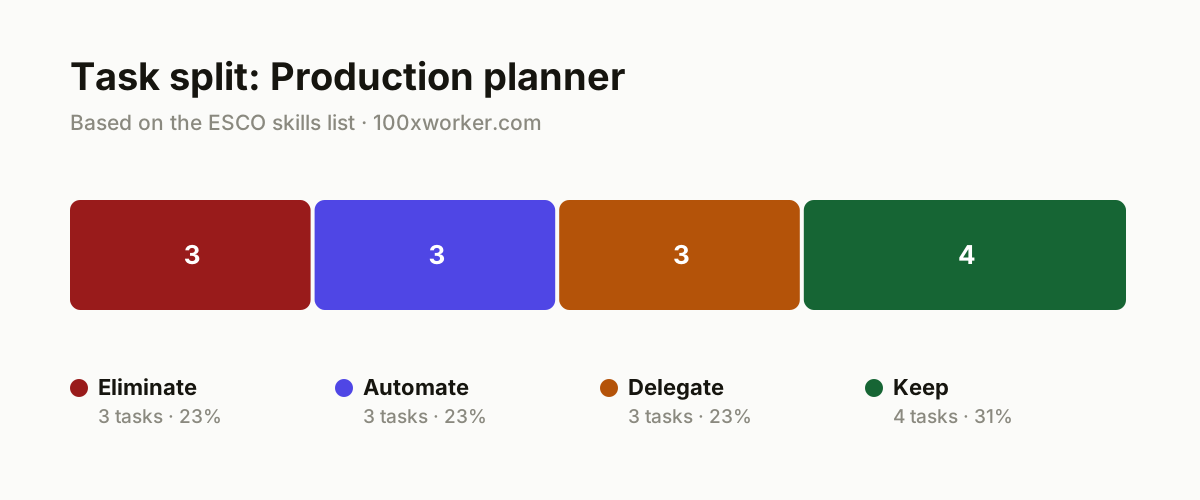
Not every task in a production planner's week faces the same AI exposure. Some tasks are pure duplication that should be eliminated outright. Others are rule-based calculations that software can already automate. A third group benefits from AI as a first draft or fast analysis, but still needs your review before you act on the outcome. The last group depends on judgment, trust, and physical context that no model has access to, so you keep it.
| Task | Bucket | Why |
|---|---|---|
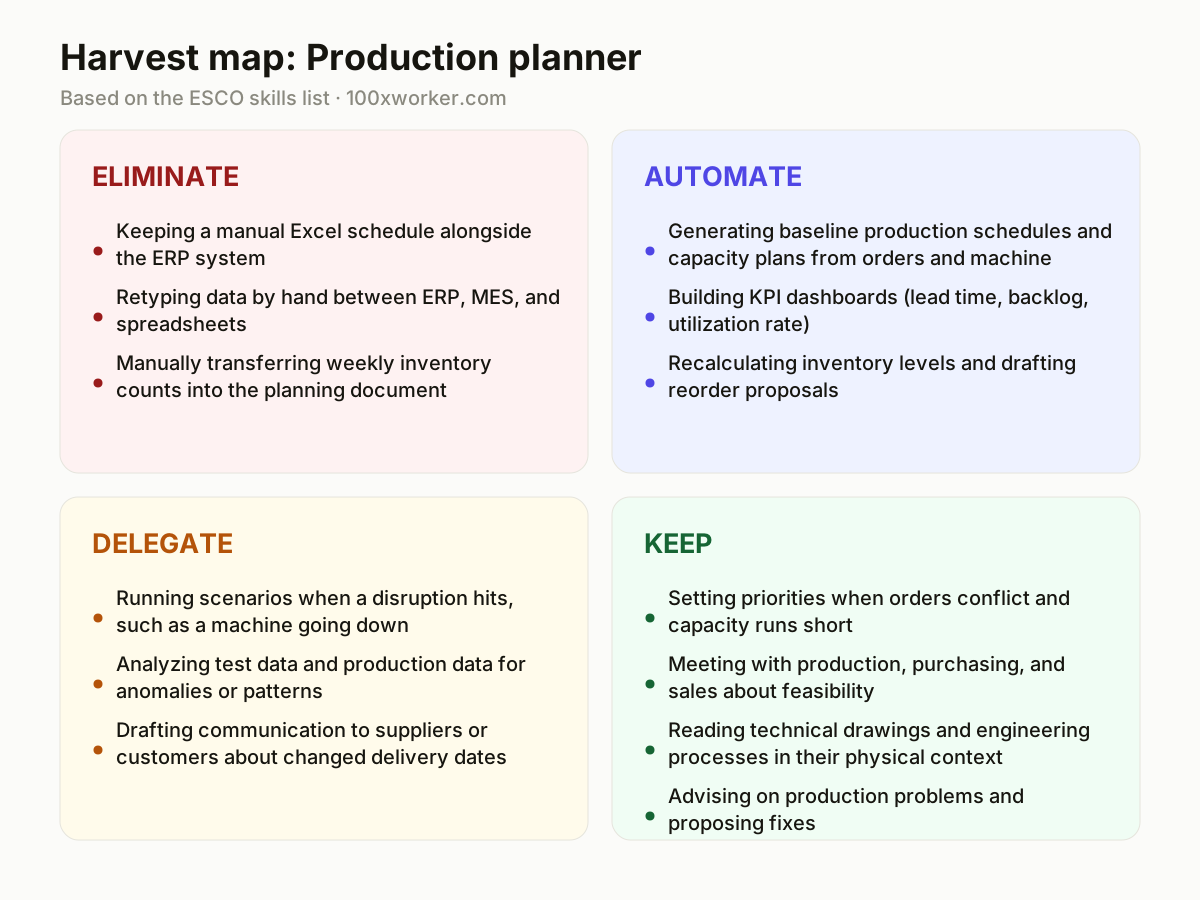
| Keeping a manual Excel schedule alongside the ERP system | eliminate | Duplicate work with no added value once data comes straight from the ERP system. |
| Retyping data by hand between ERP, MES, and spreadsheets | eliminate | Pure copy work that is error-prone and adds no planning judgment. |
| Manually transferring weekly inventory counts into the planning document | eliminate | A repetitive, rule-bound step that systems can already sync automatically. |
| Generating baseline production schedules and capacity plans from orders and machine availability | automate | Fixed-rule number crunching, ideal for a tool combining order data and capacity. |
| Building KPI dashboards (lead time, backlog, utilization rate) | automate | Reporting follows a fixed format and can be assembled and distributed automatically. |
| Recalculating inventory levels and drafting reorder proposals | automate | Based on fixed thresholds and historical usage, no judgment call needed. |
| Running scenarios when a disruption hits, such as a machine going down | delegate | AI lines up several planning alternatives fast; you choose and own the call. |
| Analyzing test data and production data for anomalies or patterns | delegate | AI speeds up the analysis; interpreting it in the context of the line stays with you. |
| Drafting communication to suppliers or customers about changed delivery dates | delegate | AI writes a draft in seconds; you manage the tone and the relationship. |
| Setting priorities when orders conflict and capacity runs short | keep | Requires weighing customer importance, margin, and floor-level feasibility. (Your edge: You know the political and organizational context behind every order.) |
| Meeting with production, purchasing, and sales about feasibility | keep | Trust and negotiation run through people, not a chat window. (Your edge: Colleagues trust your plan because they know you, not the tool.) |
| Reading technical drawings and engineering processes in their physical context | keep | Requires on-site knowledge of the installation, not just the data. (Your edge: You have seen the machine; the tool has only seen the spec sheet.) |
| Advising on production problems and proposing fixes | keep | Taking responsibility for a recommendation that touches money and safety. (Your edge: You sign off on the decision, not the model.) |
Which tasks can AI take over from production planners?
AI is already strong at the mechanical half of production planning. It can generate a baseline schedule from open orders and machine capacity, recalculate inventory levels against fixed thresholds, and build the KPI dashboards that used to eat up a morning. It can also draft communication to suppliers about a delayed shipment or run through several disruption scenarios in seconds. What it cannot do reliably is decide which order wins when two customers both need the same machine slot next week, or judge whether a supplier's promised recovery date is realistic given what you know about that supplier's track record.
Will AI replace production planners?
No. Microsoft Research scored the closest US occupation to production planning, industrial engineering technologists and technicians, at 17.4% AI applicability, a mid-low score compared with 49% for translators. Anthropic's Economic Index finds that AI use in most occupations splits between automation-like tasks (AI does the work) and augmentation-like tasks (AI assists, human decides), and production planning leans toward the second. The job's core, negotiating priorities between production, sales, and purchasing under time pressure, is not something current models do. Expect the task list to shrink and shift, not the job title to disappear.
What can you do this month as a production planner?
Start by mapping your own week task by task, the same approach ESCO uses to describe occupations as bundles of skills rather than fixed titles. Pull last month's schedule changes and see how many followed a repeatable pattern; those are automation candidates. Test an AI tool on one recurring report, such as the weekly utilization dashboard, and compare its output against your manual version for a month before trusting it fully. Flag one recurring negotiation, such as capacity conflicts between two product lines, and keep doing that one by hand. Small, tested changes beat a full rebuild of your workflow.
How do you become the AI champion on your planning team?
Volunteer to pilot one AI tool inside your planning team before management mandates one, and document what works. Write down the prompts that produce a usable draft schedule or supplier email, and share them with colleagues instead of keeping them to yourself. Push back publicly when an AI-generated schedule ignores a constraint only you know about, such as a machine due for maintenance; that visible correction builds trust in your judgment, not just the tool. Being early and honest about limits, not just early adoption, is what makes you the team's go-to person.
AI use across occupations splits into automation-like and augmentation-like patterns, not a single wholesale replacement of the job.
Anthropic Economic Index
Become the AI person on your team
Pilot before it's mandatory
Ask to test one AI scheduling or reporting tool for a month before your company rolls one out company-wide. Keep a short log of where it got the schedule wrong, especially around maintenance windows or rush orders, and share that log with your manager.
Turn your prompts into team assets
Save the prompts that reliably produce a usable draft schedule, supplier update, or KPI summary. Put them in a shared document so colleagues do not have to reinvent them, and update them as your ERP or planning tool changes.
Correct the model in public
When an AI-generated plan misses a constraint you know about, such as a supplier's real lead time versus its official one, flag it in the team meeting rather than quietly fixing it. That visible correction is what makes colleagues trust your judgment over the dashboard.
Want this for your actual task list?
The free scan on the homepage builds your personal task map in 30 seconds, based on your role and industry.
Run the free task scanTools for this work
| Tool | For which tasks | The sober take |
|---|---|---|
| Microsoft Copilot (Excel and Outlook) | KPI dashboards, drafting supplier and customer emails, first-pass schedule summaries | Useful for the tasks Microsoft's own research says generative AI already touches most in office work. |
| ERP/APS scheduling modules | Generating baseline production schedules and capacity plans, recalculating inventory and reorder points | Most of the automate bucket is already built into modern ERP or advanced planning and scheduling software, not a separate AI chatbot. |
| ChatGPT or Claude (general-purpose chat) | Drafting communication, running quick scenario comparisons, summarizing test data | Good for delegate-bucket tasks where you still review the output before sending it. |
| Claude for data analysis | Analyzing production or test data for anomalies | Anthropic's own Economic Index shows this kind of analysis leans augmentation, meaning it assists rather than replaces the read on the data. |
Prompts to try today
Draft a disruption scenario comparison
Turn raw utilization data into a KPI summary
Draft a supplier delay notice
Related jobs
Frequently asked questions
Will AI take over production planning entirely?
No. Microsoft Research's applicability score for the closest US occupation, industrial engineering technologists and technicians, is 17.4%, a mid-low score compared with 49% for translators and 12% for nurses. That means generative AI touches a meaningful slice of the job, mostly scheduling math, reporting, and drafting, but the negotiation, prioritization, and shop-floor judgment that make up the rest of the role are not tasks current AI models do well. Expect your task list to shrink in some areas and shift toward review and decision-making rather than disappear.
How many people already use generative AI at work?
Adoption varies by region and survey method, but it is already high. Eurostat found that 32.7% of the EU population aged 16-74 used generative AI in the three months before being surveyed in 2025. That number keeps rising every survey cycle, and it means a large share of your colleagues, suppliers, and customers already use these tools, even if your company has not formally rolled one out for planning yet.
Which AI tool should a production planner start with?
Start with whatever is already licensed at your company, often Microsoft Copilot if you use Excel and Outlook, since it plugs directly into the spreadsheets and emails you already produce. Use it first for the automate-bucket tasks, like KPI dashboards or reorder calculations, where mistakes are cheap to catch. Reserve a general chat tool such as ChatGPT or Claude for drafting communication and running scenario comparisons, and always review the output against your own knowledge of the floor before sending or acting on it.
Is the ESCO classification relevant to how AI affects this job?
Yes. ESCO, the European Commission's occupational taxonomy, describes production planning as a set of specific skills and tasks (reading technical drawings, collaborating with engineers, advising on production problems) rather than one fixed job title. That task-level view is exactly what makes it possible to say which pieces of the job AI touches and which it does not, instead of making a single yes-or-no claim about the whole occupation.
Sources
- Microsoft Research, Working with AI: Measuring the Applicability of Generative AI to Occupations (2025)
- Anthropic Economic Index
- Eurostat, isoc_ai_iaiu
- ESCO, European Commission
Hendrik De Winne, author of Becoming AI-Savvy, founder of VibeLab. Helps teams redesign their work with AI.
This article was drafted with AI assistance from public data sources and editorially reviewed.