100×worker · job analysis
Will AI Replace Scrum Masters?
Scrum masters spend a surprising share of their week on things that have nothing to do with coaching a team: typing up standup notes, chasing status updates, updating burndown charts, and copying numbers from Jira into a slide deck. That is exactly the kind of work generative AI is good at.
Microsoft Research analyzed 200,000 real conversations people had with Copilot and scored how applicable generative AI is to different occupations. Project management work, the closest available category to scrum mastering, scored 18.2%, meaning a meaningful but limited slice of the job's activities can already be handled by AI (Microsoft Research, 2025). That is far from a majority of the job, and it lines up with what teams are actually reporting: the reporting and note-taking layer is shrinking, the coaching and conflict-resolution layer is not.
This article breaks the scrum master role into four buckets: tasks AI eliminates outright, tasks it automates in the background, tasks you delegate to AI as a first draft, and tasks you keep because they depend on judgment, trust, and timing that no model has.
A scrum master guides an agile team, protects the scrum process, and removes obstacles for the team.
The task split: what AI takes over and what stays yours
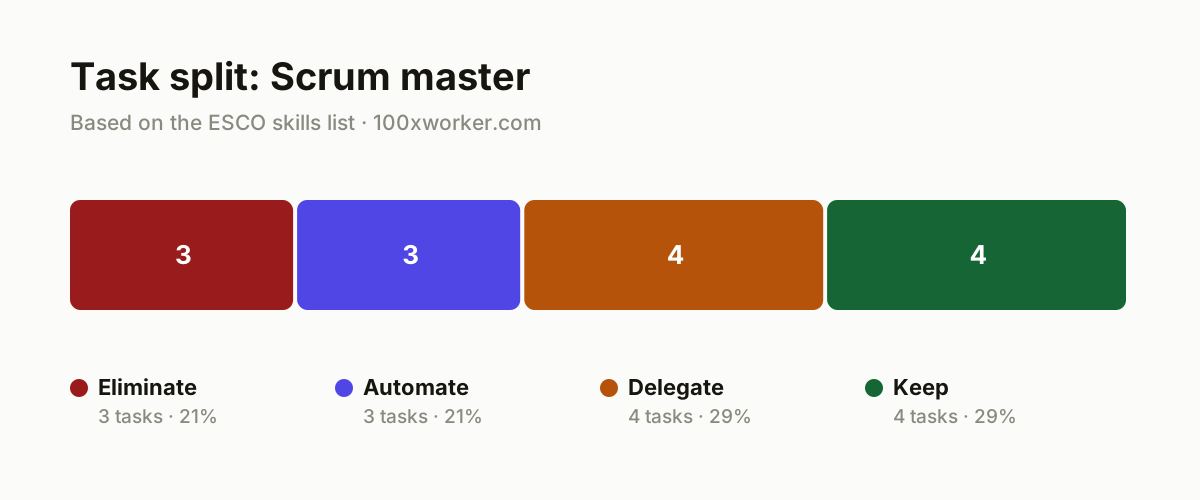
Not every task in a scrum master's week changes the same way. Some tasks disappear because a tool now does them directly. Some get automated quietly inside the platforms you already use. Some are worth handing to AI as a first draft that you then review. And some depend on human judgment that no current tool replicates. Sorting your own task list into these four buckets is a more useful exercise than asking whether the job as a whole will survive.
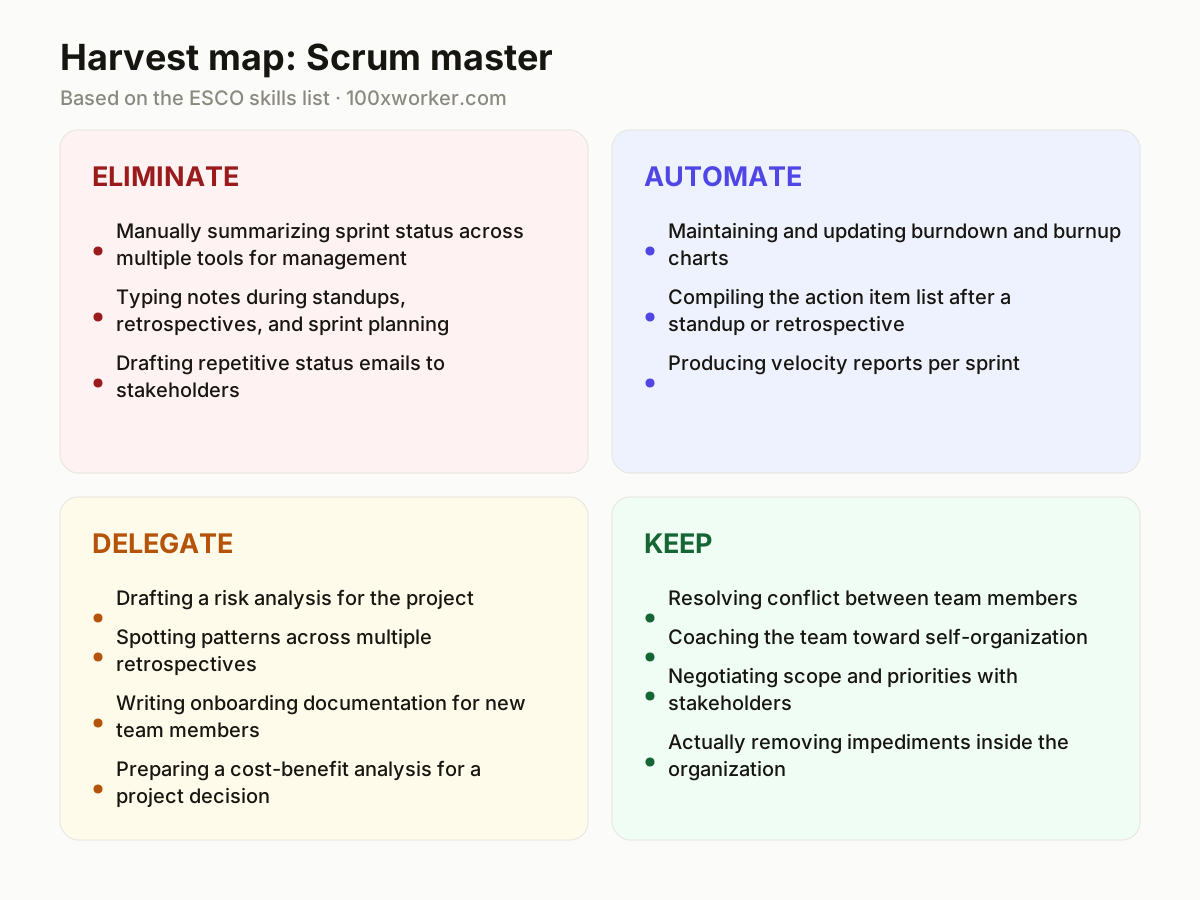
| Task | Bucket | Why |
|---|---|---|
| Manually summarizing sprint status across multiple tools for management | eliminate | An AI agent pulls data directly from Jira or Azure DevOps, faster and without retyping. |
| Typing notes during standups, retrospectives, and sprint planning | eliminate | Transcription and summarization tools capture this live, more accurately than listening and writing at once. |
| Drafting repetitive status emails to stakeholders | eliminate | A template fed by an AI-generated update from your backlog tool replaces the weekly email. |
| Maintaining and updating burndown and burnup charts | automate | Dashboards in Jira, Azure DevOps, or Linear generate these automatically from sprint data. |
| Compiling the action item list after a standup or retrospective | automate | An AI notetaker recognizes commitments and turns them into a task list immediately. |
| Producing velocity reports per sprint | automate | Numbers come straight from the system, and an agent turns them into a readable report. |
| Drafting a risk analysis for the project | delegate | AI writes a first draft list of risks, you check it against team context and project history. |
| Spotting patterns across multiple retrospectives | delegate | AI compares sprint after sprint and flags recurring blockers that are easy to miss yourself. |
| Writing onboarding documentation for new team members | delegate | A first version built from existing project and team documents, you add the missing context. |
| Preparing a cost-benefit analysis for a project decision | delegate | AI structures numbers and scenarios, you check the assumptions and present the decision. |
| Resolving conflict between team members | keep | This depends on trust and timing that no tool can read in a room. (Your edge: Reading tension that nobody has said out loud.) |
| Coaching the team toward self-organization | keep | Growth in a team comes from repeated, personal conversations over time. (Your edge: A long-term trust relationship you build yourself.) |
| Negotiating scope and priorities with stakeholders | keep | Weighing interests and organizational politics requires judgment beyond text. (Your edge: Sensing organizational politics and personal stakes in the room.) |
| Actually removing impediments inside the organization | keep | Naming a blocker is easy, resolving it structurally takes persistence and a network. (Your edge: Persistence and organizational know-how you've built up.) |
Will AI replace scrum masters?
Not as a whole role. Microsoft Research's applicability score for project management work sits at 18.2%, meaning generative AI is demonstrably useful for a limited slice of activities, mostly reporting, note-taking, and status tracking, not the entire job. Coaching a team, resolving conflict, and negotiating with stakeholders stay firmly human. What changes is the shape of the job: less time on process bookkeeping, more time on the parts that require presence and judgment. Scrum masters who ignore AI for the administrative layer will spend more hours than they need to on tasks a tool already handles well.
Which scrum master tasks will AI take over first?
The tasks going first are the ones tied to documentation and reporting: typing meeting notes, compiling action items, updating burndown charts, and writing status summaries for stakeholders. These are structured, repetitive, and already partly automated inside tools like Jira and Azure DevOps. Anthropic's Economic Index, which classifies AI conversations against standard occupational task lists, consistently finds that automation-style use concentrates on exactly this kind of drafting and summarizing work, while augmentation-style use (AI as a thinking partner) shows up more in analysis and planning tasks.
How do you become the AI-savvy person on your scrum team?
Start by running your own retrospectives and standups through a transcription tool and comparing the AI summary to your own notes for a few sprints. Once you trust it, stop taking manual notes and review the output instead. Then push further: ask an AI tool to compare five retrospectives at once and flag recurring blockers. Share that pattern analysis with your team openly, since it demonstrates a use of AI that goes beyond note-taking and into judgment support, which is the skill that keeps your role relevant.
What can you do this month to start using AI as a scrum master?
Pick one recurring task, most usefully the post-standup action item list or the weekly stakeholder status update, and run it through an AI tool for two full sprints. Compare the output to what you would have written by hand. If it holds up, stop doing it manually. Then pick a second task from the automate or delegate bucket and repeat. Within a month you should have removed two to three recurring tasks from your week without touching the coaching or conflict-resolution parts of the role.
Generative AI is applicable to a measurable but limited share of work activities in project management roles, not to the job as a whole.
Microsoft Research, Working with AI (2025)
Become the AI person on your team
Run retrospectives through a transcription tool before you trust it fully
Use a tool like Otter.ai or Fireflies alongside your own notes for two or three sprints. Compare the outputs, then drop the manual notes once you're confident the tool catches the same commitments and decisions.
Build a standing prompt for cross-sprint pattern analysis
Feed your last five retrospective summaries into an AI tool and ask it to identify recurring blockers by theme. Bring that analysis into your next retrospective instead of relying on memory.
Automate the stakeholder update, not the stakeholder relationship
Set up a template that pulls sprint data automatically and drafts the weekly status email. Still read it and adjust the tone yourself before sending, since the relationship is what stakeholders actually respond to.
Want this for your actual task list?
The free scan on the homepage builds your personal task map in 30 seconds, based on your role and industry.
Run the free task scanTools for this work
| Tool | For which tasks | The sober take |
|---|---|---|
| Jira / Azure DevOps dashboards | Burndown charts, velocity reports, sprint status | Most teams already have this data automated, the gap is usually in how it gets reported, not collected. |
| Otter.ai or Fireflies | Standup, retrospective, and sprint planning notes | Good for capture, still needs a human pass to catch nuance or sarcasm the transcript misses. |
| ChatGPT or Claude | Risk analysis drafts, onboarding docs, retrospective pattern comparison | Useful as a first-draft generator, not a substitute for checking assumptions against your actual team. |
| Linear | Action item tracking, automated status summaries | Built-in automations reduce manual updates but still require someone to set the rules correctly. |
Prompts to try today
Turn a retrospective transcript into an action item list
Compare multiple retrospectives for recurring blockers
Draft a stakeholder status update from sprint data
Related jobs
Frequently asked questions
Is the scrum master role disappearing?
No. Microsoft Research's applicability score for project management work is 18.2%, meaning AI is useful for a portion of the tasks, mostly reporting and note-taking, not the whole role. Coaching, conflict resolution, and stakeholder negotiation require judgment and trust that current AI tools do not replicate. The role is changing shape rather than disappearing.
Should a scrum master learn to use AI tools?
Yes, at minimum for meeting transcription, status reporting, and cross-sprint pattern analysis. These are the tasks where AI already saves measurable time. Learning to review and correct AI output, rather than doing the task from scratch, is now a practical skill for the role, similar to how spreadsheets became a baseline skill for earlier generations of project coordinators.
How much of a scrum master's week can realistically be automated?
Based on Microsoft Research's scoring for project management activities, roughly a fifth of typical work activities show demonstrable AI applicability. In practice that maps to documentation, status updates, and chart maintenance. Coaching conversations, conflict mediation, and organizational negotiation remain outside that scope because they depend on real-time judgment and relationships built over time.
What AI skill matters most for scrum masters right now?
The ability to critically review AI-generated output, not just accept it. Anthropic's Economic Index shows that AI use splits between automation-style tasks (drafting, summarizing) and augmentation-style tasks (analysis, thinking support). Scrum masters get the most value by using AI for the first category while treating the second as a starting point they still have to verify against team reality.
Sources
- Microsoft Research, Working with AI: Measuring the Applicability of Generative AI to Occupations (2025)
- Anthropic Economic Index
- Eurostat, Use of generative AI (isoc_ai_iaiu)
- ESCO, European Commission occupation taxonomy
Hendrik De Winne, author of Becoming AI-Savvy, founder of VibeLab. Helps teams redesign their work with AI.
This article was drafted with AI assistance from public data sources and editorially reviewed.