100×worker · job analysis
Will AI Replace Receptionists?
Reception work has always been a mix of routine and judgment: answering the same question for the tenth time, then handling a genuinely tricky situation five minutes later. AI is now good enough to take over the routine half. Microsoft Research analyzed 200,000 real Copilot conversations and scored occupations on how much of their daily work generative AI can plausibly touch. For switchboard operators, the closest official category to receptionist, that score sits at 29.8%, well below translators (49%) but far above nurses (12%).
That gap matters. It means AI reshapes the job without replacing the person in it, at least for now. Adoption is already widespread: 32.7% of the EU population aged 16 to 74 used generative AI in the last three months of 2025, according to Eurostat. The European Commission's ESCO taxonomy lists receptionist-adjacent roles among more than 3,000 occupations it tracks by task and skill, which is exactly the level at which this shift is playing out: task by task, not job by job.
This article breaks the receptionist role into four buckets: tasks to eliminate outright, tasks to automate with software, tasks to delegate to AI as a first draft, and tasks to keep because they need a person in the room.
A receptionist welcomes visitors, manages phones and calendars, and serves as an organization's first point of contact.
The task split: what AI takes over and what stays yours
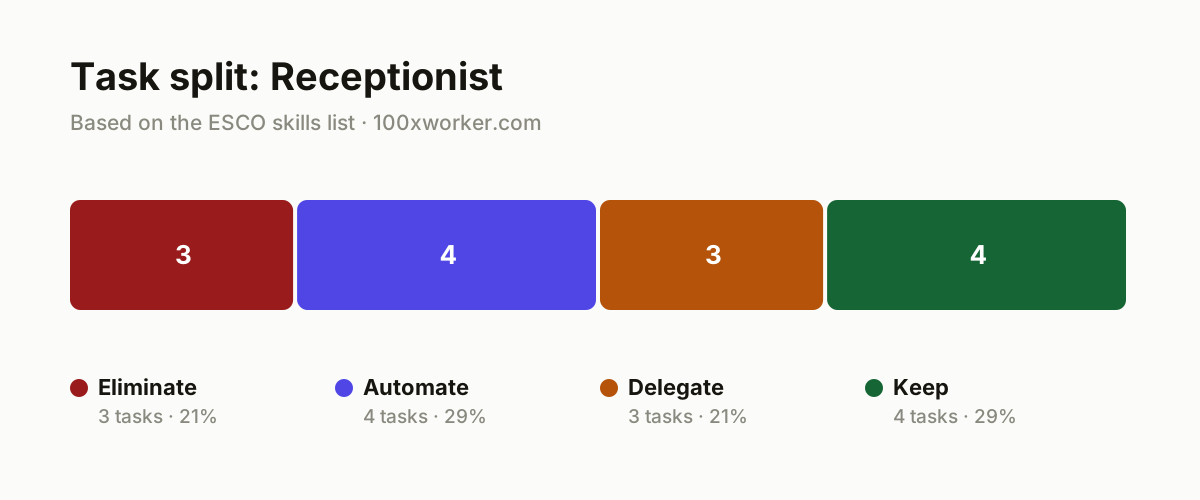
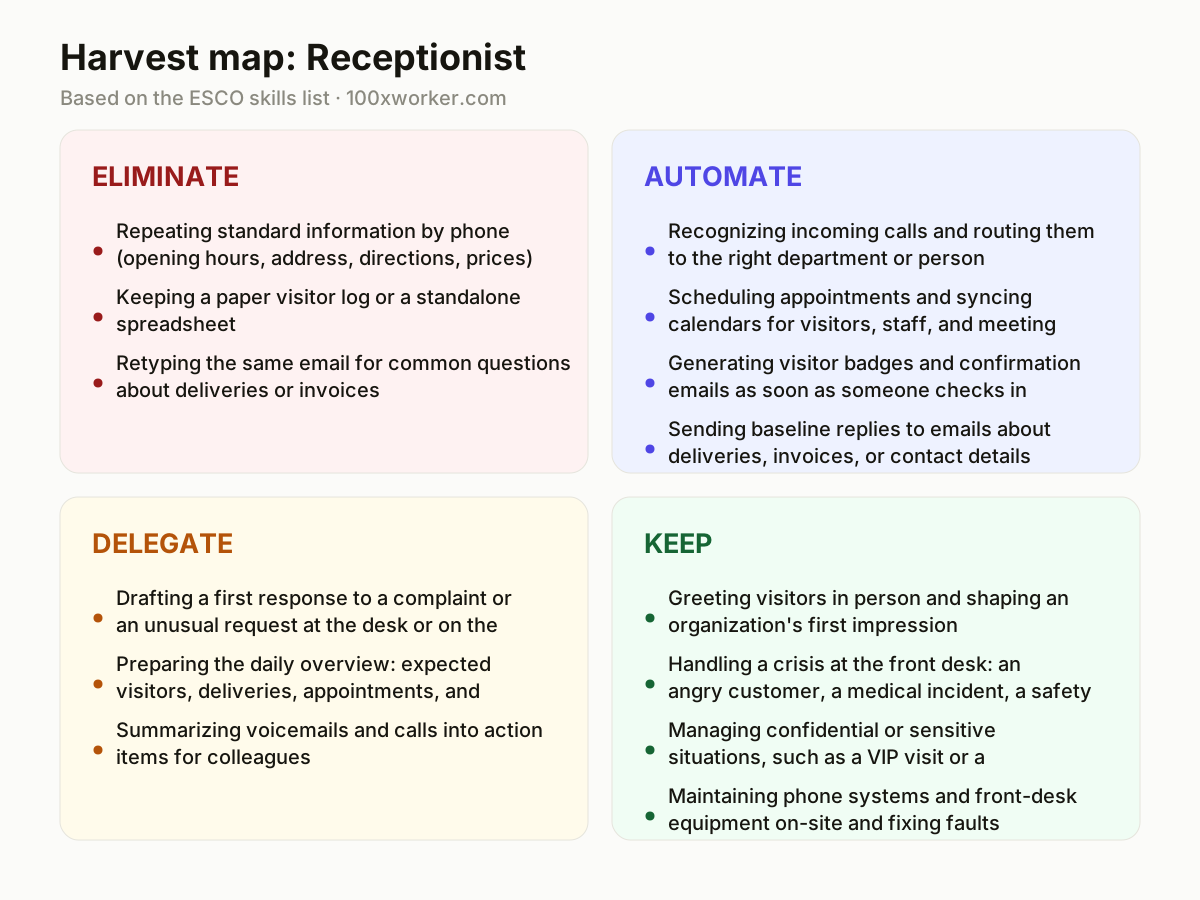
Not every reception task faces the same pressure from AI. Some tasks should simply disappear because a system already does them better. Others get fully automated, running without anyone watching. A third group gets delegated: AI drafts, a person checks and finalizes. The last group stays firmly human, because it depends on presence, judgment, or physical action a tool cannot provide. Sorting your day into these four buckets shows exactly where your time should go next.
| Task | Bucket | Why |
|---|---|---|
| Repeating standard information by phone (opening hours, address, directions, prices) | eliminate | An IVR or voice assistant answers this instantly, at any hour, without a queue. |
| Keeping a paper visitor log or a standalone spreadsheet | eliminate | Digital check-in via tablet or QR code logs visitors automatically, with no copying errors or lost sheets. |
| Retyping the same email for common questions about deliveries or invoices | eliminate | A template with autofill handles this without anyone typing it out again. |
| Recognizing incoming calls and routing them to the right department or person | automate | Voice recognition and computer telephony integration route calls automatically based on the spoken request. |
| Scheduling appointments and syncing calendars for visitors, staff, and meeting rooms | automate | AI-linked scheduling software finds a slot that works for everyone without back-and-forth emails. |
| Generating visitor badges and confirmation emails as soon as someone checks in | automate | This is a fixed, repeatable step with no judgment call, so it runs fully on its own. |
| Sending baseline replies to emails about deliveries, invoices, or contact details | automate | A rule-based or AI-driven inbox recognizes the pattern and answers without delay. |
| Drafting a first response to a complaint or an unusual request at the desk or on the phone | delegate | AI writes a usable first draft; you adjust tone and content before it reaches the customer. |
| Preparing the daily overview: expected visitors, deliveries, appointments, and flags | delegate | AI compiles the overview from calendar and email; you check it and add what no system knows. |
| Summarizing voicemails and calls into action items for colleagues | delegate | Transcription and summarization work faster than typing it out yourself; you decide what gets priority. |
| Greeting visitors in person and shaping an organization's first impression | keep | This is the moment a company shows itself, and no system replaces a genuine welcome. (Your edge: Warmth, presence, and reading who is standing in front of you.) |
| Handling a crisis at the front desk: an angry customer, a medical incident, a safety report | keep | This calls for in-the-moment judgment and accountability you don't hand to a tool. (Your edge: De-escalating fast and making the right call under pressure.) |
| Managing confidential or sensitive situations, such as a VIP visit or a difficult conversation | keep | Discretion and people-reading skill make the difference between professional and clumsy. (Your edge: Discretion and the right feel for the situation.) |
| Maintaining phone systems and front-desk equipment on-site and fixing faults | keep | Physical equipment needs physical presence and practical troubleshooting. (Your edge: Being physically present and stepping in on the spot.) |
Which receptionist tasks does AI take over?
AI takes over the repeatable, low-judgment parts first: answering the same standard questions by phone, logging visitors, routing calls, and generating badges or confirmation emails. Microsoft Research put the applicability score for switchboard operators, the closest tracked category to receptionist, at 29.8% of daily work activities. That leaves a large majority of the job, including greeting people, handling incidents, and managing confidential situations, outside what current AI tools can plausibly replace.
Will AI replace receptionists?
No single tool replaces a receptionist, because the role mixes routine tasks with judgment, presence, and physical response that AI does not provide. Anthropic's Economic Index shows that AI use across occupations splits between automation-like patterns (a system does the task) and augmentation-like patterns (a person and AI work together). Reception work leans toward augmentation: AI drafts, routes, and logs, while a person still welcomes visitors, calms difficult situations, and decides what needs a human touch.
How do you become the AI person on the front-desk team?
Start by testing the tools your organization already has: the phone system's IVR settings, the visitor management app, or draft-reply features in your email client. Document what works and what fails, then share a short how-to with colleagues. Being the person who can set up a call-routing rule or configure auto-replies for common questions makes you the go-to resource, not the person AI displaces.
What can you do this month as a receptionist?
Pick one repetitive task, such as answering the same email question or logging visitors on paper, and replace it with a template, autofill rule, or digital check-in this month. Test your organization's phone menu or chatbot as if you were a visitor, and note where it fails. Ask your manager which AI tools are already licensed but unused. Small, concrete swaps build the case for handing over more of the routine work.
Generative AI's applicability varies widely across occupations, from 49% of work activities for translators to 12% for nurses.
Microsoft Research, Working with AI: Measuring the Applicability of Generative AI to Occupations (2025)
Become the AI person on your team
Own the phone menu
Volunteer to design or update the IVR call-routing rules and standard voice prompts. Test them yourself by calling in, and fix the dead ends where callers get stuck before reaching a person.
Build the template library
Collect the ten most common emails and calls you handle, then turn each into a reusable AI-drafted template with placeholders. Share the library with the team so everyone answers routine questions the same way.
Run the daily briefing
Set up an AI-generated daily overview pulling from the calendar, delivery schedule, and inbox, then check and correct it each morning. This turns you into the person who curates information, not just relays it.
Want this for your actual task list?
The free scan on the homepage builds your personal task map in 30 seconds, based on your role and industry.
Run the free task scanTools for this work
| Tool | For which tasks | The sober take |
|---|---|---|
| Digital visitor management system with QR check-in | Eliminates paper visitor logs; automates badge printing and confirmation emails | Check your organization's data retention policy before rolling it out. |
| IVR or voice AI phone system | Automates call routing and repeating standard information | Pilot with a short, tested menu before replacing the full switchboard. |
| AI-assisted email inbox with draft suggestions | Automates baseline replies; delegates first drafts for complaints and unusual requests | Always review AI drafts before sending, especially for complaints. |
| Call and voicemail transcription with summarization | Delegates summarizing voicemails and calls into action items | Confirm local consent rules before recording or transcribing calls. |
| AI-linked scheduling assistant | Automates appointment booking and calendar syncing across visitors, staff, and rooms | Connect it to your existing calendar system rather than running it separately. |
Prompts to try today
Draft a complaint response
Summarize a voicemail into an action item
Build a daily front-desk briefing
Related jobs
Frequently asked questions
Will AI replace receptionists entirely?
No. Microsoft Research scored the closest tracked category, switchboard operators, at 29.8% applicability, meaning AI can plausibly touch less than a third of daily work activities. The rest, including greeting visitors, handling incidents, and managing confidential situations, stays with a person for now.
What receptionist tasks disappear first?
Tasks with no judgment call go first: repeating standard information by phone, keeping paper visitor logs, and retyping the same email replies. These get replaced by IVR systems, digital check-in, and templates rather than by AI making decisions.
How is a receptionist's job different from a switchboard operator's job?
ESCO groups them closely, since both involve managing calls, connecting people, and communicating through phone systems. Receptionists typically add in-person visitor handling and front-desk presence, which is why the human-facing tasks in the 'keep' bucket weigh more heavily for receptionists than for phone-only roles.
What should a receptionist learn to stay valuable?
Focus on the tasks AI cannot do: reading a tense situation, de-escalating conflict, handling confidential visits with discretion, and troubleshooting physical equipment on-site. Alongside that, learn to configure and check the AI tools your organization uses, so you become the person who manages the system rather than competes with it.
Sources
- Microsoft Research, Working with AI: Measuring the Applicability of Generative AI to Occupations (2025)
- Anthropic Economic Index
- Eurostat, isoc_ai_iaiu (generative AI use, 2025)
- ESCO, European Commission occupation and skills taxonomy
Hendrik De Winne, author of Becoming AI-Savvy, founder of VibeLab. Helps teams redesign their work with AI.
This article was drafted with AI assistance from public data sources and editorially reviewed.