100×worker · job analysis
Will AI Replace Photographers? What to Do About It
Photographers spend a lot of time on tasks that have nothing to do with pressing the shutter: sorting through thousands of frames, tagging files, color-matching a wedding set, or writing a licensing contract. Generative AI is now capable enough to take over a real share of that work.
Microsoft Research analyzed 200,000 real conversations people had with Copilot and built an AI applicability score for each occupation. Photography scores 24.6%, meaning about a quarter of the work activities in the job overlap with tasks generative AI can already handle. That is far below translators (49%) but well above nurses (12%). Separately, ESCO, the European Commission's occupational taxonomy, lists 15 core skills for photographers, from creating artificial lighting to developing visual elements, and most of the physical, on-location skills sit outside what current AI tools touch.
This article breaks the job into four buckets: tasks to drop, tasks to automate, tasks to hand off with a check, and tasks to keep doing yourself. The goal is not to guess whether 'photography' survives AI. It is to look at which specific tasks inside the job change.
A photographer is a professional who captures and finishes images using cameras, light, and software.
The task split: what AI takes over and what stays yours
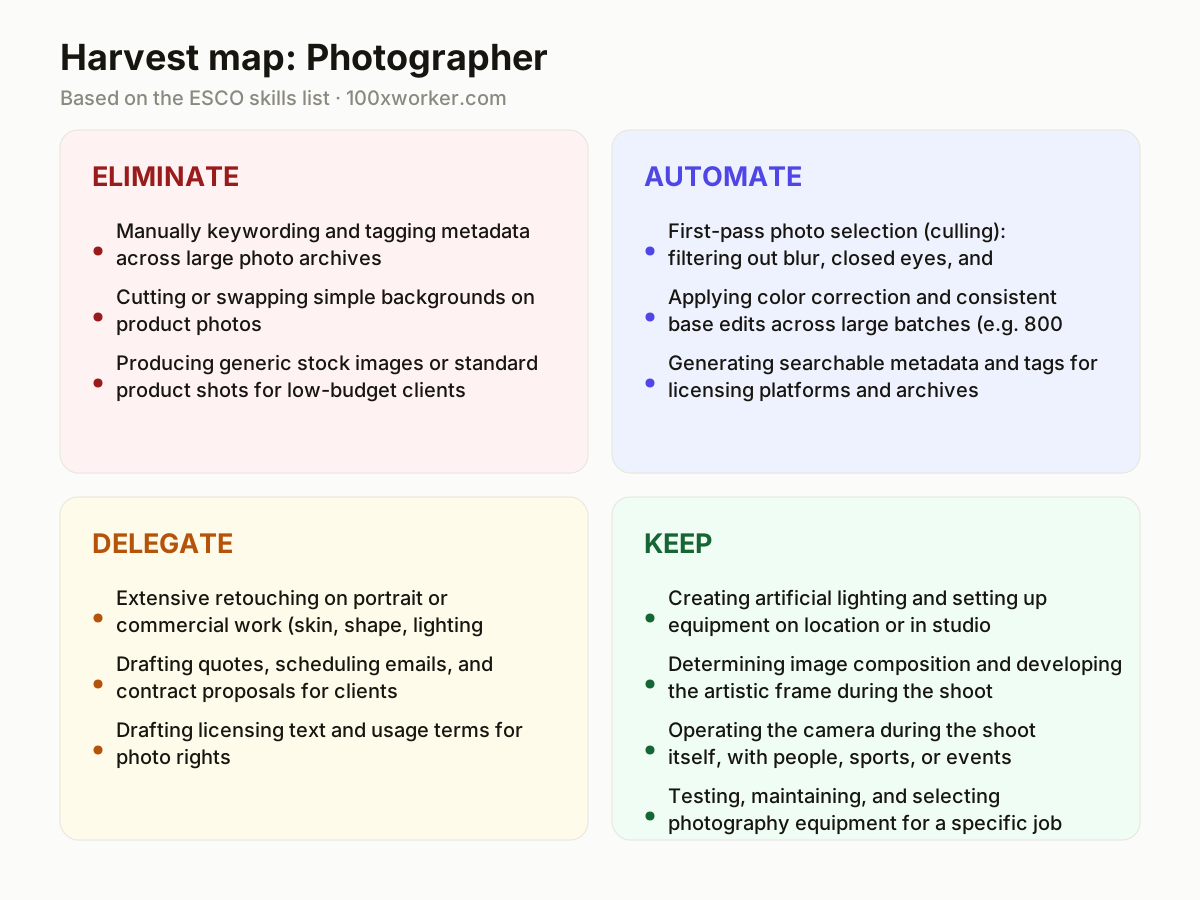
Instead of asking whether AI replaces photographers, split the job into its actual tasks. Some tasks disappear because AI-generated stock images or automated masking make them redundant. Some get automated outright, like culling or batch color correction. Some get delegated to AI for a first draft that you still check, like retouching or contracts. And some stay firmly human, because they depend on physical presence, timing, and trust in the room.
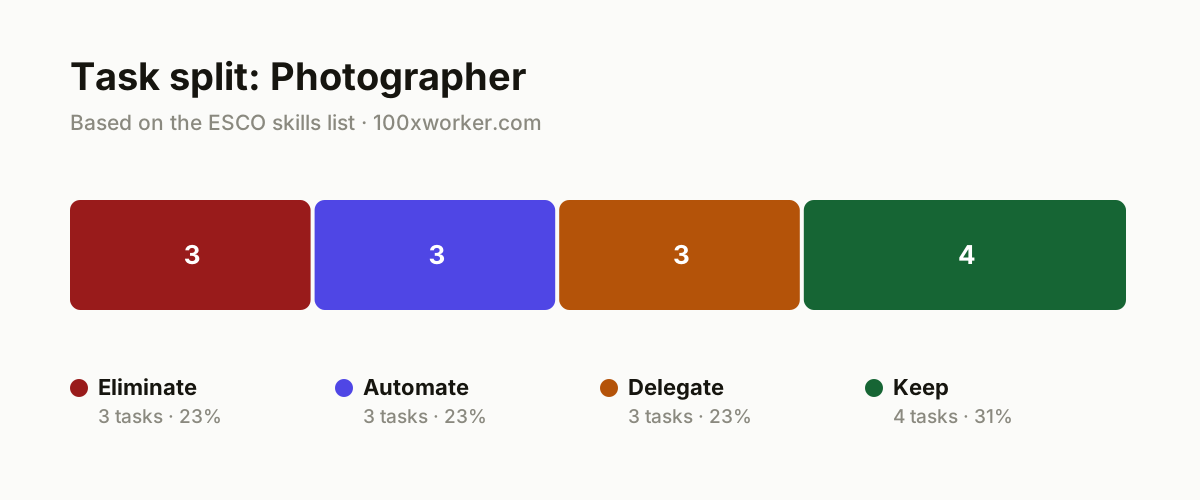
| Task | Bucket | Why |
|---|---|---|
| Manually keywording and tagging metadata across large photo archives | eliminate | AI image recognition generates tags, locations, and descriptions faster and more consistently than manual entry. |
| Cutting or swapping simple backgrounds on product photos | eliminate | Automated masking tools do this in seconds without quality loss on straightforward shots. |
| Producing generic stock images or standard product shots for low-budget clients | eliminate | For purely illustrative material, AI image generation now competes directly with basic stock photography. |
| First-pass photo selection (culling): filtering out blur, closed eyes, and duplicates | automate | AI culling software scans thousands of files and delivers a pre-sorted set without manual review. |
| Applying color correction and consistent base edits across large batches (e.g. 800 wedding photos) | automate | Presets and AI matching apply exposure and tone automatically and evenly across the whole set. |
| Generating searchable metadata and tags for licensing platforms and archives | automate | A repeatable, rule-based task with no creative input, well suited to full automation. |
| Extensive retouching on portrait or commercial work (skin, shape, lighting adjustments) | delegate | AI produces a strong first pass, but the final artistic call and quality check stay with you. |
| Drafting quotes, scheduling emails, and contract proposals for clients | delegate | AI writes a usable first draft from your pricing and terms, you review and send. |
| Drafting licensing text and usage terms for photo rights | delegate | AI produces a draft agreement, but the legal and commercial terms remain your responsibility. |
| Creating artificial lighting and setting up equipment on location or in studio | keep | Physical, situational craft knowledge that differs per job and cannot be automated remotely. (Your edge: Hands-on experience with light, space, and materials on site.) |
| Determining image composition and developing the artistic frame during the shoot | keep | Creative interpretation of the moment requires an eye that reacts to what is actually happening. (Your edge: Your artistic eye and sense of timing.) |
| Operating the camera during the shoot itself, with people, sports, or events | keep | Earning trust from a model, athlete, or couple happens in the moment, not behind a screen. (Your edge: Human contact and presence during the shoot.) |
| Testing, maintaining, and selecting photography equipment for a specific job | keep | Practical material knowledge and experience with which lens or camera gives which result stays craft work. (Your edge: Years of hands-on experience with gear.) |
Which photography tasks does AI take over?
AI already handles the repetitive back-end work: culling thousands of frames down to a shortlist, applying consistent color correction across a large batch, tagging files for archives or licensing sites, and cutting simple backgrounds on product shots. These are rule-based, high-volume tasks with little creative judgment involved. What AI does not do well yet is anything requiring physical presence: setting lights in an unfamiliar room, directing a nervous subject, or reading a live event as it unfolds. Microsoft Research's 24.6% applicability score for photographers reflects that split: real overlap on file handling and editing, little overlap on the shoot itself.
Will AI replace photographers?
No. AI applicability for photographers sits at 24.6%, according to Microsoft Research, meaning most of the job still falls outside what generative AI can currently do. AI-generated images can replace some generic stock photography, and editing software increasingly handles retouching and culling. But composition, lighting decisions on location, and working with real people in real time stay human tasks. The job changes shape: less time on sorting and editing, more time expected to go into shooting itself and higher-touch client work. The photographers most exposed are those doing high-volume, low-creativity work, like basic product shots for stock libraries.
How do you become the AI person in your photo studio or team?
Start by running an AI culling tool (like Aftershoot or Narrative Select) on your next shoot and comparing its picks to your own. Set up batch presets or AI color-matching for repeat clients like weddings or events, so editing time drops per job. Use a chatbot to draft your quotes, scheduling emails, and licensing terms, then edit before sending. Document which parts of your workflow you have automated. In a studio or team, being the person who has already tested these tools and can show time saved makes you the reference point when others ask how to speed up delivery.
What can you do this month to start working with AI?
Pick one repetitive task, culling, tagging, or batch editing, and test an AI tool on your next real shoot instead of a demo file. Compare the AI-selected shortlist or edit against what you would have chosen manually, and note the time difference. Draft your next client quote or contract with a chatbot, then edit it yourself before sending. Keep every task involving physical setup, live shooting, or in-person client interaction exactly as it is. Small, task-level tests like this show you where AI actually saves time in your specific workflow, rather than guessing from general claims about the industry.
The overlap between what generative AI can already do and what an occupation involves rarely covers a whole job, it covers specific tasks inside it.
Microsoft Research, Working with AI (2025)
Become the AI person on your team
Run an AI culling tool on a real job, not a test set
Load your next full shoot into a tool like Aftershoot or Narrative Select and compare its shortlist to your manual pick. Track how many minutes you save per 1,000 frames, and use that number when you talk to clients or colleagues about turnaround time.
Build one AI-assisted workflow for your most repetitive job type
If you shoot a lot of weddings or events, set up batch color-matching and AI-assisted culling as a standard step. Document the workflow so it is repeatable, and share it with any assistants or second shooters you work with.
Let AI draft the paperwork, you keep control of the terms
Use a chatbot to produce first drafts of quotes, scheduling emails, and licensing text based on your standard pricing and conditions. Review every draft yourself before it goes to a client, especially the legal and commercial details.
Want this for your actual task list?
The free scan on the homepage builds your personal task map in 30 seconds, based on your role and industry.
Run the free task scanTools for this work
| Tool | For which tasks | The sober take |
|---|---|---|
| Aftershoot / Narrative Select | Automating first-pass culling and initial photo selection | Built specifically for photo culling, not general-purpose AI. |
| Adobe Lightroom (AI masking and batch editing) | Automating background masking and consistent color correction across large sets | Handles routine edits well, still needs a human check on client-facing work. |
| ChatGPT or Claude | Delegating quotes, scheduling emails, and draft licensing text | Fast for first drafts, not a substitute for reviewing legal terms yourself. |
| Topaz Labs (upscaling and denoise) | Automating technical fixes like noise reduction and upscaling | Useful for volume work, less relevant for creative retouching decisions. |
Prompts to try today
Draft a client quote
First-draft licensing terms
Batch tagging plan
Related jobs
Frequently asked questions
Will AI take over photo editing completely?
No, but it takes over the repetitive parts. AI tools handle culling, basic color correction, and background removal on simple shots reliably. Detailed retouching on portrait or commercial work, where skin, shape, and lighting need artistic judgment, still needs a human to make the final call. Expect AI to produce a strong first draft that you finish and approve, rather than a hands-off replacement for editing.
Which photography jobs are most at risk from AI?
High-volume, low-creativity work is most exposed: generic stock photography, basic product shots for e-commerce listings, and simple headshot batches where AI-generated or AI-edited images can substitute directly. Work that depends on being physically present, weddings, events, sports, editorial assignments, is far less exposed, since it requires real-time judgment and trust that current AI tools cannot replicate.
How much does AI actually get used by photographers today?
Across the EU, 32.7% of people aged 16 to 74 used generative AI in the three months before being surveyed in 2025, according to Eurostat. Photography-specific adoption figures are not separately tracked in the available data, but the tools most relevant to photographers (culling software, editing assistants, chatbots for admin) are widely available and increasingly built into standard editing platforms like Lightroom.
Should a photographer learn to use AI tools now?
Yes, starting with the tasks that eat the most non-shooting time: culling and batch editing. Microsoft Research's 24.6% AI applicability score for photography shows real overlap with generative AI on file handling and editing tasks, less on the shoot itself. Learning one culling tool and one AI writing assistant for client communication covers most of the near-term time savings without touching the creative core of the job.
Sources
- Microsoft Research, Working with AI: Measuring the Applicability of Generative AI to Occupations (2025)
- Anthropic Economic Index
- Eurostat, Use of generative AI (isoc_ai_iaiu)
- ESCO, European Commission occupational taxonomy
Hendrik De Winne, author of Becoming AI-Savvy, founder of VibeLab. Helps teams redesign their work with AI.
This article was drafted with AI assistance from public data sources and editorially reviewed.