100×worker · job analysis
Will AI Replace Illustrators, and What Should You Do About It?
Illustrators keep asking the same question every creative field is asking right now: does generative AI take my job, or just parts of it? Microsoft Research looked at 200,000 real Copilot conversations and scored how applicable generative AI is to different occupations. For illustration-related work, the applicability score sits at 18.3%, far below translators (49%) and closer to occupations where AI plays a supporting role rather than a replacing one.
That number matters because it comes from actual usage patterns, not speculation. Anthropic's Economic Index runs a similar analysis on Claude conversations, mapping them against O*NET task lists and splitting usage into automation-like and augmentation-like patterns. Across creative occupations, the pattern tends to lean toward augmentation: people use AI to speed up parts of a task, not to skip the task entirely.
The practical question for you isn't whether AI replaces illustrators as a category. It's which of your specific tasks, sketching, referencing, formatting, pitching, client negotiation, shift toward tools and which stay entirely in your hands. This article breaks that down task by task.
An illustrator turns concepts into drawn images for publications, brands, or media.
The task split: what AI takes over and what stays yours
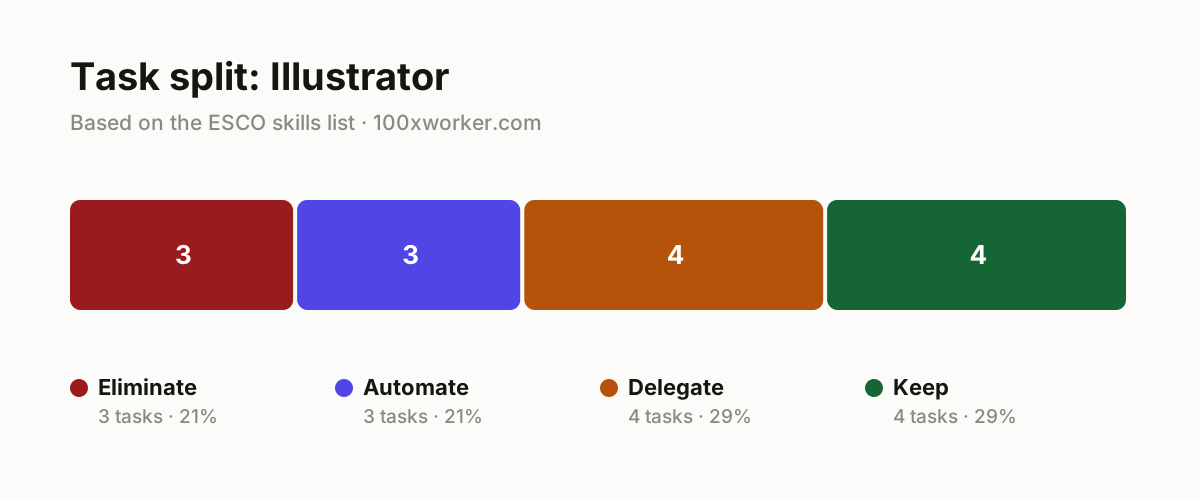
Break your job down into four buckets instead of asking a yes/no question about AI. Eliminate covers tasks AI makes pointless to do manually. Automate covers tasks a tool now runs without your daily input. Delegate covers tasks AI can draft first, with you deciding and finishing. Keep covers tasks that still require your hand, judgment, or relationship with the client.
| Task | Bucket | Why |
|---|---|---|
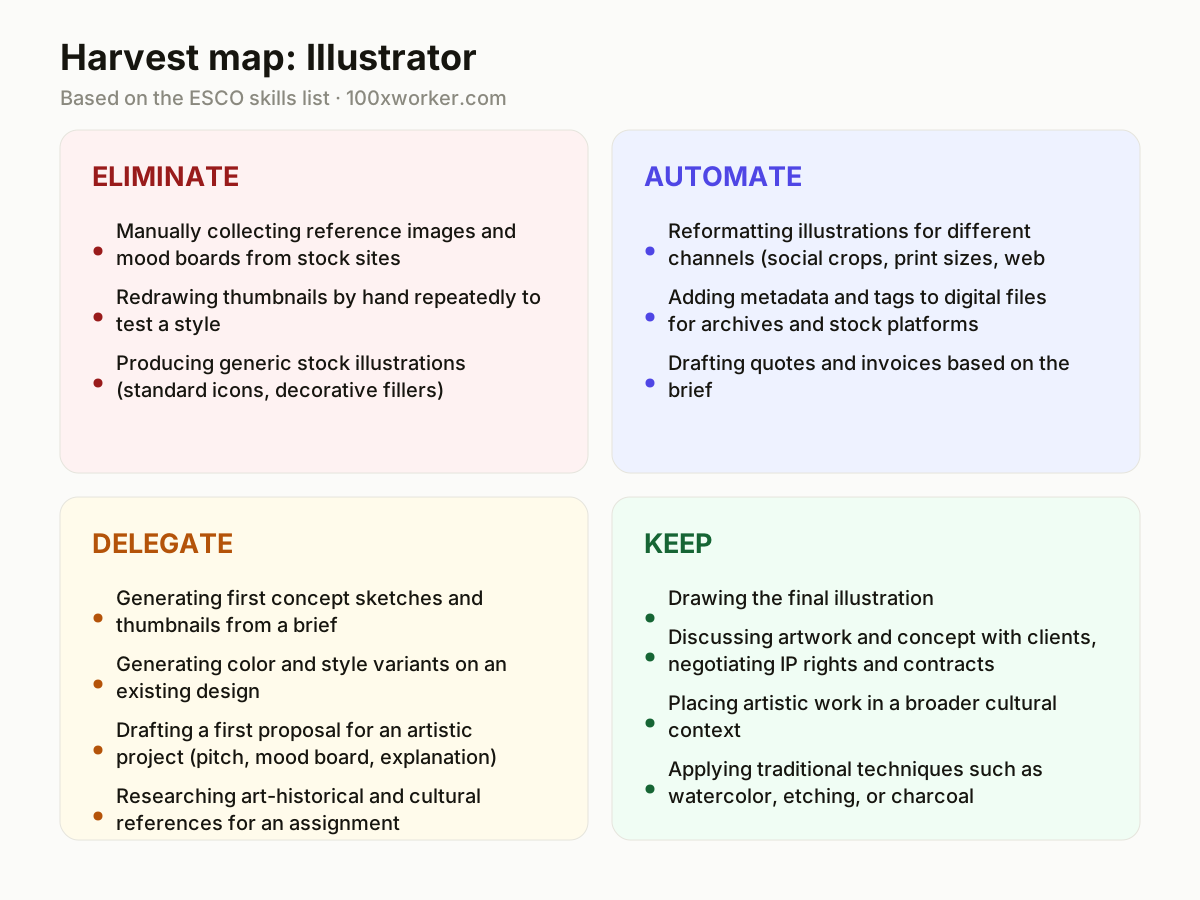
| Manually collecting reference images and mood boards from stock sites | eliminate | An image generator produces dozens of tailored references in seconds, faster than scrolling stock libraries for hours. |
| Redrawing thumbnails by hand repeatedly to test a style | eliminate | AI generates dozens of style variants instantly, so you choose and refine instead of drawing every option yourself. |
| Producing generic stock illustrations (standard icons, decorative fillers) | eliminate | For artwork without real artistic requirements, a generated image is often enough, and cheaper to produce. |
| Reformatting illustrations for different channels (social crops, print sizes, web resolutions) | automate | A workflow tool automatically crops, scales, and exports to every required format without your involvement. |
| Adding metadata and tags to digital files for archives and stock platforms | automate | Software recognizes the content and style of an image and labels it consistently and searchably. |
| Drafting quotes and invoices based on the brief | automate | A template tool fills in amounts, hours, and terms automatically from the project document. |
| Generating first concept sketches and thumbnails from a brief | delegate | AI turns a text brief into ten directions at once, and you select and redirect from there. |
| Generating color and style variants on an existing design | delegate | You test palettes and styles quickly, but you decide which variant actually serves the assignment. |
| Drafting a first proposal for an artistic project (pitch, mood board, explanation) | delegate | AI writes a first version of the pitch, and you rewrite it to match your artistic vision. |
| Researching art-historical and cultural references for an assignment | delegate | AI handles the preparatory research, and you judge relevance and apply it in context. |
| Drawing the final illustration | keep | This is the end product a client hires and pays you for. (Your edge: Personal line work and feel cannot be copied.) |
| Discussing artwork and concept with clients, negotiating IP rights and contracts | keep | Trust, legal judgment, and relationship management require a human who carries responsibility. (Your edge: Client trust and legal risk stay human work.) |
| Placing artistic work in a broader cultural context | keep | Giving cultural meaning to an image requires interpretation and taste, not generation. (Your edge: Interpretation and cultural background are personal.) |
| Applying traditional techniques such as watercolor, etching, or charcoal | keep | Physical material and craft can't be simulated digitally at the same level. (Your edge: Feel for material and hand skill stay physical work.) |
Which tasks does AI take over from illustrators?
AI takes over the repetitive, low-judgment parts of the job first. It eliminates manual reference gathering, thumbnail redraws for style testing, and generic stock illustration work, because a generator produces variants faster than a person can. It automates formatting for different channels, metadata tagging, and administrative documents like quotes and invoices. It also drafts first concept sketches, color variants, pitches, and background research for you to edit. What it doesn't do is finish the final illustration, decide which direction actually serves the client, or take responsibility for the contract.
Will AI replace illustrators?
No, not as an occupation. Microsoft Research's applicability score for illustration-related work sits at 18.3%, meaning generative AI overlaps with less than a fifth of the tasks in the job, well below occupations like translation (49%). ESCO's occupational taxonomy still lists core illustrator skills as things like selecting illustration styles, developing visual elements, and placing artwork in context, none of which a generator does on its own. AI reshapes which tasks take your time, shifting hours from reference hunting and thumbnail iteration toward final drawing, client conversation, and creative direction. The job changes shape more than it disappears.
How do you become the AI person on your illustration team or agency?
Start by owning the tools your colleagues avoid or misuse. Build a personal library of tested prompts for concept generation, mood boards, and reformatting, then share it with your team instead of keeping it to yourself. Offer to run the first AI-assisted round on a project (sketches, variants, research) so others can see the time saved and the limits in practice. Document where AI output needed heavy correction, since that knowledge is what makes you the person clients and colleagues trust to judge AI output rather than just produce it.
What can you do this month as an illustrator?
Pick one recurring task from the eliminate or automate bucket, formatting exports or reference gathering are good starting points, and set up a tool for it this week. Test one AI image generator on a real brief and compare its concept sketches against your usual first drafts, timing both. Write down which of your tasks clients actually pay for versus which ones just support the final drawing. That list becomes your argument for pricing, for what you delegate, and for what you never hand off.
Generative AI's applicability varies sharply by occupation, from nearly half of tasks in translation to under a fifth of tasks in illustration-related creative work.
Microsoft Research, Working with AI (2025)
Become the AI person on your team
Build a prompt library instead of starting from scratch every brief
Save prompts that reliably produce usable concept directions, mood boards, or pitch drafts for your specific style of work. Reuse and refine them instead of reinventing the wheel on every project.
Time-test AI against your own process before recommending it to clients or colleagues
Run the same brief through an AI generator and your normal sketching process, then compare speed and quality honestly. Share the result, not just the tool name, when you make recommendations.
Turn AI-generated variants into a client-facing option menu
Instead of presenting one polished concept, use AI to generate several directions quickly and let the client choose before you invest hours in the final piece. This shortens revision cycles and shows clients where their money goes.
Want this for your actual task list?
The free scan on the homepage builds your personal task map in 30 seconds, based on your role and industry.
Run the free task scanTools for this work
| Tool | For which tasks | The sober take |
|---|---|---|
| Midjourney or Adobe Firefly | Eliminate: reference gathering, generic stock illustration. Delegate: concept sketches, color and style variants. | Good for fast variation, not for a finished, signed piece of client work. |
| Photoshop Generative Fill | Delegate: style variants on an existing design. Automate: quick background or texture changes. | Useful inside your existing file rather than as a separate generator. |
| ChatGPT or Claude | Delegate: pitch drafts, art-historical and cultural research. Automate: quote and invoice drafting from a brief. | Treat the output as a first draft you rewrite, not a final client document. |
| Canva Magic Resize or Photoshop batch actions | Automate: reformatting illustrations across social, print, and web sizes. | Set it up once per project template and reuse it, rather than resizing manually each time. |
Prompts to try today
Generate concept direction options from a brief
Draft a project pitch
Research cultural and art-historical references
Related jobs
Frequently asked questions
Is the Microsoft Research applicability score the same as a job loss risk?
No. The score measures how often generative AI shows up as relevant to real Copilot conversations tied to an occupation's tasks. It does not measure employment risk, headcount changes, or income impact. An 18.3% applicability score for illustration-related work means AI overlaps with a limited slice of the job's tasks, mostly the preparatory and administrative ones, not that a fifth of illustrator jobs disappear.
Should illustrators worry about older automation-risk percentages for creative jobs?
Be cautious with them. The widely cited Frey and Osborne (2013) automation study predates large language models and image generators entirely, so its risk percentages for creative occupations were built on a different technology landscape. Numbers from that study circulating online for illustrators or artists should be treated as outdated rather than a current forecast, and any specific figure from it needs fresh verification before you rely on it.
Does the official ESCO skills list for illustrators include AI tools?
Not yet. ESCO's current skill list for the drawing artist occupation covers things like drafting artistic proposals, selecting illustration styles, using traditional and digital illustration techniques, and placing artwork in context. It doesn't list generative AI tools as a core skill. That gap itself is worth noting: official taxonomies tend to lag behind how the job is actually practiced day to day.
Will clients start accepting AI-generated images instead of hiring an illustrator?
Some already do for low-stakes, generic visuals like decorative fillers or quick internal mockups, which fits the eliminate bucket described above. For work that needs a distinct style, IP clarity, or a named artist behind it, clients still need a human who can be held accountable and who brings a consistent visual identity. Where exactly that line sits for a specific client or industry needs case-by-case verification rather than a blanket answer.
Sources
- Microsoft Research, Working with AI: Measuring the Applicability of Generative AI to Occupations (2025)
- Anthropic Economic Index
- Eurostat, isoc_ai_iaiu (generative AI use, 2025)
- ESCO, European Commission occupational taxonomy
Hendrik De Winne, author of Becoming AI-Savvy, founder of VibeLab. Helps teams redesign their work with AI.
This article was drafted with AI assistance from public data sources and editorially reviewed.