100×worker · job analysis
Will AI Replace Paralegals?
If you work as a paralegal, you have probably already used AI to speed up a first read of a case file or to draft a routine letter. The question is whether that changes your job or just your task list. Microsoft Research analyzed 200,000 real Copilot conversations and scored how applicable generative AI is to each occupation's day-to-day activities. Paralegals scored 5.7%, near the bottom of the scale, far below translators (49%) and even below nurses (12%).
That low score does not mean AI is irrelevant to your work. It means the tasks where AI helps are concentrated: research, drafting, and document review, rather than the whole job. Adoption is already widespread across the general population. Eurostat found that 32.7% of EU residents aged 16 to 74 used generative AI in the last three months of 2025. In legal work specifically, the task mix matters more than the adoption rate.
This article breaks your job into four buckets: tasks AI eliminates outright, tasks it automates for you, tasks you delegate to it while keeping oversight, and tasks that stay yours because they depend on judgment, trust, or persuasion.
A paralegal supports lawyers with case management, legal research, and drafting legal documents.
The task split: what AI takes over and what stays yours
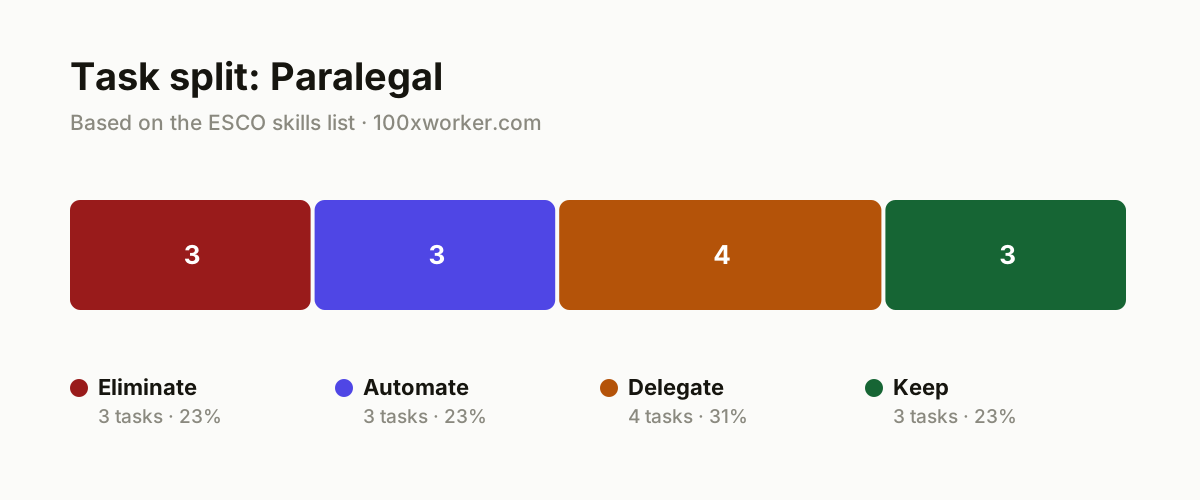
Not every task in a paralegal's job changes the same way. Some tasks disappear because better tools make the old manual method pointless. Some get automated end to end by an AI agent. Some are best delegated to AI for a first pass, with you reviewing and finishing the work. And some stay firmly in human hands because they depend on judgment, experience, or trust that no model can supply. Sorting your actual workload into these four buckets is more useful than asking whether 'the job' will be replaced.
| Task | Bucket | Why |
|---|---|---|
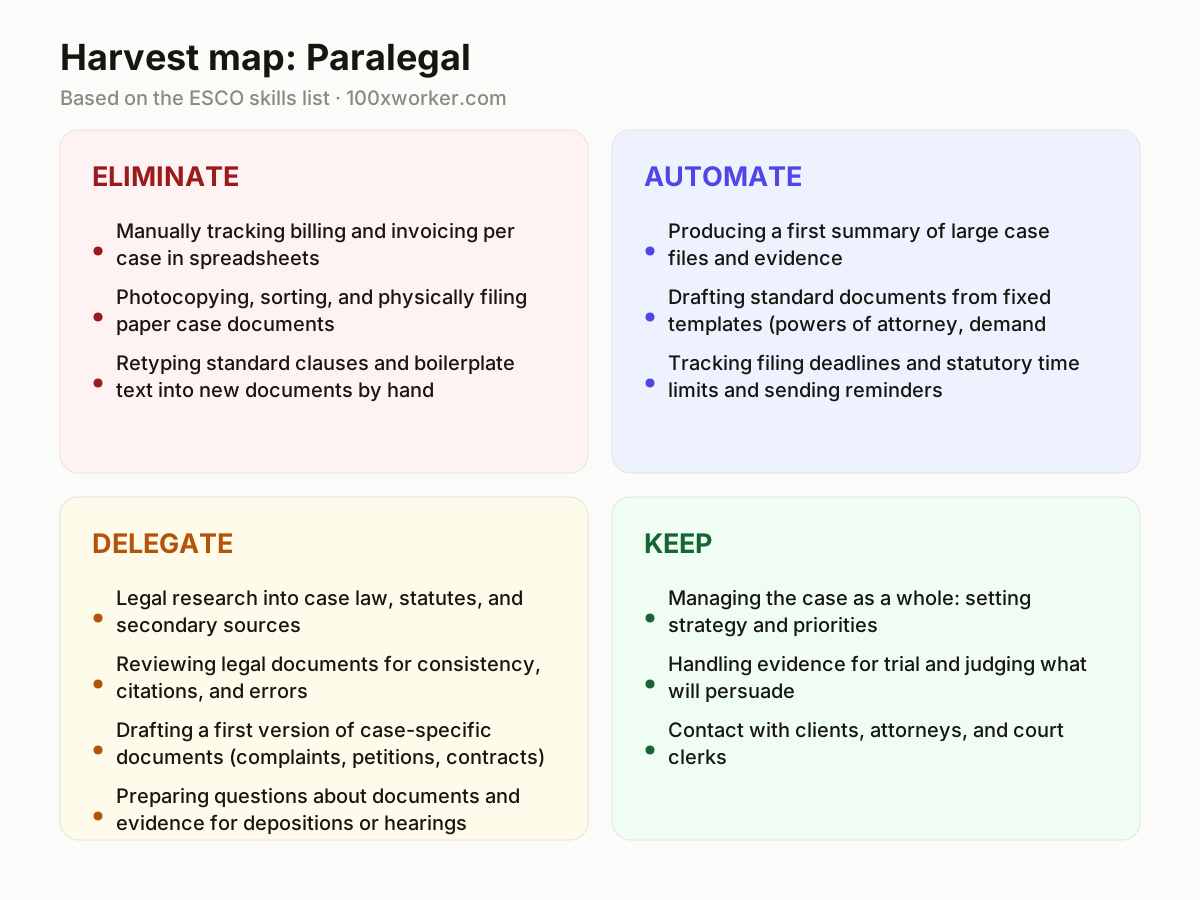
| Manually tracking billing and invoicing per case in spreadsheets | eliminate | Case management and billing software with automatic time and expense tracking makes manual spreadsheets unnecessary. |
| Photocopying, sorting, and physically filing paper case documents | eliminate | Digital document management systems with full-text search replace physical filing cabinets and the sorting that goes with them. |
| Retyping standard clauses and boilerplate text into new documents by hand | eliminate | Templates with fill-in fields and AI generation make literally retyping fixed text pointless. |
| Producing a first summary of large case files and evidence | automate | An AI agent reads hundreds of pages in seconds and returns a structured summary with references to source pages. |
| Drafting standard documents from fixed templates (powers of attorney, demand letters, simple petitions) | automate | For repetitive document types with a fixed structure, an agent can produce the full first draft on its own. |
| Tracking filing deadlines and statutory time limits and sending reminders | automate | Calendar agents link deadlines to case data automatically and send alerts without manual entry. |
| Legal research into case law, statutes, and secondary sources | delegate | AI searches faster than you can, but you judge relevance, jurisdiction, and how current the sources are. |
| Reviewing legal documents for consistency, citations, and errors | delegate | AI flags inconsistencies and incorrect citations, you decide what stays in the final version. |
| Drafting a first version of case-specific documents (complaints, petitions, contracts) | delegate | AI produces a usable first draft from the facts and instructions you give it, you build the case strategy into it. |
| Preparing questions about documents and evidence for depositions or hearings | delegate | AI generates a long list of possible questions, you select what actually goes to the core of the case. |
| Managing the case as a whole: setting strategy and priorities | keep | This requires an overview of the entire file and legal judgment that no tool takes over. (Your edge: Taking responsibility for the direction of a case.) |
| Handling evidence for trial and judging what will persuade | keep | What convinces a judge or jury is a matter of experience and reading people, not text analysis. (Your edge: Sensing what will persuade a judge or opposing counsel.) |
| Contact with clients, attorneys, and court clerks | keep | Building trust, reassuring anxious clients, and negotiating remain human skills. (Your edge: Building trust and reading nuance in a live conversation.) |
Which paralegal tasks does AI take over?
AI takes over the parts of the job that are repetitive and text-based: producing first summaries of large case files, drafting standard documents from fixed templates, and tracking deadlines. It also speeds up legal research and document review, though you still need to check relevance and accuracy. What it does not take over is judgment calls: which precedent actually applies, what a client needs to hear, or how to present evidence in a way that lands with a judge.
Will AI replace paralegals?
Unlikely, based on current evidence. Microsoft Research scored paralegal work at 5.7% AI applicability, one of the lowest scores of any occupation in its dataset. Anthropic's Economic Index, which classifies real AI conversations against O*NET tasks, also finds that most legal-adjacent AI use looks like augmentation (helping a person work faster) rather than full automation (replacing the task entirely). The job changes task by task. The tasks that survive are the ones built on judgment, trust, and courtroom experience, not text processing.
How do you become the AI person in your legal department?
Start by mapping your own week into the four buckets above and naming which tasks you already hand to AI informally. Pick one recurring document type (a demand letter, a simple motion, an intake summary) and build a reusable prompt or template for it. Share that template with your team instead of keeping it to yourself. Being the person who knows which tasks AI handles reliably, and which ones still need a lawyer's eyes, makes you more valuable, not less.
What can you do this month to start using AI concretely?
Pick one task from the automate or delegate bucket, ideally something you do weekly, like summarizing intake documents or drafting a standard letter. Run it through an AI tool you already have access to (Copilot, a legal research assistant, or your firm's document platform) and compare the output against your usual result. Note where it saved time and where you had to fix errors. Repeat with one new task type each week rather than trying to change your whole workflow at once.
The AI applicability score for paralegals and legal assistants is 5.7 percent, one of the lowest among all occupations measured.
Microsoft Research, Working with AI: Measuring the Applicability of Generative AI to Occupations (2025)
Become the AI person on your team
Build a prompt library for your most common documents
Take the three or four document types you draft most often and write a tested prompt for each, including the tone, structure, and facts the model needs. Store them somewhere your team can find and reuse them, not just in your own notes.
Run AI output next to your own draft before you trust it
For the first few months on any new task, do the work yourself and then compare it to what AI produced. This tells you exactly where the tool is reliable and where it misses context, which is more useful than a generic policy.
Flag AI-drafted sections clearly in the file
Mark which parts of a document came from an AI first draft versus your own edits. This makes review faster for the supervising attorney and protects you if a citation or fact turns out to be wrong.
Want this for your actual task list?
The free scan on the homepage builds your personal task map in 30 seconds, based on your role and industry.
Run the free task scanTools for this work
| Tool | For which tasks | The sober take |
|---|---|---|
| Microsoft Copilot | Automate: summarizing case files; drafting standard documents | Works inside Microsoft 365 documents and email, but every output still needs a human read before it goes in a filing. |
| AI-assisted legal research platforms (e.g., Lexis+ AI, Westlaw CoCounsel) | Delegate: legal research; reviewing documents for consistency and citations | Speeds up finding relevant case law, but checking jurisdiction and currency of sources stays your job. |
| Case management software with billing automation (e.g., Clio) | Eliminate: manual billing and invoice tracking per case | Only as reliable as the time entries you feed it, garbage in still means garbage out. |
| Document management systems with full-text search | Eliminate: physical filing, copying, and sorting of paper case files | Useful mainly once older paper files are actually scanned and indexed. |
Prompts to try today
First summary of a large case file
Draft a standard demand letter
Prepare deposition questions from case documents
Related jobs
Frequently asked questions
Is paralegal work at high risk of automation?
Not based on the most recent data. Microsoft Research's 2025 analysis of real AI usage scored paralegal work at 5.7% applicability, near the bottom of all occupations studied. Older estimates like Frey and Osborne's 2013 Oxford study predate large language models and are less relevant now. The current picture shows AI assisting with specific tasks, like drafting and research, rather than replacing the role.
What is the difference between AI automating a task and AI augmenting it?
Automation means AI completes a task with little to no human involvement, like generating a routine reminder. Augmentation means AI helps a person do a task faster or better while the person still drives the work, like drafting a document that a paralegal then rewrites for strategy. Anthropic's Economic Index classifies real AI conversations this way and finds augmentation is common in legal-adjacent work.
Do I need to learn to code or use complex AI tools as a paralegal?
No. The tools most relevant to paralegal work, like Copilot, AI research assistants, and case management platforms with built-in AI features, are built for everyday drafting and research tasks, not programming. What helps most is learning to write clear prompts and knowing which outputs need extra checking before you rely on them.
How should I explain AI use to a supervising attorney?
Be specific about which tasks you used AI for and what you checked afterward. For example, say you used AI to produce a first summary of a 300-page file and then verified the key dates and citations yourself. Framing it this way shows you understand where AI output needs review, which builds trust rather than raising concerns about accuracy.
Sources
- Microsoft Research, Working with AI: Measuring the Applicability of Generative AI to Occupations (2025)
- Anthropic Economic Index
- Eurostat, Use of generative AI (isoc_ai_iaiu)
- ESCO, European Commission occupation taxonomy
Hendrik De Winne, author of Becoming AI-Savvy, founder of VibeLab. Helps teams redesign their work with AI.
This article was drafted with AI assistance from public data sources and editorially reviewed.