100×worker · job analysis
Will AI Replace Key Account Managers?

Every time a new AI tool launches, someone in sales asks whether it will replace account managers. The honest answer sits in a number: Microsoft Research analyzed 200,000 real Copilot conversations and scored how much of each occupation's work generative AI can already handle. For Sales Managers, the closest match to key account manager in the dataset, that score is 16.4%. Translators, whose work is mostly language conversion, score 49%. Nurses, whose work is mostly hands-on and relational, score 12%. Key account management sits closer to nursing than to translation.
That gap matters because it tells you where the job is actually vulnerable. Anthropic's Economic Index, which classifies millions of Claude conversations against standard occupational task lists, finds a similar pattern across sales roles: AI shows up mostly as augmentation (drafting, summarizing, forecasting) rather than full automation of the relationship itself. The ESCO taxonomy, maintained by the European Commission, lists the core skills of this role as managing contracts, negotiating prices, building business relationships, and analyzing client needs, tasks that are hard to hand to a model entirely.
This article breaks the job into four buckets: tasks to stop doing by hand, tasks to automate, tasks to delegate to AI with your review, and tasks to keep doing yourself.
A key account manager manages the sales relationship and long-term partnership with an organization's most important clients.
The task split: what AI takes over and what stays yours
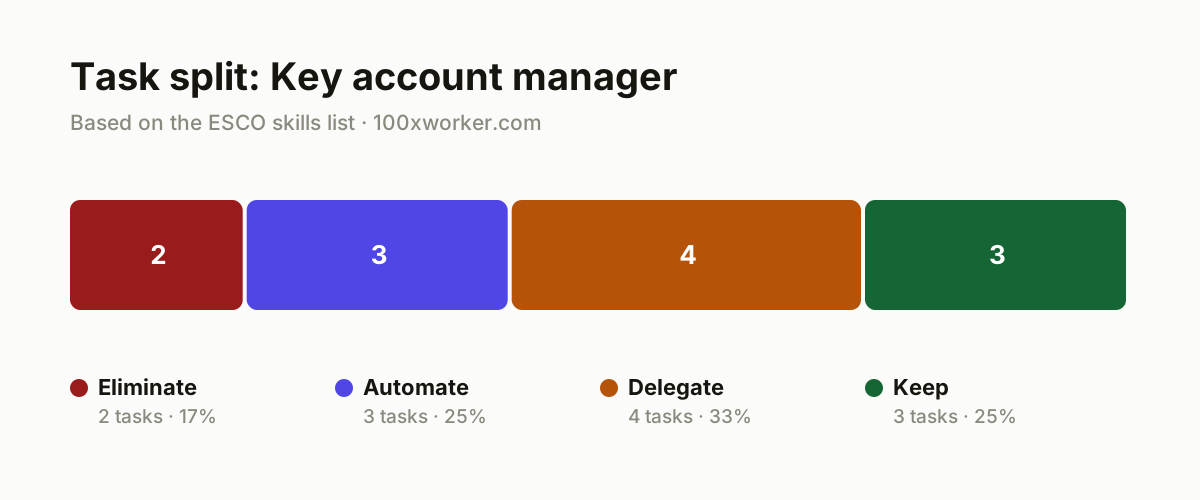
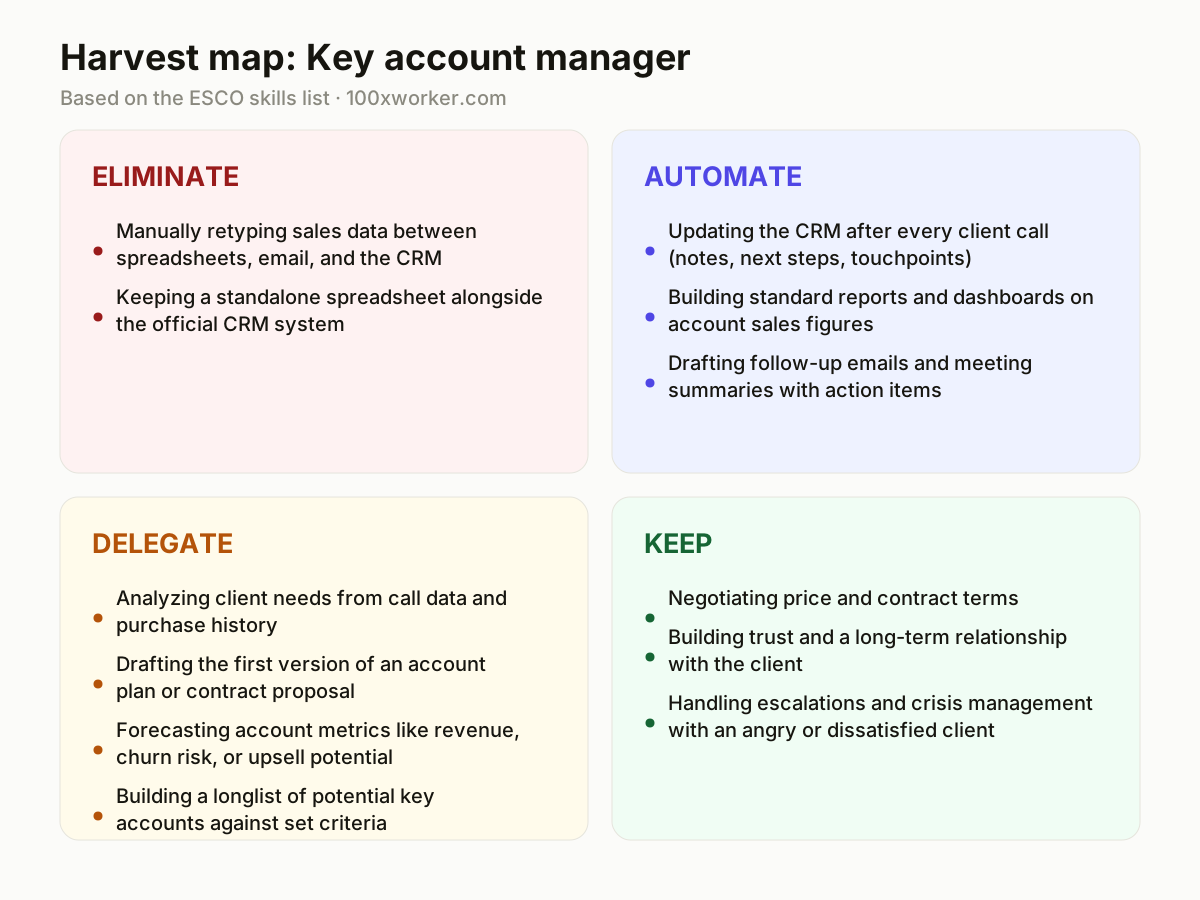
Not every task in a key account manager's job changes the same way. Some tasks should simply stop (manual data entry duplicated across systems). Some can run fully in the background through an AI agent (CRM updates, standard reports). Some are worth drafting with AI first and then reviewing yourself (account plans, forecasts). And some depend on judgment, trust, and reading a room, which stays with you regardless of what AI can do.
| Task | Bucket | Why |
|---|---|---|
| Manually retyping sales data between spreadsheets, email, and the CRM | eliminate | Every duplicate customer file goes stale the moment someone updates it somewhere else. |
| Keeping a standalone spreadsheet alongside the official CRM system | eliminate | A spreadsheet next to the CRM means double work and numbers that eventually disagree. |
| Updating the CRM after every client call (notes, next steps, touchpoints) | automate | An AI agent pulls this from your calendar, email, and call notes and fills in the CRM automatically. |
| Building standard reports and dashboards on account sales figures | automate | The numbers already live in the CRM; an AI tool turns them into a readable report without you assembling it manually. |
| Drafting follow-up emails and meeting summaries with action items | automate | An AI notetaker pulls action items and a draft email out of the call transcript within minutes of the meeting ending. |
| Analyzing client needs from call data and purchase history | delegate | AI spots patterns across hundreds of interactions faster than you can; you know the internal politics at the client's company. |
| Drafting the first version of an account plan or contract proposal | delegate | A language model writes a structured first draft from past plans; you correct the strategy and the tone. |
| Forecasting account metrics like revenue, churn risk, or upsell potential | delegate | The data model gives you a numeric starting point; you weigh it against what you're actually hearing from the client. |
| Building a longlist of potential key accounts against set criteria | delegate | AI searches databases and signals faster than you can; you decide which leads are worth your time. |
| Negotiating price and contract terms | keep | Trust, timing, and a feel for the other side matter here, and none of that comes from a data feed. (Your edge: You read hesitation and bluff in a voice; AI cannot.) |
| Building trust and a long-term relationship with the client | keep | A relationship grows out of shared history and genuine interest, not something you can outsource. (Your edge: Trust grows from shared history; no algorithm builds that.) |
| Handling escalations and crisis management with an angry or dissatisfied client | keep | An upset client needs someone who can de-escalate and take responsibility, not a script. (Your edge: Empathy and decision-making under pressure are your job.) |
Will AI replace key account managers?
No single tool replaces the role, but the task list underneath it is shrinking. Microsoft Research scored how much of each occupation's work generative AI can already handle, based on 200,000 real Copilot conversations. For Sales Managers, the closest match to key account manager, that score is 16.4%, far below translators at 49% and above nurses at 12%. Most of the job, negotiation, relationship building, escalation handling, stays with a person. What disappears is the administrative layer: retyping data, building reports by hand, chasing meeting notes. The job title survives; the task mix underneath it changes.
Which key account manager tasks does AI already handle?
AI already drafts CRM updates from call notes, builds standard sales dashboards, and turns meeting transcripts into follow-up emails with action items. Anthropic's Economic Index tracks this pattern across millions of Claude conversations, splitting AI use into automation-like use (AI completes the task end to end) and augmentation-like use (AI drafts, you edit). For key account managers, most current use falls into augmentation: a first draft of an account plan, a churn-risk forecast, a longlist of target accounts. You still check the output against context the AI does not have, such as internal politics or unwritten history with the client.
How do you become the AI-savvy person on your sales team?
Start by connecting your CRM to an AI assistant that reads call notes, emails, and calendar entries, so it drafts updates instead of you typing them. Learn to write clear prompts for account plan drafts and client need analyses, then edit rather than start from a blank page. Pick one repetitive task, meeting summaries or weekly reports, and automate it fully within a month so colleagues see the time saved. Share the prompts and workflows that work with your team instead of keeping them to yourself. Being the AI-savvy person on the team means testing tools first and reporting back, not claiming AI will replace everyone else's job.
What can you do this month to start using AI?
Pick your three biggest accounts and use an AI tool to draft account plans from your notes, CRM history, and past emails, then edit the drafts yourself. Turn on AI meeting notes (built into Microsoft Teams, Zoom, or a standalone tool) for your next five client calls and check whether the summaries and action items are accurate enough to send with light editing. Ask your CRM's built-in AI features, most major platforms now have them, to generate a weekly pipeline report and compare it against the one you currently build by hand. If it holds up, stop building it manually.
Key account managers act as the intermediary between customers and the organization, managing both the sales and the long-term customer relationship.
ESCO, European Commission
Become the AI person on your team
Automate your CRM hygiene first
Connect your CRM to an AI assistant that reads call transcripts and emails and drafts the update itself. This is the fastest, lowest-risk win because CRM data entry has no strategic value and nobody enjoys doing it.
Turn meeting notes into a five-minute task
Run every client call through an AI notetaker and let it generate the follow-up email draft. Send it after a thirty-second review instead of writing it from scratch.
Use forecasts as a starting point, not an answer
Let AI flag churn risk or upsell potential from account data, then weigh that against what you actually hear from the client. Treat the AI number as one input in a conversation, not a verdict.
Want this for your actual task list?
The free scan on the homepage builds your personal task map in 30 seconds, based on your role and industry.
Run the free task scanTools for this work
| Tool | For which tasks | The sober take |
|---|---|---|
| Microsoft Copilot (Teams, Outlook) | Meeting summaries, follow-up emails, CRM update drafts | Works inside tools you already use, so adoption friction is low. |
| Salesforce Einstein / Agentforce | CRM updates, account metric forecasting, pipeline reports | Built into the CRM itself, but output quality depends on how clean your existing data is. |
| HubSpot AI (Breeze) | Report building, account summaries, first-draft account plans | Similar promise to Salesforce's tools, tied to the HubSpot ecosystem. |
| Otter.ai or Fireflies.ai | Meeting transcription, action item extraction | A standalone option if your CRM or video tool lacks native AI notes. |
Prompts to try today
Draft an account plan
Turn a meeting transcript into a follow-up email
Build a churn-risk shortlist
Related jobs
Frequently asked questions
Will AI take over key account management jobs entirely?
No, based on current evidence. Microsoft Research's applicability score for the closest matching occupation, Sales Managers, sits at 16.4%, meaning most of the work involves tasks generative AI cannot yet fully perform. Negotiation, trust-building, and handling escalations depend on reading people and context, which stays human work for now. What changes is the size of the administrative layer around the relationship, not the relationship itself.
What percentage of key account manager tasks can AI currently do?
Microsoft Research scored Sales Managers, the closest occupational match to key account manager in its dataset, at 16.4% AI applicability, based on an analysis of 200,000 real Copilot conversations. That is a rough proxy, not an exact figure for this specific job title, since no dataset scores 'key account manager' directly. It sits well below high-applicability roles like translation (49%) and above low-applicability roles like nursing (12%).
Do I need to learn to code to use AI in sales?
No. The skills that matter are writing clear prompts, knowing which tasks to hand to AI, and reviewing its output critically. Most tools relevant to account management, CRM assistants, meeting notetakers, report generators, work through plain-language instructions rather than code. The technical bar for using them is low; the judgment bar for checking their output stays high.
How is AI adoption in sales roles actually measured?
Anthropic's Economic Index classifies millions of real Claude conversations against standard occupational task lists and separates automation-like use, where AI completes a task end to end, from augmentation-like use, where AI drafts and a person edits. Microsoft Research takes a similar approach with Copilot conversations, scoring how applicable generative AI is to each occupation's task set. Both point to the same pattern in sales: AI shows up mostly as a drafting and analysis assistant, not a replacement for the client relationship.
Sources
- Microsoft Research: Working with AI: Measuring the Applicability of Generative AI to Occupations (2025)
- Anthropic Economic Index
- Eurostat, isoc_ai_iaiu (generative AI use, 2025)
- ESCO, European Commission
Hendrik De Winne, author of Becoming AI-Savvy, founder of VibeLab. Helps teams redesign their work with AI.
This article was drafted with AI assistance from public data sources and editorially reviewed.