100×worker · job analysis
Will AI Replace Customer Service Representatives?
Customer service work is built from dozens of small tasks: logging a complaint, processing a refund, drafting a reply, deciding whether to bend a policy for a frustrated customer. Generative AI does not touch all of these tasks equally. Microsoft Research analyzed 200,000 real Copilot conversations across occupations and published an 'AI applicability score' for each one. Customer service representatives scored 40.8%, meaning generative AI is demonstrably useful for well under half of the work activities in the role. For comparison, translators scored highest at 49%, and registered nurses scored one of the lowest at 12% (Microsoft Research, Working with AI, 2025).
That 40.8% is not a layoff number. It is a task-level signal. Some tasks in this job disappear because a connected system, not a person, should run them. Others get automated end to end. Others get delegated to AI as a first draft that a person still checks. And some stay firmly human because they involve emotion, judgment, or risk to the organization's reputation. This article sorts the real tasks of a customer service representative, as described in the ESCO occupational taxonomy, into those four buckets, and lays out what to actually do about it this month.
A customer service representative handles complaints and manages customer satisfaction between an organization and its customers.
The task split: what AI takes over and what stays yours
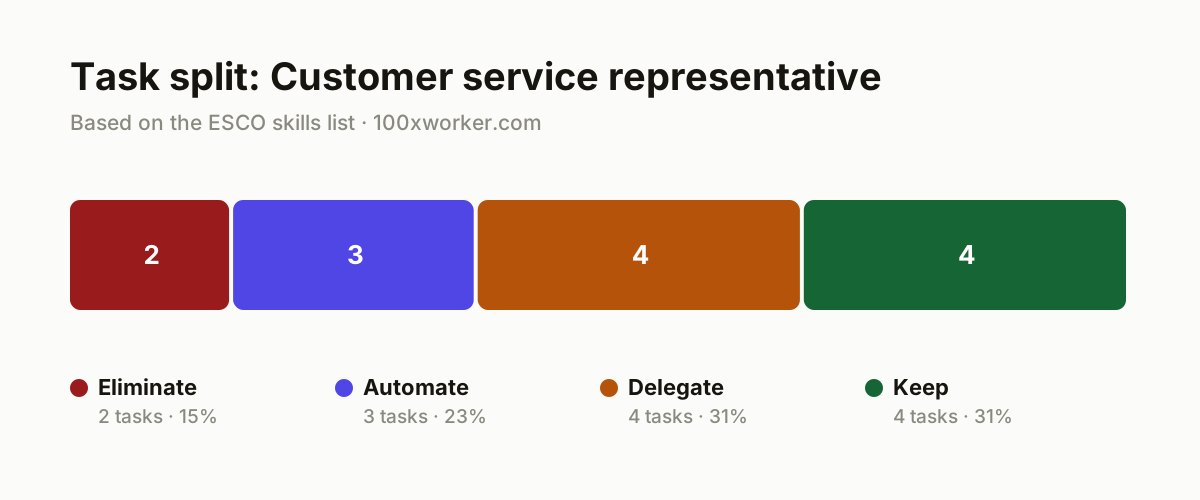
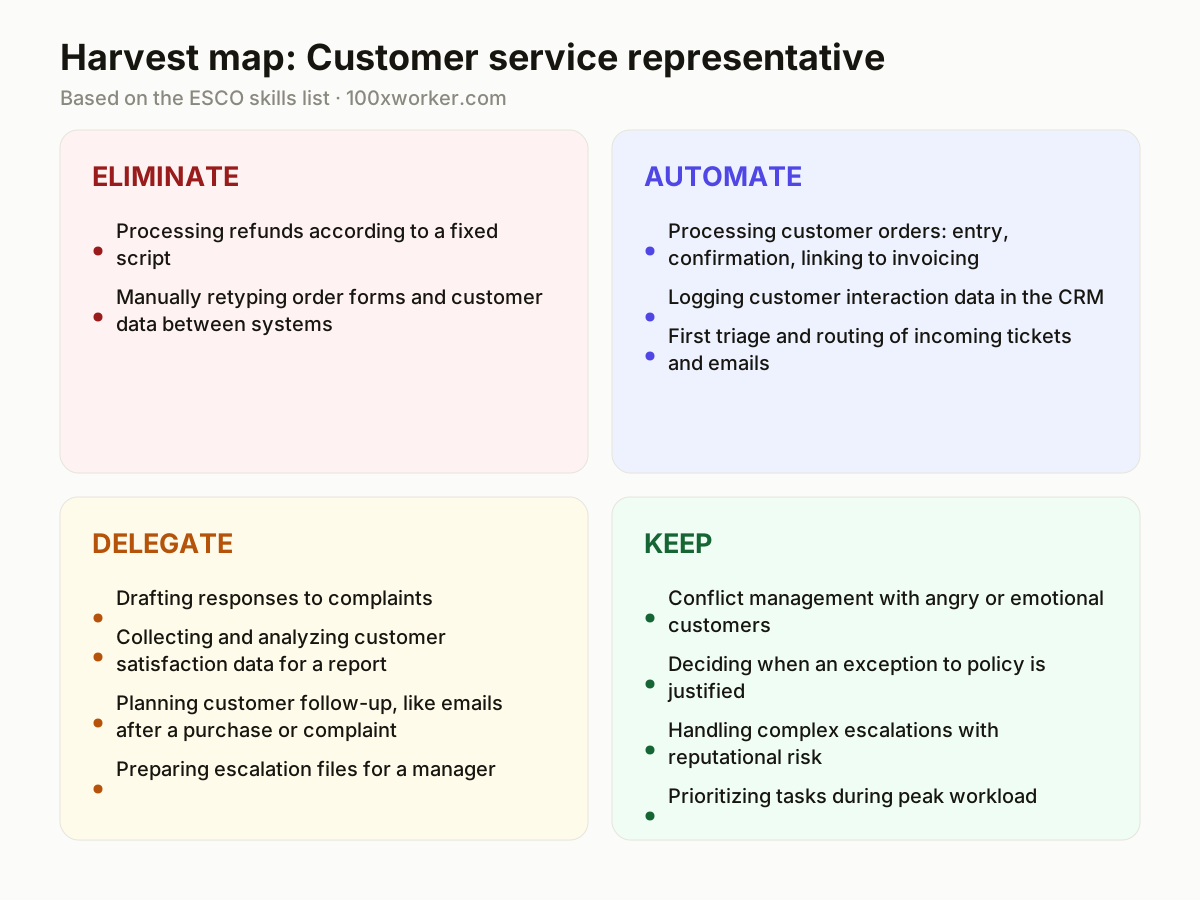
Not every task in a job changes the same way. This article splits the real tasks of a customer service representative into four buckets: eliminate (tasks that should stop being done manually at all), automate (tasks an AI system can run without a person watching), delegate (tasks where AI drafts and a person checks), and keep (tasks that stay with a person because they need judgment, empathy, or accountability). Sorting tasks this way, instead of asking whether the job disappears, gives a clearer picture of what actually shifts.
| Task | Bucket | Why |
|---|---|---|
| Processing refunds according to a fixed script | eliminate | Rule-based work with no judgment involved, a system executes it faster and without errors than a person clicking through screens. |
| Manually retyping order forms and customer data between systems | eliminate | Pure data entry adds no value when a person does it, connect the systems and let AI handle the transfer instead. |
| Processing customer orders: entry, confirmation, linking to invoicing | automate | A standardized process with clear input and output, AI agents run this unsupervised once the rules are fixed. |
| Logging customer interaction data in the CRM | automate | Transcription and classification tag and log conversations automatically, nobody needs to type this by hand anymore. |
| First triage and routing of incoming tickets and emails | automate | A language model recognizes topic and urgency faster than a rep sorting through hundreds of tickets a day. |
| Drafting responses to complaints | delegate | AI writes a first version based on the case file, you adjust tone and concrete commitments before sending it. |
| Collecting and analyzing customer satisfaction data for a report | delegate | AI groups CSAT comments by theme, you decide which conclusion actually matters for the team. |
| Planning customer follow-up, like emails after a purchase or complaint | delegate | An AI agent proposes the schedule and the text, you decide which customer genuinely needs a personal touch. |
| Preparing escalation files for a manager | delegate | AI summarizes the history and suggests a recommendation, you check that against the customer relationship and context. |
| Conflict management with angry or emotional customers | keep | Real-time escalation requires reading tone, pace, and emotion, something no model handles reliably yet. (Your edge: Empathy and de-escalation in the moment) |
| Deciding when an exception to policy is justified | keep | This requires weighing rules against cost and the customer relationship, something a script leaves no room for. (Your edge: Weighing policy against the actual customer relationship) |
| Handling complex escalations with reputational risk | keep | The organization's goodwill is at stake here, which calls for judgment and taking responsibility. (Your edge: Taking responsibility for a high-stakes decision) |
| Prioritizing tasks during peak workload | keep | Knowing what is truly urgent among a hundred open cases requires context that urgency labels do not capture. (Your edge: Context sense for what actually matters right now) |
Will AI replace customer service representatives?
Full replacement is unlikely. Customer service work involves emotional judgment, policy exceptions, and reputation management that language models cannot yet handle reliably. Microsoft Research analyzed 200,000 real Copilot conversations and scored customer service representatives at 40.8% AI applicability, meaning generative AI is demonstrably useful for less than half of the tasks in this role. The rest, especially conflict resolution and judgment calls, still needs a person. What changes is the day-to-day task list, not the job title: routine data entry and scripted replies shift to AI, while human attention concentrates on complex, emotionally charged, or high-stakes cases.
Which tasks of a customer service representative does AI take over?
AI takes over the mechanical and repetitive parts of the job first. Scripted refund processing and manual data re-entry between systems are candidates for elimination, since a connected system can run them without a human step at all. Order processing, CRM logging, and first-line ticket triage move into automation: an AI agent runs the whole workflow once the rules are set, without anyone watching each step. Drafting complaint replies, preparing escalation summaries, and planning follow-up emails move into delegation: AI produces a first version, and a person still reviews tone, facts, and commitments before anything goes to a customer. Judgment stays human: policy exceptions, emotional de-escalation, and reputation-sensitive escalations.
What can I do this month to become the AI person on my team?
Pick one recurring task you dread, like drafting replies to complaint emails, and run it through an AI tool for two weeks before deciding if it works. Keep a short log of drafts you had to heavily rewrite versus ones you sent almost as-is, so you have evidence instead of a gut feeling. Ask your manager whether your CRM or helpdesk tool (Zendesk, Salesforce, Freshdesk) already has an AI drafting or summarization feature switched off, since many teams pay for capabilities nobody has turned on. Volunteer to test it on a low-risk ticket queue first and document what breaks. That log becomes your case for owning the rollout, not just using it.
How many customer service reps already use AI at work?
There is no dedicated global survey of customer service representatives specifically, but the surrounding numbers are informative. Eurostat found that 32.7% of the EU population aged 16 to 74 used generative AI in the three months before being surveyed in 2025. Anthropic's Economic Index, which classifies millions of real Claude conversations against standardized occupational task lists, shows that AI use in customer-facing roles splits between automation-like use, where AI does the task, and augmentation-like use, where AI assists a person doing it. In practice, that matches the task list in this article: some tasks are handed over fully, others stay a collaboration.
Generative AI usage in customer-facing roles splits between automation-like and augmentation-like patterns.
Anthropic Economic Index
Become the AI person on your team
Own the AI drafting workflow
Instead of waiting for IT to roll out an AI drafting tool, propose piloting one for complaint replies in your own queue. Document turnaround time and how often drafts need heavy edits, then present that data to your manager.
Build the escalation prompt library
Write and save reusable prompts for summarizing customer history and drafting exception requests. Share them with your team so everyone starts from the same quality baseline instead of reinventing it each time.
Track what AI gets wrong
Keep a running list of AI-drafted replies that needed correction, especially around policy details or tone. That list becomes training material and evidence of where human review still matters.
Want this for your actual task list?
The free scan on the homepage builds your personal task map in 30 seconds, based on your role and industry.
Run the free task scanTools for this work
| Tool | For which tasks | The sober take |
|---|---|---|
| Zendesk AI | Ticket triage, routing, and drafting complaint replies | Built into an existing helpdesk, so adoption usually depends on what your team already licenses. |
| Salesforce Einstein / Agentforce | Order processing automation and CRM logging | Works best when your CRM data is already clean and structured. |
| Intercom Fin | First-line triage and automated replies to routine questions | Marketed as resolving tickets end to end, but still needs monitoring on edge cases. |
| Microsoft Copilot | Drafting escalation summaries and CSAT report analysis | The same underlying tool Microsoft Research used to build the applicability scores cited in this article. |
Prompts to try today
Draft a complaint reply
Summarize an escalation for a manager
Group CSAT comments by theme
Related jobs
Frequently asked questions
Will customer service reps lose their jobs to AI?
Full job loss is unlikely for most reps, though the number of people needed for purely routine ticket volume may shrink as automation handles more first-line contacts. Microsoft Research scores the role at 40.8% AI applicability, meaning a large share of tasks, especially judgment-heavy ones like policy exceptions and conflict de-escalation, still require a person. The practical risk is not the job title disappearing but the task list shrinking to the parts that need a human, which changes what the job looks like day to day.
What skills should customer service reps develop now?
Focus on the skills that stay in the keep bucket: conflict de-escalation, judgment about policy exceptions, and clear communication during high-stakes escalations. Also build comfort reviewing and editing AI-drafted replies quickly, since checking a draft for tone and accuracy is becoming a core daily task rather than writing from scratch every time. Familiarity with your team's specific AI tools, whether Zendesk AI, Salesforce Einstein, or Copilot, is now as relevant as CRM skills used to be.
Which AI tools are already used in customer service teams?
Common tools include Zendesk AI and Intercom Fin for ticket triage and drafting, Salesforce Einstein or Agentforce for CRM-linked automation, and Microsoft Copilot for summarizing cases and analyzing satisfaction data. Which tool a given team uses depends heavily on which helpdesk or CRM platform they already run, since most AI features ship as add-ons to existing systems rather than standalone products.
Is the 40.8% applicability score the same as a job loss risk?
No. The score measures the share of work activities in the role where generative AI is demonstrably applicable, based on analysis of real Copilot conversations, not the share of jobs or workers at risk of being cut. A high score means AI can help with many individual tasks. It says nothing directly about staffing levels, which depend on ticket volume, budget decisions, and how a company reorganizes the remaining tasks.
Sources
- Microsoft Research, Working with AI: Measuring the Applicability of Generative AI to Occupations (2025)
- Anthropic Economic Index
- Eurostat, Individuals using generative AI (isoc_ai_iaiu)
- ESCO, European Commission
Hendrik De Winne, author of Becoming AI-Savvy, founder of VibeLab. Helps teams redesign their work with AI.
This article was drafted with AI assistance from public data sources and editorially reviewed.