100×worker · job analysis
Will AI Replace Construction Managers?
Construction management has always meant juggling paperwork, schedules, and people on a moving site. Generative AI is now taking on a chunk of that paperwork. Microsoft Research analyzed 200,000 real Copilot conversations and scored how applicable generative AI is to different occupations. Civil engineers, the closest US occupational match to construction managers, scored 20.5%, meaning about a fifth of their documented work activities show clear AI applicability. For comparison, translators scored highest at 49% and nurses scored low at 12%.
Anthropic's Economic Index adds a useful distinction: it splits real AI usage into automation-like use, where AI does the task directly, and augmentation-like use, where AI supports a person who stays in charge. That split maps well onto construction management, where report drafting can be automated but the walk-through inspection cannot. Meanwhile, the European Commission's ESCO taxonomy, which catalogs over 3,000 occupations across the EU, lists the core skills construction professionals are expected to hold: interpreting designs, checking code compliance, running feasibility studies, and communicating with workers on site. Several of those skills are exactly where AI tools now help most.
A construction manager who uses AI lets software handle reporting and document checks, and keeps final responsibility on site.
The task split: what AI takes over and what stays yours
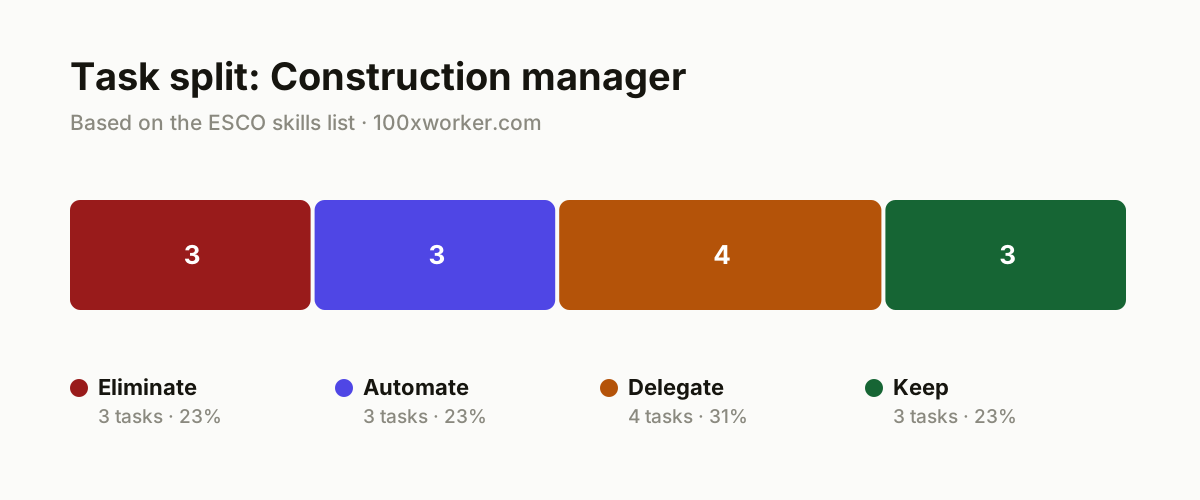
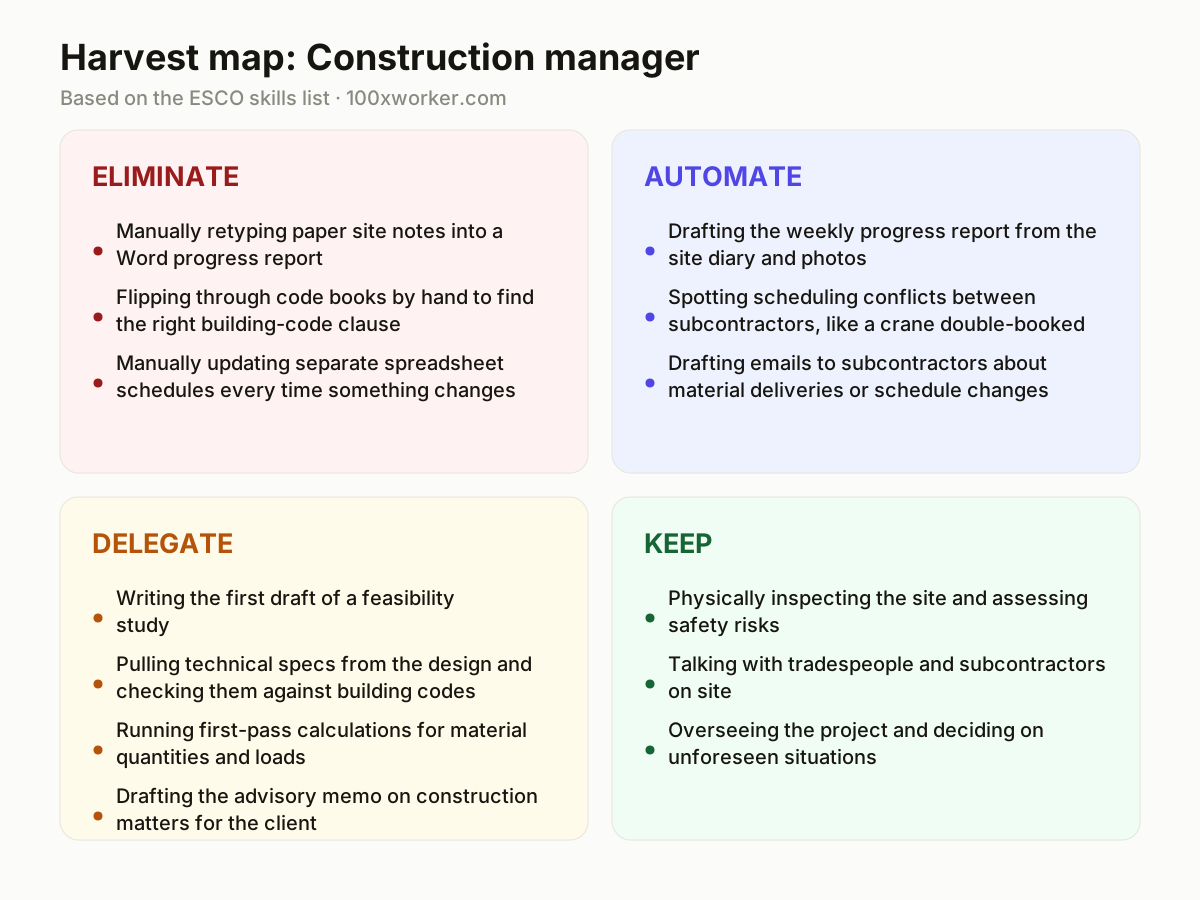
Not every task in a construction manager's day changes the same way. Some tasks disappear because software does them without you asking. Some get automated end to end by an AI agent that still needs your sign-off. Some get delegated to AI for a first draft that you then check and correct. And some stay entirely with you because they require physical presence, trust, or legal accountability. Sorting your week into these four buckets, eliminate, automate, delegate, keep, is a more useful exercise than asking whether AI will take your job.
| Task | Bucket | Why |
|---|---|---|
| Manually retyping paper site notes into a Word progress report | eliminate | AI turns voice memos and site photos straight into a readable report. |
| Flipping through code books by hand to find the right building-code clause | eliminate | An AI assistant finds and quotes the relevant clause in seconds. |
| Manually updating separate spreadsheet schedules every time something changes | eliminate | Scheduling tools with an AI agent sync changes across all documents automatically. |
| Drafting the weekly progress report from the site diary and photos | automate | An agent produces a ready draft, you sign off and send it. |
| Spotting scheduling conflicts between subcontractors, like a crane double-booked | automate | The agent compares schedules continuously and flags clashes before they become a problem. |
| Drafting emails to subcontractors about material deliveries or schedule changes | automate | Standard communication does not need to be typed out from scratch each time. |
| Writing the first draft of a feasibility study | delegate | AI gathers data and codes, you check assumptions, risks, and local context. |
| Pulling technical specs from the design and checking them against building codes | delegate | AI screens most of it fast, you decide on gray areas and exceptions. |
| Running first-pass calculations for material quantities and loads | delegate | AI computes a base version fast, the engineer or manager validates the critical numbers. |
| Drafting the advisory memo on construction matters for the client | delegate | AI writes a draft, you sharpen it with knowledge of the site and client. |
| Physically inspecting the site and assessing safety risks | keep | Physical inspection and risk judgment require being there in person. (Your edge: physical presence and personal liability on site) |
| Talking with tradespeople and subcontractors on site | keep | Trust, tone, and improvising on the floor stay human work. (Your edge: direct authority and trust you build on the floor) |
| Overseeing the project and deciding on unforeseen situations | keep | Responsibility and liability ultimately rest with the construction manager. (Your edge: final accountability cannot be delegated to software) |
Will AI replace construction managers?
No. Microsoft Research's applicability score for civil engineers, the closest matched occupation, is 20.5%, far below high-scoring roles like translators at 49%. That means AI touches a real but limited slice of the job, mostly documentation, drafting, and calculation support. Physical site inspection, crew communication, and legal accountability for the project stay with a person. The practical shift is not job loss but a changed task list: less time on paperwork, more time on judgment calls, coordination, and problem solving that require being physically present and legally responsible.
Which construction manager tasks will AI take over first?
Documentation and repetitive drafting go first. Retyping site notes into reports, searching code books for the right clause, and manually updating schedules after every change are already handled by AI tools that turn voice notes into text, search codes instantly, and sync schedule changes automatically. Slightly more complex tasks like weekly progress reports, spotting scheduling conflicts between subcontractors, and drafting routine emails move to automate, where an AI agent produces the work and you approve it. These are the tasks with clear inputs, repeatable structure, and low ambiguity, exactly the pattern Anthropic's Economic Index links to automation-style AI use.
How do you become the AI-savvy person on your crew?
Start by running one recurring task through an AI tool before doing it manually, such as your next progress report or a code lookup. Keep a short library of prompts for tasks you repeat weekly, like subcontractor emails or feasibility study outlines, so you are not rebuilding them from scratch. Share what works with your team instead of keeping it to yourself. Being the person who knows which tasks to hand to AI and which to keep firmly in human hands makes you more useful on site, not less necessary.
What can you do this month as a construction manager?
Pick one eliminate-bucket task, such as manual note transcription, and replace it with a voice-to-text or photo-to-report tool this week. Try an AI assistant on your next code-compliance question and time how much faster it is than searching manually. Draft your next feasibility study or client memo with AI first, then revise it with your own judgment about the site and the client. Track how many hours this frees up over four weeks. That number tells you where to invest more, and where AI still falls short on your specific projects.
Generative AI is applicable to roughly one in five documented work activities of civil engineers, the closest matched occupation to construction management.
Microsoft Research, Working with AI (2025)
Become the AI person on your team
Run your next report through AI before writing it by hand
Feed your site diary notes and photos into an AI tool and compare its draft to what you would have written manually. Use the time saved to walk the site instead of typing at a desk.
Build a small prompt library for repeat documents
Save working prompts for the progress report, subcontractor emails, and the client advisory memo. Reuse and refine them instead of starting from a blank page every week.
Test an AI code-lookup tool on your next compliance question
Next time you need to check a building code clause, ask an AI assistant first and verify the citation against the actual code book. This builds the habit of using AI as a first pass, not a final answer.
Want this for your actual task list?
The free scan on the homepage builds your personal task map in 30 seconds, based on your role and industry.
Run the free task scanTools for this work
| Tool | For which tasks | The sober take |
|---|---|---|
| Microsoft Copilot | Drafting progress reports, subcontractor emails, and client memos (automate, delegate) | Useful for turning rough notes into structured drafts you still review. |
| ChatGPT or Claude | Code lookups, feasibility study drafts, first-pass calculations (eliminate, delegate) | General-purpose assistants that work well for research and drafting, not for final sign-off. |
| Construction management platforms with AI features (e.g. Procore, Autodesk Construction Cloud) | Schedule syncing and conflict detection between subcontractors (eliminate, automate) | Feature sets vary by vendor and license, confirm current AI capabilities before relying on them. |
Prompts to try today
Turn site notes into a progress report
Check a design element against a building code
Draft the first section of a feasibility study
Related jobs
Frequently asked questions
Will AI replace construction managers entirely?
No. Microsoft Research's applicability score for civil engineers, the closest matched occupation, is 20.5%, meaning AI touches a real but minority share of the work. Tasks like physical site inspection, on-site crew communication, and final project accountability are not things software can take over. The realistic outlook is a changed task mix: less manual documentation, more time spent on judgment calls, coordination, and decisions that require being physically present and legally responsible for the outcome.
What percentage of construction manager tasks can AI help with?
There is no verified figure specific to construction managers. The closest available data point is Microsoft Research's 20.5% applicability score for civil engineers, based on an analysis of 200,000 real Copilot conversations. This score measures how much of documented work activity generative AI can plausibly support, not how many jobs disappear. Treat it as a rough proxy rather than an exact number for the construction manager role.
Do I need to learn to code to use AI as a construction manager?
No. The AI tools most relevant to construction management, chat assistants, voice-to-text tools, and scheduling platforms with built-in AI features, are designed to be used through plain language prompts and existing software interfaces. What helps most is knowing which of your recurring tasks (reports, code checks, schedule updates) are worth handing to AI, and being specific when you ask for a draft.
Which AI tools should a construction manager start with?
Start with a general assistant like Microsoft Copilot, ChatGPT, or Claude for drafting reports, emails, and code lookups, since these require no special setup. From there, check whether your existing construction management platform (such as Procore or Autodesk Construction Cloud) already includes AI features for schedule syncing or conflict detection, since adding tools to systems you already use is usually faster than adopting something new.
Sources
- Microsoft Research, Working with AI: Measuring the Applicability of Generative AI to Occupations (2025)
- Anthropic Economic Index
- Eurostat, isoc_ai_iaiu (generative AI use, 2025)
- ESCO, European Commission occupation and skills taxonomy
Hendrik De Winne, author of Becoming AI-Savvy, founder of VibeLab. Helps teams redesign their work with AI.
This article was drafted with AI assistance from public data sources and editorially reviewed.