100×worker · job analysis
What AI Changes for System Administrators
System administrator work is defined by hundreds of small, repeatable tasks: checking backups, patching servers, resetting accounts, reading logs. Generative AI is well suited to exactly that kind of repeatable, text- and log-based work, which is why the role is changing faster than most people expect, even though the job itself is not disappearing.
Microsoft Research analyzed 200,000 real Copilot conversations across occupations and found that generative AI is applicable to about 25.3% of the work activities of network and computer systems administrators (Microsoft Research, Working with AI: Measuring the Applicability of Generative AI to Occupations, 2025). That is lower than translators (49%) but higher than nurses (12%), placing sysadmin work in the middle of the pack: some tasks are clearly automatable, many are not.
Broader adoption data backs this up. Eurostat reports that 32.7% of the EU population aged 16 to 74 used generative AI in the three months before being surveyed in 2025. Anthropic's Economic Index, which classifies millions of Claude conversations against O*NET task categories, finds that AI use in technical fields splits between tasks where AI does the work directly (automation) and tasks where it supports a person doing the work (augmentation). For system administrators, that split matters more than any single adoption number.
A system administrator keeps computer networks, servers, and systems running, secure, and up to date.
The task split: what AI takes over and what stays yours
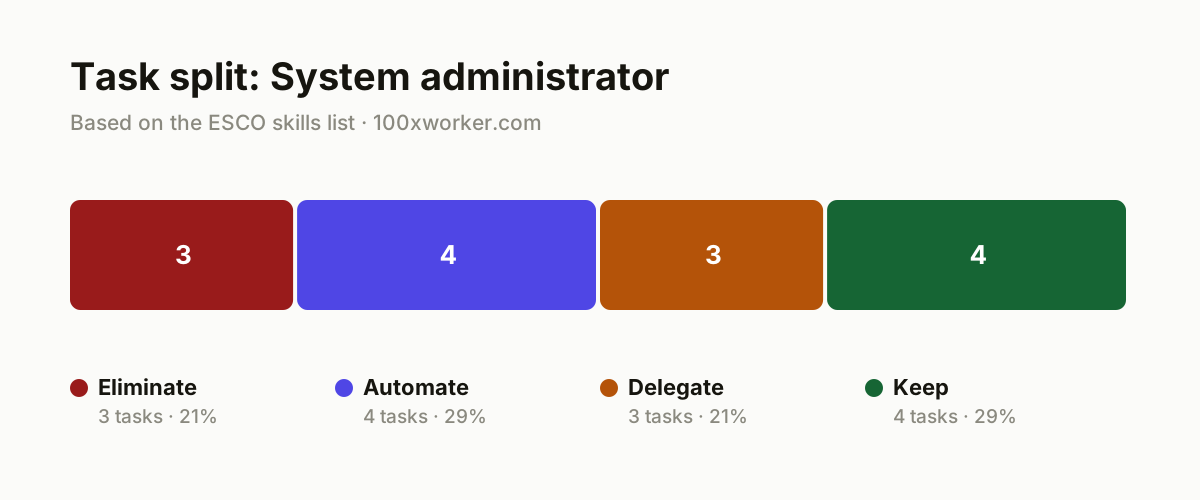
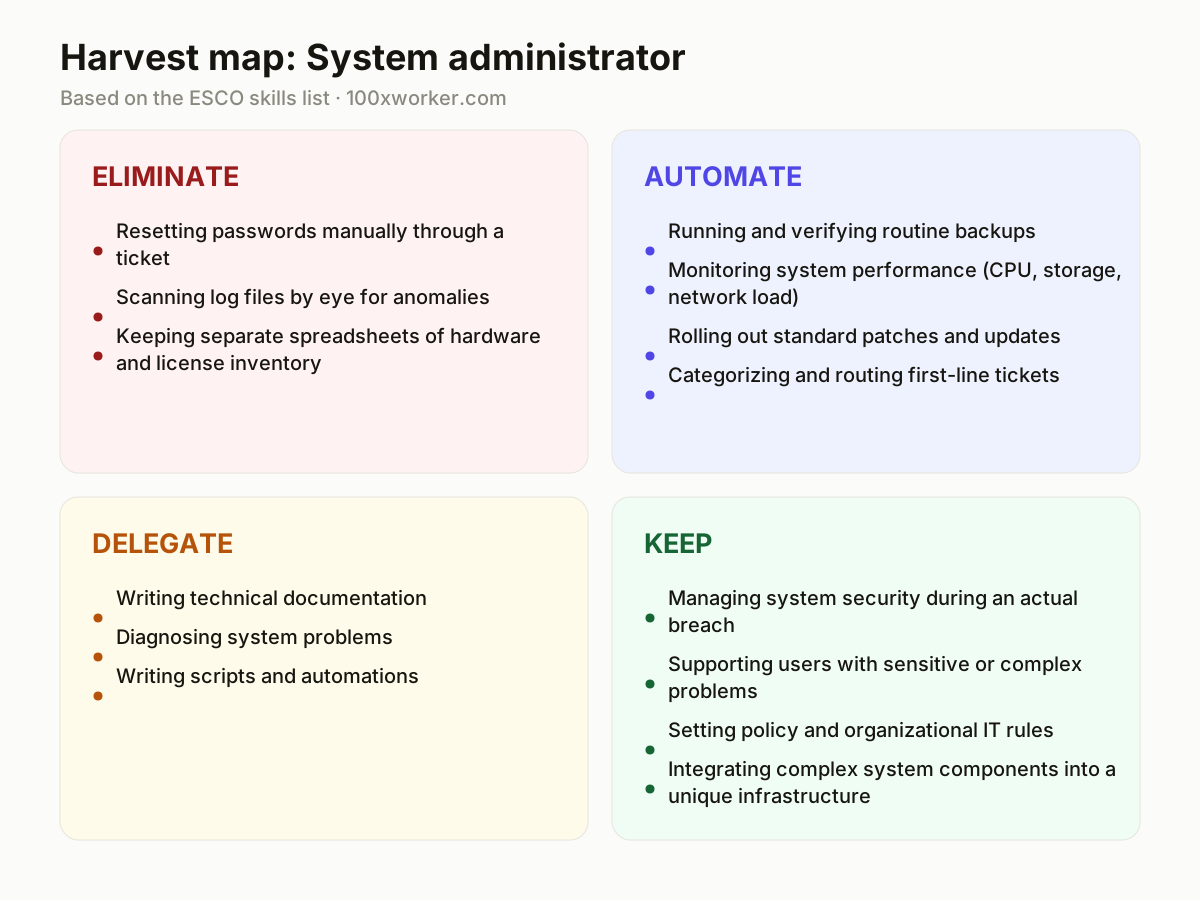
Not every task in a system administrator's job changes the same way. Some tasks disappear because self-service tools now handle them without a human. Others get automated: they still happen, but a system runs them and only flags exceptions. A third group gets delegated to AI as a first draft or first opinion, which a person then checks. The last group stays firmly with the administrator, because it requires judgment, accountability, or context no model has access to. Sorting your own task list into these four buckets is more useful than asking whether the job as a whole will survive.
| Task | Bucket | Why |
|---|---|---|
| Resetting passwords manually through a ticket | eliminate | Self-service portals with identity verification handle this without an administrator in the loop. |
| Scanning log files by eye for anomalies | eliminate | Continuous anomaly detection spots patterns faster and more consistently than manual review. |
| Keeping separate spreadsheets of hardware and license inventory | eliminate | Automatic discovery tools maintain a live asset database without manual entry. |
| Running and verifying routine backups | automate | Scheduled jobs run and check themselves, with an alert only if something fails. |
| Monitoring system performance (CPU, storage, network load) | automate | AI-driven monitoring thresholds send alerts before a user notices anything. |
| Rolling out standard patches and updates | automate | Patch management with a test environment and rollback plan can run largely on autopilot. |
| Categorizing and routing first-line tickets | automate | AI classification recognizes the type of problem and sends it to the right queue. |
| Writing technical documentation | delegate | AI drafts a first version from your configurations, you check it for accuracy and nuance. |
| Diagnosing system problems | delegate | AI proposes a likely cause based on logs and error codes, you confirm and act. |
| Writing scripts and automations | delegate | AI generates a working version, you review it for security, edge cases, and style. |
| Managing system security during an actual breach | keep | Risk assessment and escalation require accountability you cannot hand to a tool. (Your edge: You carry final responsibility, not the model.) |
| Supporting users with sensitive or complex problems | keep | Reading context and earning trust with a stressed colleague stays human work. (Your edge: Empathy and organizational knowledge, not an AI task.) |
| Setting policy and organizational IT rules | keep | Legal and political trade-offs inside the organization require human judgment. (Your edge: Whoever bears the consequences sets the policy.) |
| Integrating complex system components into a unique infrastructure | keep | Architectural overview of a non-standard environment is still not an AI strength. (Your edge: Overview of the whole system stays with you.) |
Which system administrator tasks does AI take over?
AI already takes over the most repetitive, high-volume parts of the job. Password resets move to self-service portals. Log monitoring shifts to anomaly-detection systems that flag issues around the clock instead of during business hours. Routine backups run on schedules that verify themselves. Patch rollouts use test environments and automatic rollback. First-line ticket routing gets sorted by classification models before a human ever reads the ticket. None of this eliminates the administrator role, but it removes the parts of the job that used to eat up hours of monitoring and manual checking, leaving more time for diagnosis, security decisions, and architecture work that still needs a person.
Will AI replace system administrators?
No single occupation disappears because of generative AI, and system administrator is not an exception. Microsoft Research puts the applicability of generative AI to this occupation's work activities at about 25.3%, a mid-range score compared to occupations like translation (49%) or nursing (12%). That means roughly a quarter of daily tasks can be handled or heavily assisted by AI, while the rest, security judgment, incident response, architecture decisions, stays with a person. The realistic outcome is fewer routine tasks and a job that leans more on troubleshooting, security oversight, and system design than on manual monitoring and ticket handling.
How do you become the AI person on your IT team?
Start by using AI on your own tasks before recommending it to others. Feed real log excerpts, error codes, and configuration files into an AI assistant to get a first-pass diagnosis, then verify it against your own knowledge of the environment. Use AI to draft documentation, runbooks, and incident postmortems, and edit rather than write from scratch. Track where AI gets things wrong in your specific infrastructure, because that list becomes your case for what still needs a human. Share concrete examples with your team rather than general enthusiasm. Being the person who has actually tested AI against your own systems, with results, carries more weight than being the person who talks about it.
What can you do this month to start using AI?
Pick one recurring task, such as writing weekly incident summaries or drafting documentation for a system you maintain, and run it through an AI assistant for two weeks. Compare the AI draft to what you would have written and note the gap. Set up one monitoring alert that uses an AI-based anomaly threshold instead of a fixed number, and watch how often it catches something a static threshold would have missed. Ask an AI tool to summarize a batch of first-line tickets and check whether its categorization matches your own judgment. Small, measured tests like this tell you more than reading predictions about the future of the job.
Generative AI's applicability varies task by task within an occupation, rather than replacing whole jobs at once.
Microsoft Research, Working with AI (2025)
Become the AI person on your team
Build a documentation habit with AI drafts
Instead of writing runbooks and configuration notes from a blank page, feed your setup into an AI tool and edit the draft. This alone saves hours per month and produces documentation that colleagues actually read.
Use AI as a second opinion on diagnostics
When a system throws an unfamiliar error, paste the logs into an AI assistant before escalating. Treat the answer as a hypothesis to test, not a fix to apply blindly.
Track what AI gets wrong in your environment
Keep a running note of cases where AI suggestions failed or missed context specific to your infrastructure. That list is evidence for what still requires a human, and it makes you the internal expert on where the line is.
Want this for your actual task list?
The free scan on the homepage builds your personal task map in 30 seconds, based on your role and industry.
Run the free task scanTools for this work
| Tool | For which tasks | The sober take |
|---|---|---|
| GitHub Copilot | Writing scripts and automations, drafting technical documentation | Good at boilerplate scripts, still needs review for security and edge cases. |
| AI-based monitoring platforms (e.g. Datadog anomaly detection) | Monitoring system performance, anomaly detection in logs | Threshold-based alerts get replaced by pattern-based ones, fewer false positives over time. |
| AI ticket classification in ITSM tools (e.g. ServiceNow) | Categorizing and routing first-line tickets | Reduces manual triage but still needs spot-checking on ambiguous tickets. |
| General AI assistants (ChatGPT, Claude) | Diagnosing problems from logs, drafting documentation, writing scripts | Useful as a first-pass reasoning partner, not a replacement for verifying against your own systems. |
Prompts to try today
Diagnose an error from logs
Draft a runbook from a configuration
Summarize a batch of tickets
Related jobs
Frequently asked questions
Is the system administrator job at risk from AI?
The role is not at high risk of disappearing. Microsoft Research scores its AI applicability at about 25.3% of work activities, in the middle range compared to other occupations. What changes is the mix of daily tasks: fewer manual checks and resets, more diagnosis, security judgment, and architecture decisions. Employers are more likely to restructure task lists than eliminate the position outright.
Which parts of sysadmin work will AI never fully handle?
Tasks that require accountability, legal or organizational judgment, or a full picture of a non-standard infrastructure stay with a person. Managing an active security breach, deciding IT policy, and supporting a colleague through a sensitive problem all depend on context and responsibility that a model cannot carry. AI can support these situations with information, but the decision and the consequences remain with a human.
How widely is AI actually used at work right now?
Adoption is already broad and growing. Eurostat found that 32.7% of the EU population aged 16 to 74 used generative AI in the three months before being surveyed in 2025. Anthropic's Economic Index shows millions of work-related conversations happening on Claude alone, split between AI doing tasks directly and AI supporting a person doing them. For IT roles specifically, usage tends to cluster around diagnostics, scripting, and documentation.
Do I need to learn to code differently because of AI?
You need to get comfortable reviewing AI-generated scripts rather than writing everything from scratch, which shifts the skill from typing syntax to spotting security issues, edge cases, and bad assumptions in someone else's (AI's) draft. The scripting skill itself does not disappear, but the day-to-day use of it moves from writing to reviewing and testing.
Sources
- Microsoft Research, Working with AI: Measuring the Applicability of Generative AI to Occupations (2025)
- Anthropic Economic Index
- Eurostat, isoc_ai_iaiu
- ESCO, European Commission
Hendrik De Winne, author of Becoming AI-Savvy, founder of VibeLab. Helps teams redesign their work with AI.
This article was drafted with AI assistance from public data sources and editorially reviewed.